EasyManua.ls Logo

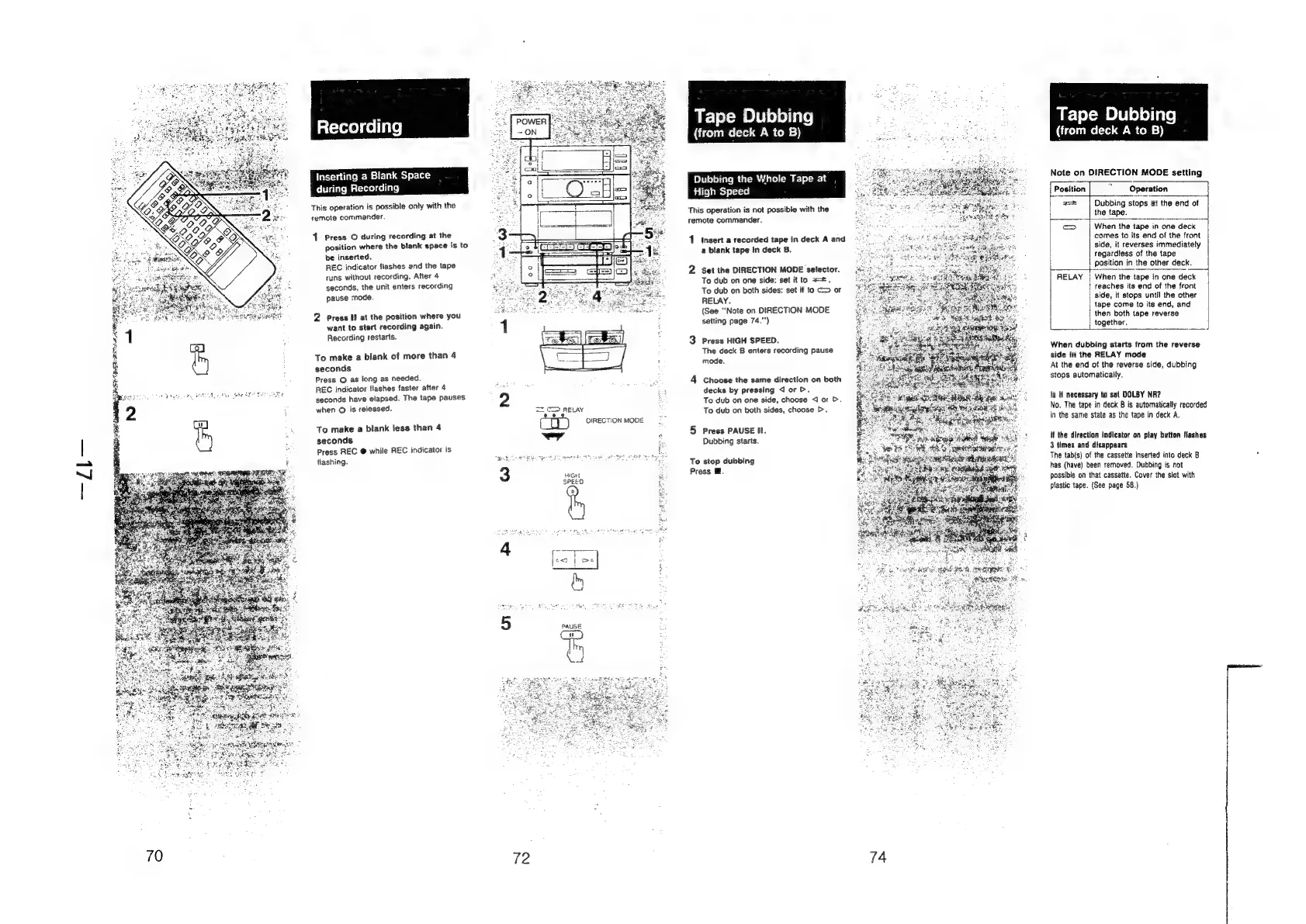
Sony HCD-H700 - Recording; Inserting a Blank Space during Recording; To make a blank of more than 4 seconds; To make a blank less than 4 seconds

Sony HCD-H700
91 pages
Print Icon
To Next Page IconTo Next Page
To Previous Page IconTo Previous Page
Loading...
rs
ee
EET:
70
stereo)
collar?
|
Inserting
a
Blank
Space
during
Recording
This
operation
is
possible
only
with
the
remote
commander.
1
Press
O
during
recording
at
the
position
where
the
blank
space
is
to
be
inserted.
REC
indicator
flashes
and
the
tape
runs
without
recording.
After
4
seconds,
the
unit
enters
recording
pause
mode.
2
Press
Il
at
the
position
where
you
want
to
start
recording
again.
Recording
restarts.
To
make
a
blank
of
more
than
4
seconds
Press
Q
as
long
as
needed.
REC
indicator
flashes
faster
after
4
seconds
have
elapsed.
The
tape
pauses
when
@
is
released.
To
make
a
blank
less
than
4
seconds
Press
REC
@
while
REC
indicator
is
flashing.
a
RELAY
aeD)
DIRECTION
MODE
wy
Seok
ERE
IT
aps
eee
SPEED
°
5
PAUSE
Ci
ae
72
Tape
Dubbing
(from
deck
A
to
B)
Whole
Tape
at
High
Speed
This
operation
is
not
possible
with
the
remote
commander.
1
Insert
a
recorded
tape
in
deck
A
and
a
blank
tape
in
deck
B.
2
Set
the
DIRECTION
MODE
selector.
To
dub
on
one
side:
set
it
to
==.
To
dub
on
both
sides:
set
it
to
C>
or
RELAY.
(See
“Note
on
DIRECTION
MODE
setting
page
74."')
3
Press
HIGH
SPEED.
The
deck
B
enters
recording
pause
mode.
4
Choose
the
same
direction
on
both
decks
by
pressing
J
or
>.
To
dub
on
one
side,
choose
4
or
>.
To
dub
on
both
sides,
choose
>.
5
Press
PAUSE
Il.
Dubbing
starts.
To
stop
dubbing
Press
@.
74
Tape
Dubbing
(from
deck
A
to
B)
Note
on
DIRECTION
MODE
setting
Position
“Operation
=
Dubbing
stops
at
the
end
of
the
tape.
SS.
When
the
tape
in
one
deck
|
|
comes
to
its
end
of
the
front
side,
it
reverses
immediately
regardless
of
the
tape
position
in
the
other
deck.
RELAY
|
When
the
tape
in
one
deck
reaches
its
end
of
the
front
side,
it
stops
until
the
other
tape
come
to
its
end,
and
then
both
tape
reverse
together,
+
When
dubbing
starts
from
the
reverse
side
in
the
RELAY
mode
At
the
end
of
the
reverse
side,
dubbing
stops
automatically.
Is
It
necessary
to
set
DOLBY
NR?
No.
The
tape
in
deck
B
is
automatically
recorded
in
the
same
state
as
the
tape
in
deck
A.
if
the
direction
indicator
on
ptay
button
flashes
3
times
and
disappears
The
tab(s)
of
the
cassette
inserted
into
deck
B
has
(have)
been
removed.
Dubbing
is
not
possible
on
that
cassette.
Cover
the
stot
with
plastic
tape.
(See
page
58.)
oY