EasyManua.ls Logo

Sony HCD-H700 - CD Recording; To stop recording; When playback ends; To cancel the TIME FADE function

Sony HCD-H700
91 pages
Print Icon
To Next Page IconTo Next Page
To Previous Page IconTo Previous Page
Loading...
82
CD
Recording
To
stop
recording
Press
ll
of
the
cassette
deck
and
the
CD
player.
When
playback
ends
The
CD
player
fades
out
and
enters
pause
mode
at
the
designated
time.
“TIME
FADE
B”
appears
in
the
display.
The
cassette
deck
reverses
automatically
if
you
set
the
DIRECTION
MODE
selector
loc.
you
want
also
to
record
on
the
reverse
side
of
the
cassette,
press
DAE
after
the
tape
reverses.
When
playback
of
the
reverse
side
ends
and
fades
out,
the
player
enters
the
pause
mode
and
the
Time
Fade
is
canceled.
To
cancel
the
TIME
FADE
function
During
stop,
press
EDIT/TIME
FADE
so
that
‘TIME
FADE”
disappears.
When
the
playback
of
the
disc
ends
during
Time
Fade
The
Time
Fade
tunction
is
still
active.
If
you
place
another
disc,
the
recording
can
be
continued
and
will
fade
out
when
the
total
playing
time
of
the
discs
reaches
the
designated
time.
About
the
remaining
time
during
Time
Fade
When
you
press
TIME
twice,
the
remaining
time
until
the
designated
time
is
displayed.
If
you
press
kk+€4
or
DRDD]
Time
Fade
will
be
canceled.
&
a
8
§
?
a
teas
Sane
enw
seer
aoe
:
AI
Front
side/Face
avant/
Cara
frontal/JEifl/Voorkant
‘--7
~
~ ™
‘Reverse
side/Face
arriére/
Cara
posterior/
i
ifii/Achterkant
—
EJECTS
==
C>
RELAY
oe
DIRECTION
MODE
wy
84
k
CD
Recording
Recording
the
ire
Program
on
a
Disc
—
Fade
E:
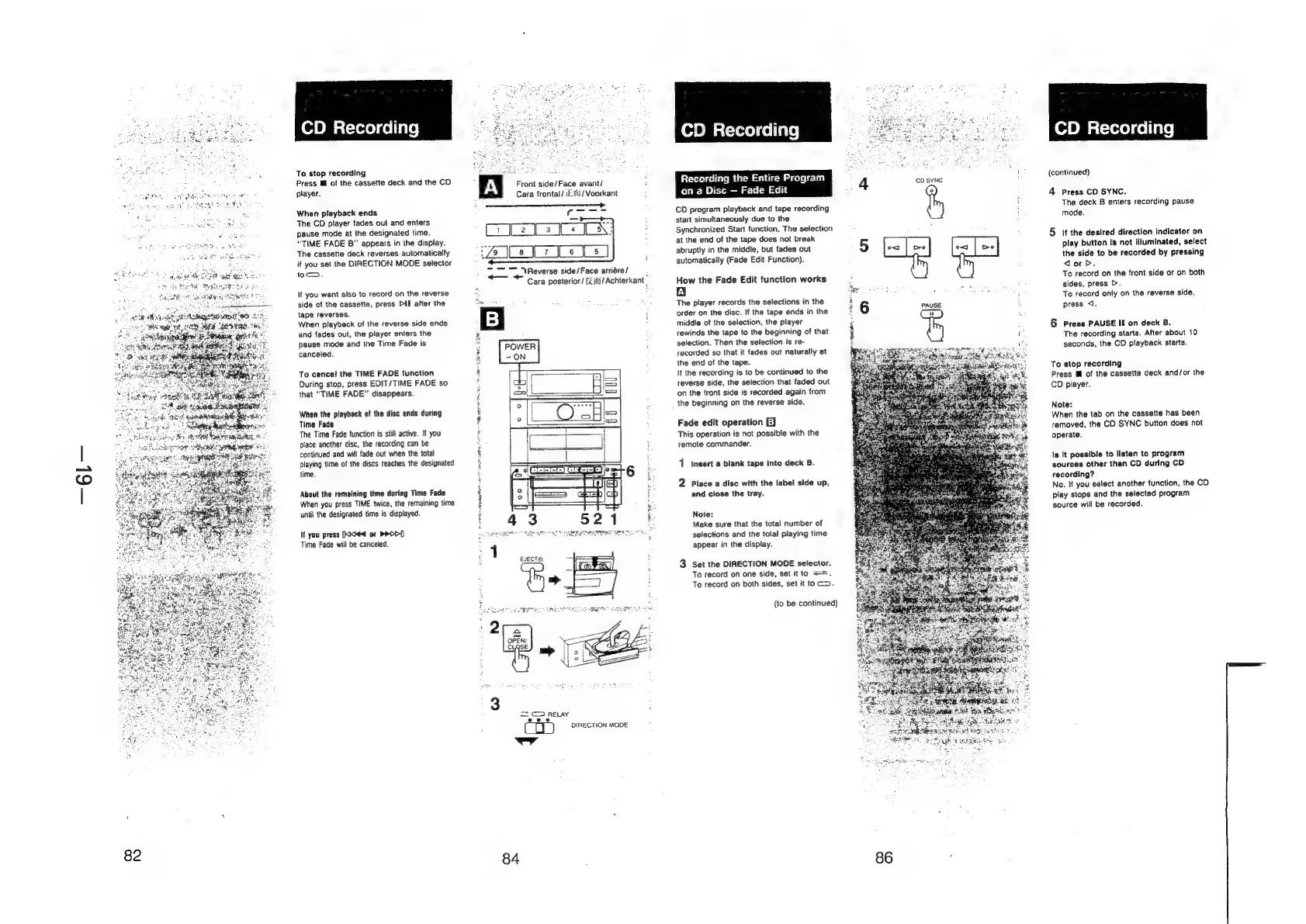
CD
program
playback
and
tape
recording
start
simultaneously
due
to
the
Synchronized
Start
function.
The
selection
at
the
end
of
the
tape
does
not
break
abruptly
in
the
middle,
but
fades
out
automatically
(Fade
Edit
Function).
How
the
Fade
Edit
function
works
ty
The
player
records
the
selections
in
the
order
on
the
disc.
If
the
tape
ends
in
the
middie
of
the
selection,
the
player
rewinds
the
tape
to
the
beginning
of
that
selection.
Then
the
selection
is
re-
recorded
so
that
it
fades
out
naturally
at
the
end
of
the
tape.
It
the
recording
is
to
be
continued
to
the
reverse
side,
the
selection
that
faded
out
‘on
the
front
side
is
recorded
again
from
the
beginning
on
the
reverse
side.
Fade
edit
operation
EJ
This
operation
is
not
possible
with
the
remote
commander.
1
insert
a
blank
tape
into
deck
B.
2
Place
a
disc
with
the
label
side
up,
and
close
the
tray.
Note:
Make
sure
that
the
total
number
of
selections
and
the
total
playing
time
appear
in
the
display.
3
Set the
DIRECTION
MODE
selector.
To
record
on
one
side,
set
itto
=*.
To
record
on
both
sides,
set
it
to
c>.
(to
be
continued)
86
CD
SYNC
(continued)
4
Press
CD
SYNC.
The
deck
B
enters
recording
pause
mode.
5
if
the
desired
direction
indicator
on
play
button
is
not
illuminated,
select
the
side
to
be
recorded
by
pressing
donb.
To
record
on
the
front
side
or
on
both
sides,
press
>.
To
record
only
on
the
reverse
side,
press
<.
6
Press
PAUSE
II
on
deck
B.
The
recording
starts.
After
about
10
seconds,
the
CO
playback
starts.
To
stop
recording
Press
Mf
of
the
cassette
deck
and/or
the
CD
player.
Note:
When
the tab
on
the
cassette
has
been
removed,
the
CD
SYNC
button
does
not
operate.
Is
it
possible
to
listen
to
program
sources
other
than
CD
during
CD
recording?
No,
if
you
select
another
function,
the
CD
play
stops
and
the
selected
program
source
will
be
recorded.