EasyManua.ls Logo

Sony HCD-H77 - CD SECTION Adjustments

Sony HCD-H77
71 pages
Print Icon
To Next Page IconTo Next Page
To Previous Page IconTo Previous Page
Loading...
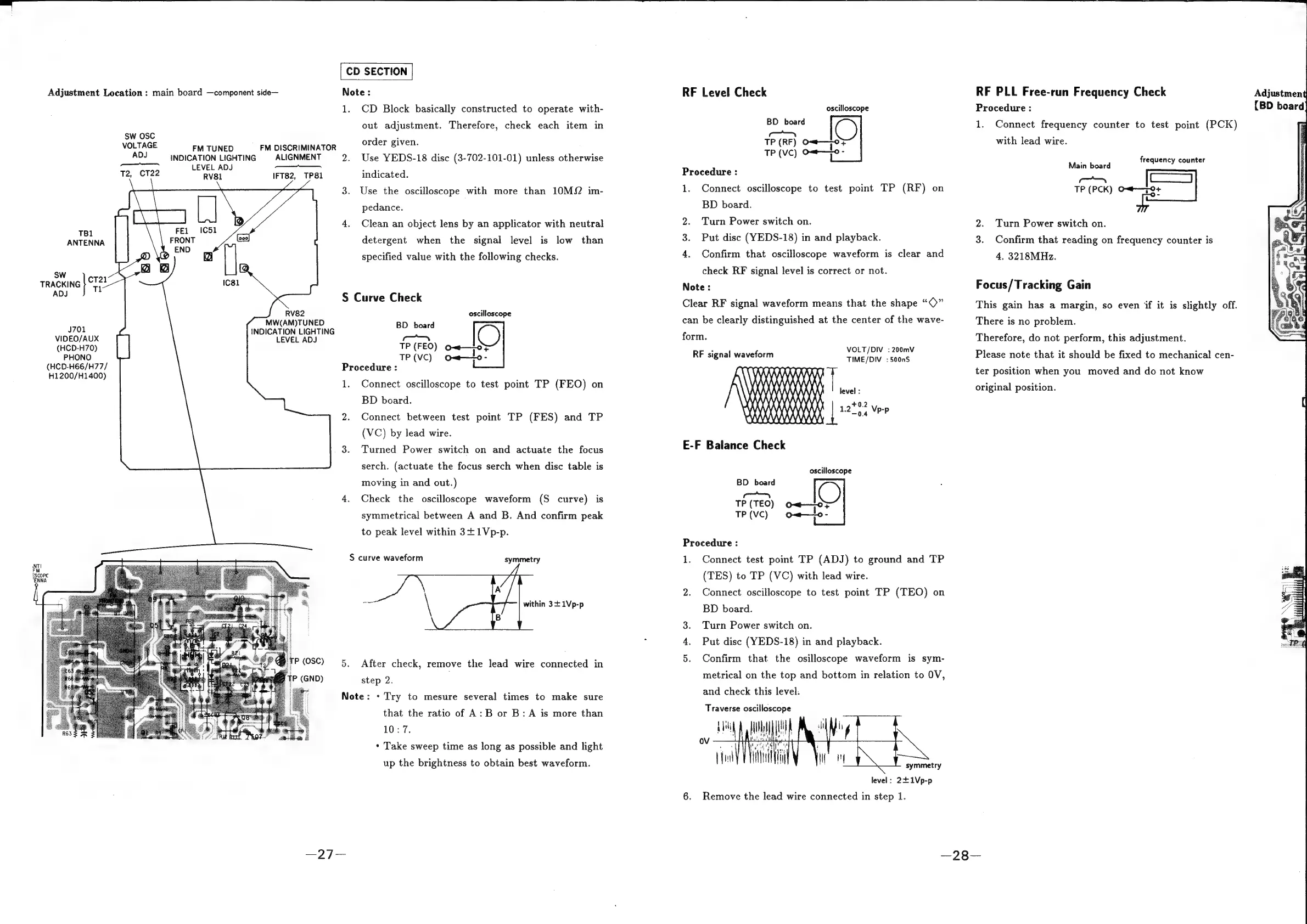
CD
SECTION
Adjustment
Location
:
main
board
—component
side—
Note:
1.
CD
Block
basically
constructed
to
operate
with-
out
adjustment.
Therefore,
check
each item
in
sw
OSC
:
VOLTAGE
FM
TUNED
FM
DISCRIMINATOR
order
given.
as
INDICATION
LIGHTING
ALIGNMENT
2.
Use
YEDS-18
disc
(3-702-101-01)
unless
otherwise
ee
ray
LEVEL
ADJ
T2,
CT22
RV81
IFT82,
TP81
indicated.
3.
Use
the
oscilloscope
with
more
than
10MS2
im-
pedance.
4.
Clean
an
object
lens
by
an
applicator
with
neutral
TB1
3 :
ANTENNA
detergent
when
the
signal
level
is
low
than
specified
value
with
the
following
checks.
sw
TRACKING
dik
nee
S
Curve
Check
oscilloscope
MW(AM)TUNED
BD
board
J701
INDICATION
LIGHTING
ie
VIDEO/AUX
LEVEL
ADJ
—s
(HCD-H70)
TP
(FEO)
o=<—
°F
PHONO
TP
(VC)
omw—to-
(HCD-H66/H77/
Procedure
:
H1200/H1400)
1.
Connect
oscilloscope
to
test
point
TP
(FEO)
on
BD
board.
2.
Connect
between
test
point
TP
(FES)
and
TP
(VC)
by
lead
wire.
3.
Turned
Power
switch
on
and
actuate
the
focus
serch.
(actuate
the
focus
serch
when
disc
table
is
moving
in
and
out.)
4.
Check
the
oscilloscope
waveform
(S
curve)
is
symmetrical
between
A
and
B.
And
confirm
peak
to
peak
level
within
3+1Vp-p.
S
curve
waveform
symmetry
step
2.
Note:
+
Try
to
mesure
several
times
to
make
sure
that
the
ratio
of
A:
B
or
B:
A
is
more
than
10:7.
*
Take
sweep
time
as
long
as
possible
and
light
up
the
brightness
to
obtain
best
waveform.
RF
Level
Check
oscilloscope
BD
board
—S
TP
(RF)
O<—
0+
TP
(VC)
O=t——0
-
Procedure
:
1.
Connect
oscilloscope
to
test
point
TP
(RF)
on
BD
board.
2.
Turn
Power
switch
on.
3.
Put
disc
(YEDS-18)
in
and
playback.
4.
Confirm
that
oscilloscope
waveform
is
clear
and
check
RF
signal
level
is
correct
or
not.
Note:
Clear
RF
signal
waveform
means
that
the
shape
“©”
can
be
clearly
distinguished
at
the
center
of
the
wave-
form.
VOLT/DIV
:
200mV
TIME/DIV
:
500nS
level
:
RF
signal
waveform
MAMAAAAAA?
\}
Wy)
i
'
X)
49000000009
1000000000000
+0.2
E-F
Balance
Check
oscilloscope
BD
board
mS
TP(TEO)
O——o}
TP(vC)
ow—lo-
Procedure
:
1.
Connect
test
point
TP
(ADJ)
to
ground
and
TP
(TES)
to
TP
(VC)
with
lead
wire.
2.
Connect
oscilloscope
to
test
point
TP
(TEO)
on
BD
board.
Turn
Power
switch
on.
Put
disc
(YEDS-18)
in
and
playback.
5.
Confirm
that
the
osilloscope
waveform
is
sym-
metrical
on
the
top
and
bottom
in
relation
to
OV,
and
check
this
level.
Traverse
oscilloscope
symmetry
level:
2£1Vp-p
6.
Remove
the
lead
wire
connected
in
step
1.
RF
PLL
Free-run
Frequency
Check
Procedure
:
1.
Connect
frequency
counter
to
test
point
(PCK)
with
lead
wire.
Main
beat
frequency
counter
Finds
om
fe
TP
(PCK)
se
Turn
Power
switch
on.
3.
Confirm
that
reading
on
frequency
counter
is
4.
3218MHz.
Focus/Tracking
Gain
This
gain
has
a
margin,
so
even
if
it
is
slightly
off.
There
is
no
problem.
Therefore,
do
not
perform,
this
adjustment.
Please
note
that
it
should
be
fixed
to
mechanical
cen-
ter
position
when
you
moved
and
do
not
know
original
position.
Adjustment
(BD
board
pL
Ld

Related product manuals