EasyManua.ls Logo

Sony HCD-H77 - AMPLIFIER SECTION Operation; CD SECTION Operation

Sony HCD-H77
71 pages
Print Icon
To Next Page IconTo Next Page
To Previous Page IconTo Previous Page
Loading...
Sieh
Sad
2
iM
eT.”
2-3.
AMPLIFIER
SECTION
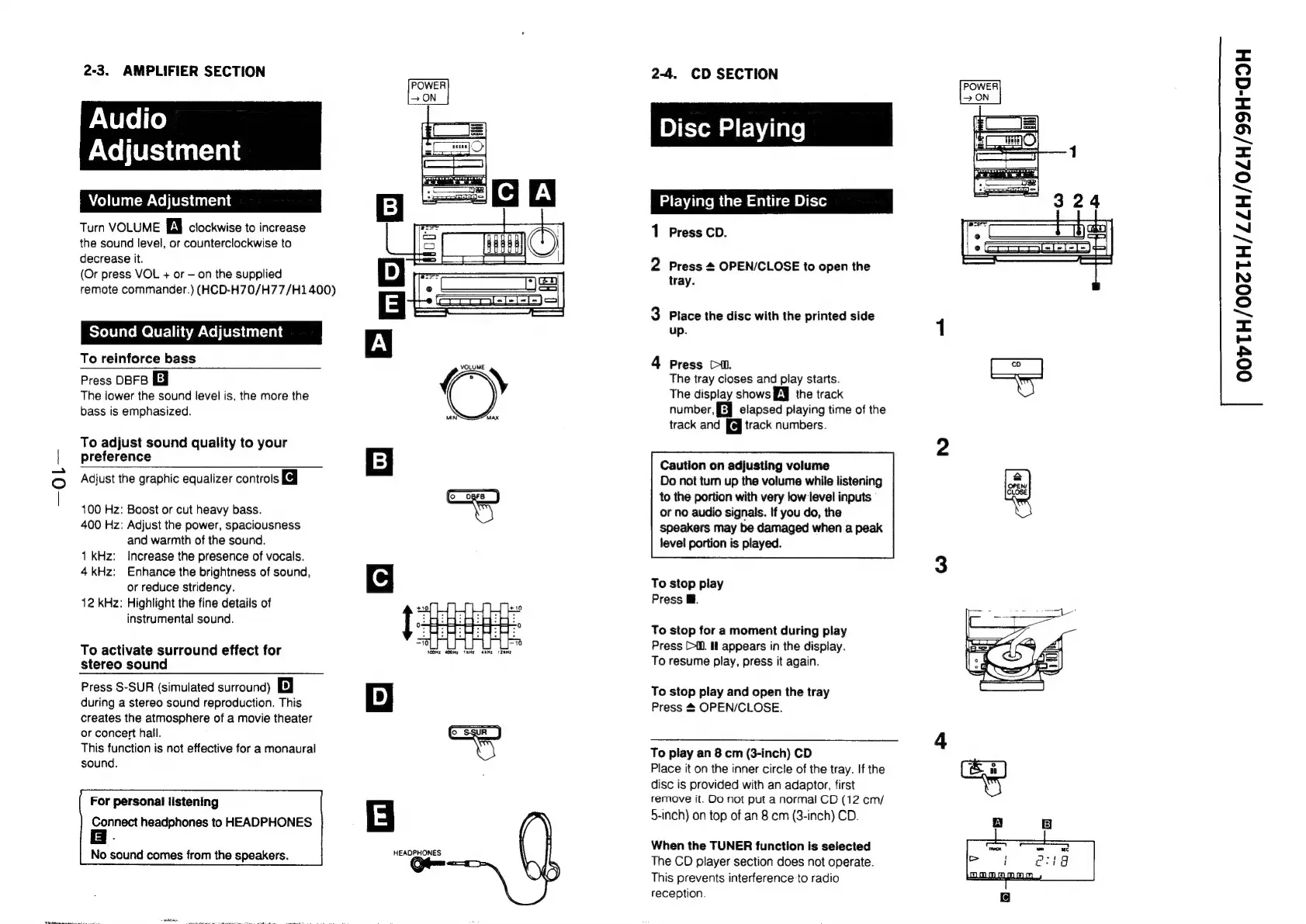
Audio
Adjustment
Volume
Adjustment
Turn
VOLUME
Al
clockwise
to
increase
the
sound
level,
or
counterclockwise
to
decrease
it.
(Or
press
VOL
+
or
on
the
supplied
remote
commander.)
(HCD-H70/H77/H1
400)
Sound
Quality
Adjustment
To
reinforce
bass
Press
OBFB
The
lower
the
sound
level
is,
the
more
the
bass
is
emphasized.
To
adjust
sound
quality
to
your
preference
Adjust
the
graphic
equalizer
controls
Kj
100
Hz:
Boost
or
cut
heavy
bass.
400
Hz:
Adjust
the
power,
spaciousness
and
warmth
of
the
sound.
1
kHz:
Increase
the
presence
of
vocals.
4kHz:
Enhance
the
brightness
of
sound,
or
reduce
stridency.
12
kHz:
Highlight
the
fine
details
of
instrumental
sound.
To
activate
surround
effect
for
stereo
sound
Press
S-SUR
(simulated
surround)
B
during
a
stereo
sound
reproduction.
This
creates
the
atmosphere
of
a
movie
theater
or
concert
hall.
This
function
is
not
effective
for
a
monaural
sound.
For
personal
listening
Connect
headphones
to
HEADPHONES
f
No
sound
comes
from
the
speakers.
POWER
ON
1)
MIN’
MAX
(oc
oare
)
HEADPHONES
2-4.
CD
SECTION
Disc
Playing
[Playing
the
Entire
Disc
Playing
the
Entire
Disc
ook
Press
CD.
Ls)
Press
4
OPEN/CLOSE
to
open
the
tray.
a
Place
the
disc
with
the
printed
side
up.
p=
Press
Ci.
The
tray
closes
and
play
starts.
The
display
shows
EJ
the
track
number,
[Eq
elapsed
playing
time
of
the
track
and
[@
track
numbers.
Caution
on
adjusting
volume
Do
not
tum
up
the
volume
while
listening
to
the
portion
with
very
low
level
inputs
or
no
audio
signals.
If
you
do,
the
speakers
may
be
damaged
when
a
peak
level
portion
is
played.
To
stop
piay
Press
i.
To
stop
for
a
moment
during
play
Press
(il.
Il
appears
in
the
display.
To
resume
play,
press
it
again.
To
stop
play
and
open
the
tray
Press
&
OPEN/CLOSE.
To
play
an
8
cm
(3-inch)
CD
Place
it
on
the
inner
circle
of
the
tray.
If
the
disc
is
provided
with
an
adaptor,
first
remove
it.
OO
not
put
a
normal
CD
(12
cm/
5-inch)
on
top
of
an
8
cm
(3-inch)
CD.
When
the
TUNER
function
is
seiected
The
CD
player
section
does
not
operate.
This
prevents
interference
to
radio
reception.
POWER
>
ON
OOVTH/002TH/ZZH/0ZH/99H-dG9H

Related product manuals