40
Menu List
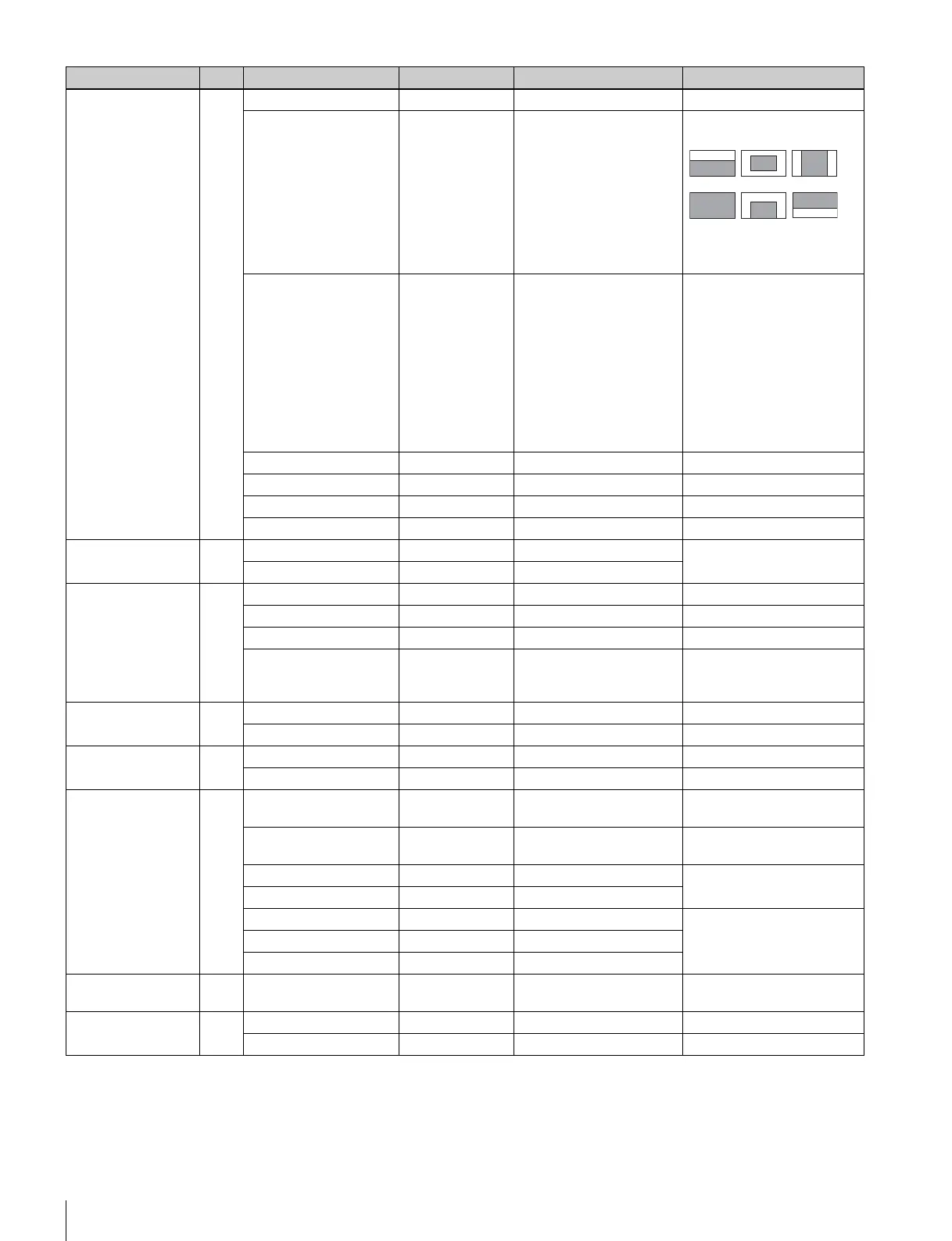
<AUTO IRIS> M05 AUTO IRIS OFF ON, OFF
WINDOW 1 1, 2, 3, 4, 5, 6 Select the auto iris windows:
The shaded parts indicate the
area where light detection
occurs.
OVERRIDE - - –99 to +99, - - To set the override to
temporarily change the
reference value for brightness
of the automatic iris level in the
range of ±2 steps:
–99: two steps to fully closed
iris
+99: two steps to fully open iris
- - : OFF
The setting returns to “ - - ”
when the power is turned off.
IRIS LEVEL 0 –99 to +99 ±4 steps
APL RATIO 65 –99 to +99
IRIS GAIN 0 –99 to +99
IRIS CLOSE OFF ON, OFF
<MIC GAIN> M06
(U14)
MIC1 60 dB 20, 30, 40, 50, 60 dB valid only in standalone
operation
MIC2 60 dB 20, 30, 40, 50, 60 dB
<UP TALLY> M07
(U18)
TALLY BRIGHTNESS 50 0 to 100
NUMBER BRIGHTNESS 50 0 to 100
CAMERA NUMBER - - - -, 1 to 96
NUMBER DISPLAY AUTO ON, OFF, AUTO AUTO: to correspond to the UP
TALLY switch setting of
HDLA attached
<CALL/TALLY> M08 CCU CALL ON ON, OFF Invalid with CCU connected
CAM CALL OFF ON, OFF Invalid with CCU connected
<DOWN
CONVERTER>
M09
(U16)
OUTPUT SIGNAL MAIN MAIN, RET, VF
ASPECT SQ SQ, EC
<TEST OUT> M10
(U15)
OUTPUT VF SD-SYNC, HD-SYNC, VF,
VBS
(PWR SAVE) Displayed in POWER SAVE
mode only
VBS-OUT
CHARACTER OFF ON, OFF
HD-SYNC-OUT
V-PHASE 0 –127 to +127
H-PHASE 0 –127 to +127
<POWER SAVE> M11
(U10)
DOWN CONVERTER ACTIVE PWR SAVE, ACTIVE
<TRUNK> M12
(U17)
TRUNK ON ON, OFF
IF 232c 232c, 422a
Menu page No. Item⁄ Default Settings Remarks
123
456



 To Next Page