Getting Started
masterpage:Right
lename[C:\Documents and
ettings\pc13\Desktop\J9031708_4252085411HT5800DPUS\4252085411\GB03CON_HT-
800DP-US.fm]
7
US
model name1[HT-5800DP]
model name2[HT-4850DP]
model name3[HT-4800DP]
-
-
-
.
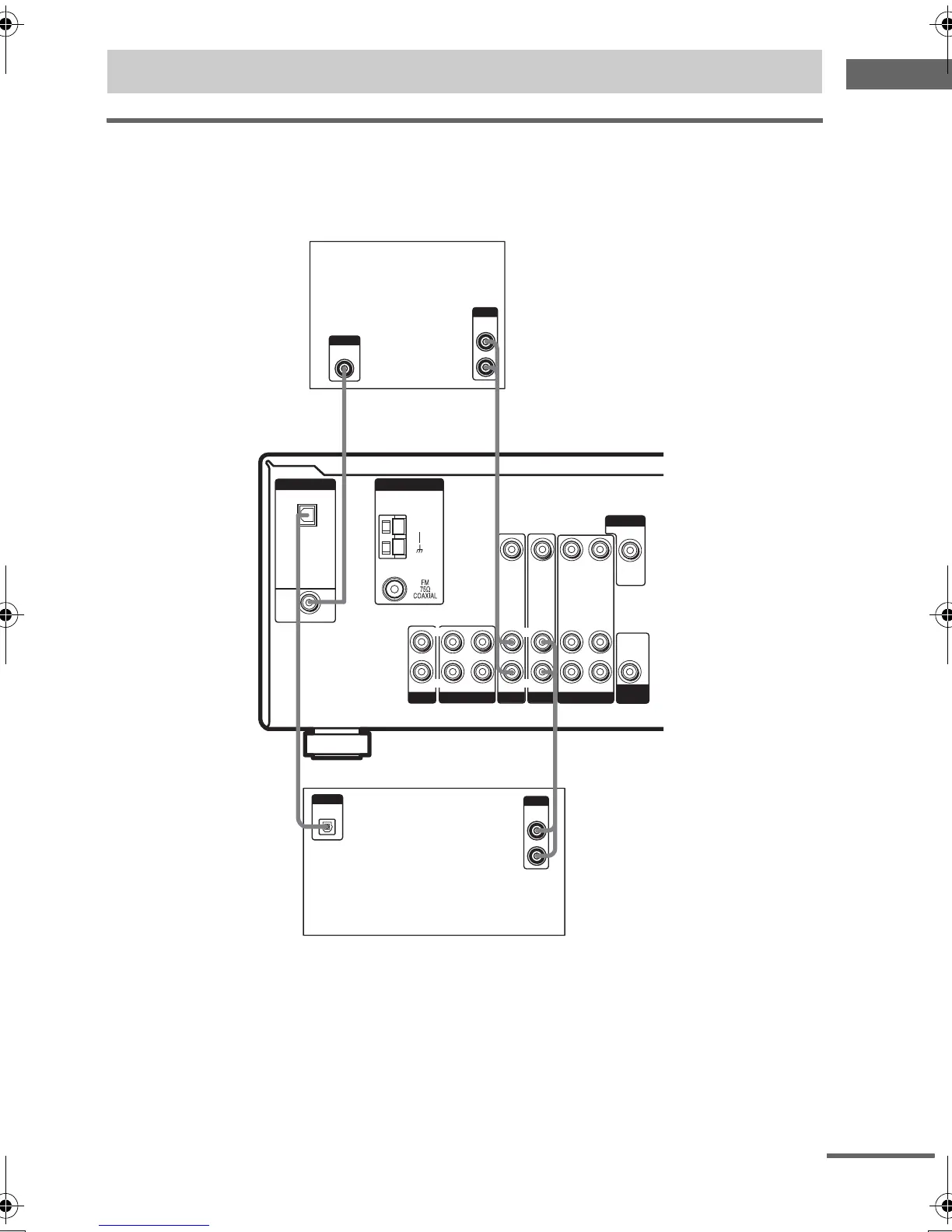
Hooking up a DVD player or satellite tuner
For details on the required cords (A–E), see page 6.
1 Connect the audio jacks.
Note
You can also listen to the sound of your TV by connecting your TV’s audio output jacks to the VIDEO 2 AUDIO IN
jacks on the receiver. In this case, do not connect the TV’s video output jack to the VIDEO 2 VIDEO IN jack on the
receiver.
1a: Connecting components with digital audio output jacks
ANTENNA
DIGITAL
OPTICAL
VIDEO 2
IN
DVD IN
COAXIAL
L
R
L
R
MD/TAPE
CD
IN OUT
IN
L
R
L
R
MONITOR
SUB
WOOFER
VIDEO 1
VIDEO 2
DVD
AUDIO IN AUDIO IN
AUDIO OUT AUDIO IN
VIDEO IN VIDEO IN
VIDEO OUT VIDEO IN
VIDEO OUT
AUDIO
OUT
AM
DIGITAL
OPTICAL
OUTPUT
AE
R
AUDIO
OUT
OUTPUT
L
DIGITAL
COAXIAL
OUTPUT
D
A
R
AUDIO
OUT
OUTPUT
L
Satellite tuner
DVD player
continued
GB01COV_HT-5800DP-US.book Page 7 Wednesday, March 17, 2004 5:48 PM


 To Next Page
 Loading...