-
C)
~.
::I
ca
en
-
m
::1
(1)
a.
Connect the AC power cord (mains lead) last.
Conllectioll'the.
DIGltA~,MEDIA.PORt~"aaaptir:,
'~<'-\','-c;:;'-';f
,,:
;-
~
.4.:
':'x,',::
c:::::::::..
: Signal
flow
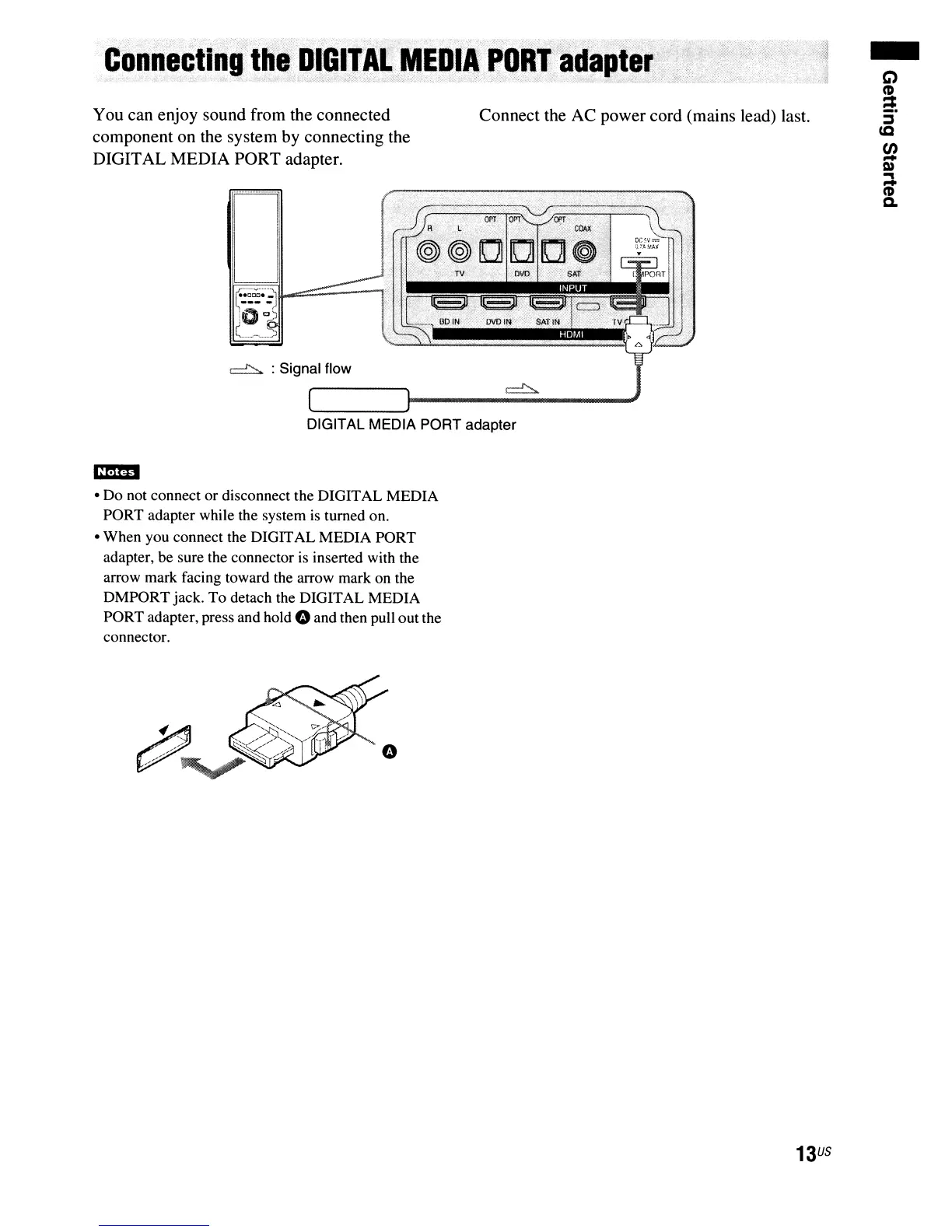
You can enjoy sound from the connected
component on the system by connecting the
DIGITAL MEDIA PORT adapter.
DIGITAL MEDIA PORT adapter
cmD
• Do not connect or disconnect the DIGITAL MEDIA
PORT adapter while the system
is
turned on.
• When you connect the DIGITAL MEDIA PORT
adapter, be sure the connector
is
inserted with the
arrow mark facing toward the arrow mark on the
DMPORT jack. To detach the DIGITAL MEDIA
PORT adapter, press and
hold"
and then pull out the
connector.
13
US



 To Next Page