Remote
control
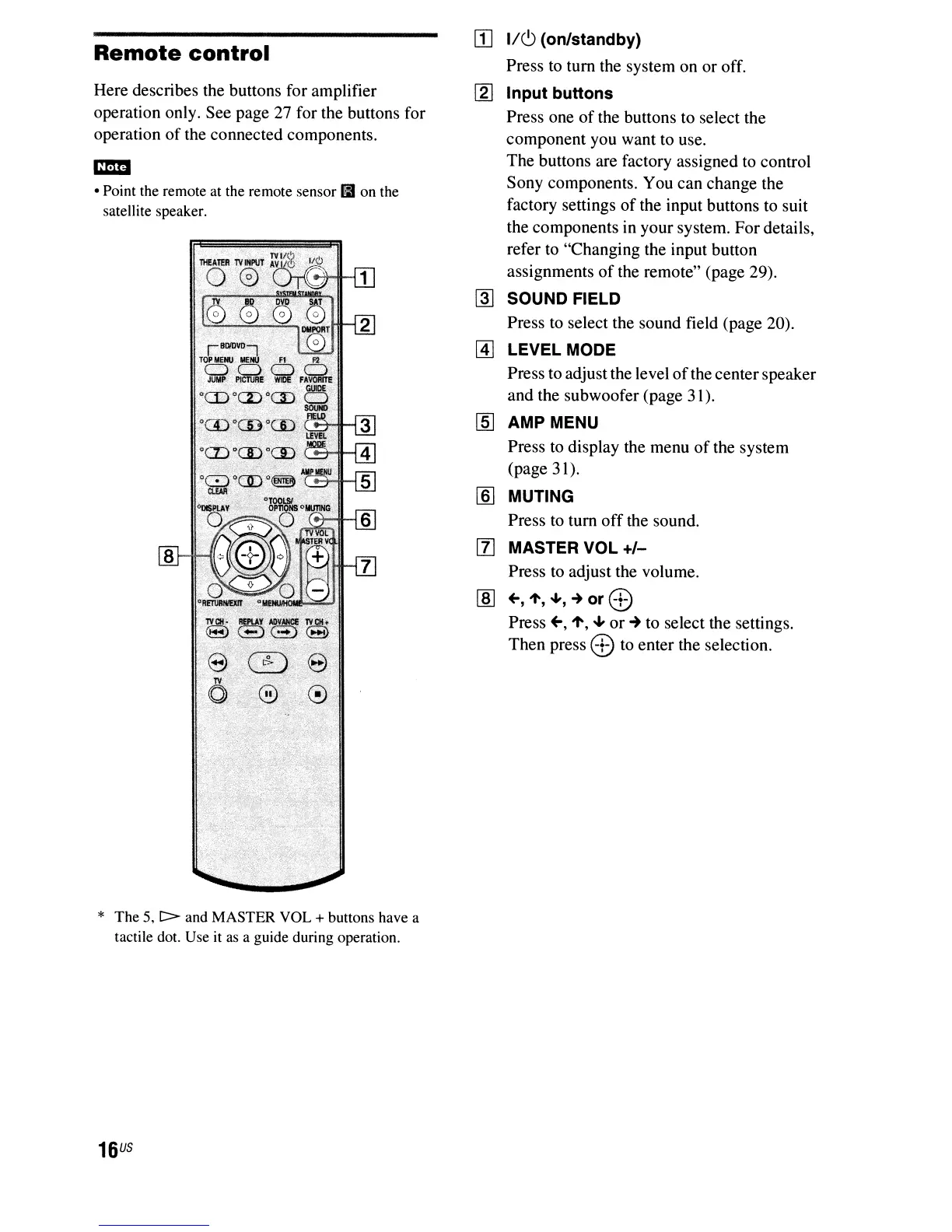
Here describes the buttons for amplifier
operation only. See page 27 for the buttons for
operation
of
the connected components.
m:mI
• Point the remote at the remote sensor
II
on the
satellite speaker.
* The 5,
C>
and MASTER VOL + buttons have a
tactile dot. Use
it
as
a guide during operation.
16
US
[I]
1/6
(on/standby)
Press
to
tum the system on or off.
[g]
Input buttons
Press one
of
the buttons to select the
component you want to use.
The buttons are factory assigned
to
control
Sony components. You can change the
factory settings
of
the input buttons to suit
the components in your system. For details,
refer
to
"Changing the input button
assignments
of
the remote" (page 29).
~
SOUND FIELD
Press to select the sound field (page 20).
~
LEVEL
MODE
Press to adjust the level
of
the centerspeaker
and the subwoofer (page 31).
[ID
AMP MENU
Press to display the menu
of
the system
(page 31).
[§] MUTING
Press
to
tum
off
the sound.
[lJ MASTER VOL
+/-
Press to adjust the volume.
[ID
+-,1',
....
,
~
or
8.:)
Press
+-,
1',
.....
or'"
to select the settings.
Then press
8.:)
to enter the selection.



 To Next Page