23
GB
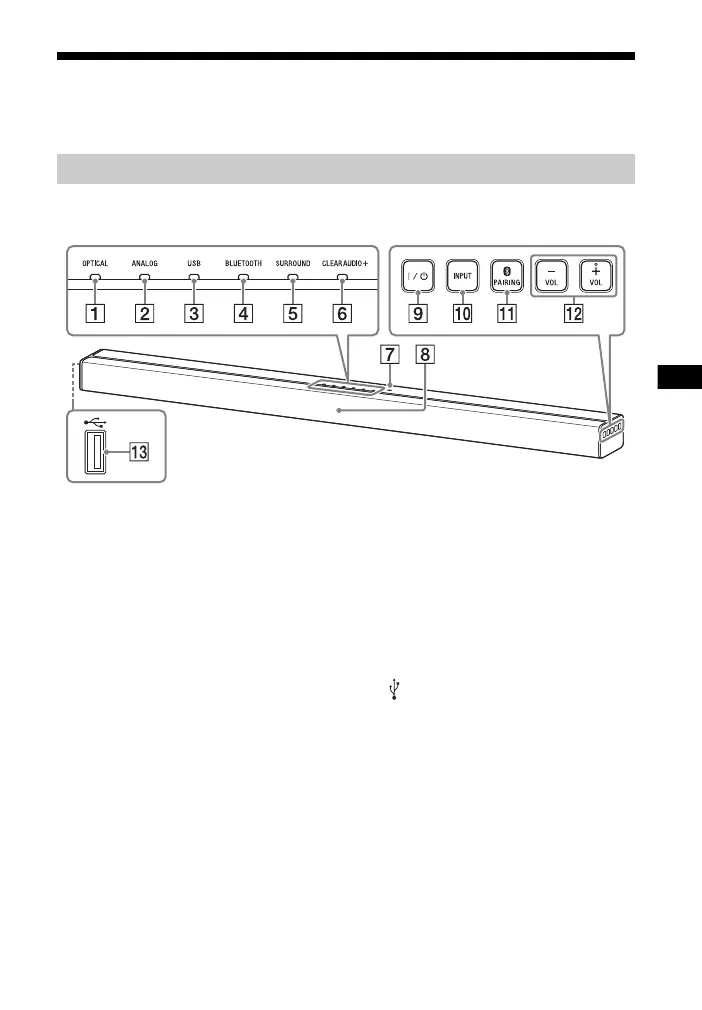
Guide to parts and controls
For more information, refer to the pages indicated in parentheses.
Top, front, and side panels
OPTICAL indicator (page 13)
ANALOG indicator (page 13)
USB indicator (page 13)
BLUETOOTH indicator (blue)
BLUETOOTH status
– During BLUETOOTH pairing:
Flashes quickly
– BLUETOOTH connection is being
attempted: Flashes
– BLUETOOTH connection has been
established: Lit
– BLUETOOTH standby mode (when
the system is off): Unlit
SURROUND indicator (page 15)
CLEARAUDIO+ indicator
(page 15)
N-Mark (page 17)
When using the NFC function,
touch your NFC-compatible
device to the mark.
Remote control sensor
/ (on/standby) button
Turns on the system, or sets it to
standby mode.
INPUT button (page 13)
PAIRING button (page 16)
VOL (volume) +/– buttons
(USB) port (page 14)
Bar Speaker



 To Next Page