37
GB
Getting Started
c)
For details, refer “Front speaker distance”
(page 52).
d)
For details, refer “Tip” on page 53.
8: Adjusting the speaker
levels and balance
(TEST TONE)
You can adjust the speaker levels and balance
while listening to the test tone from your
listening position.
Tip
The receiver employs a test tone with a frequency
centered at 800 Hz.
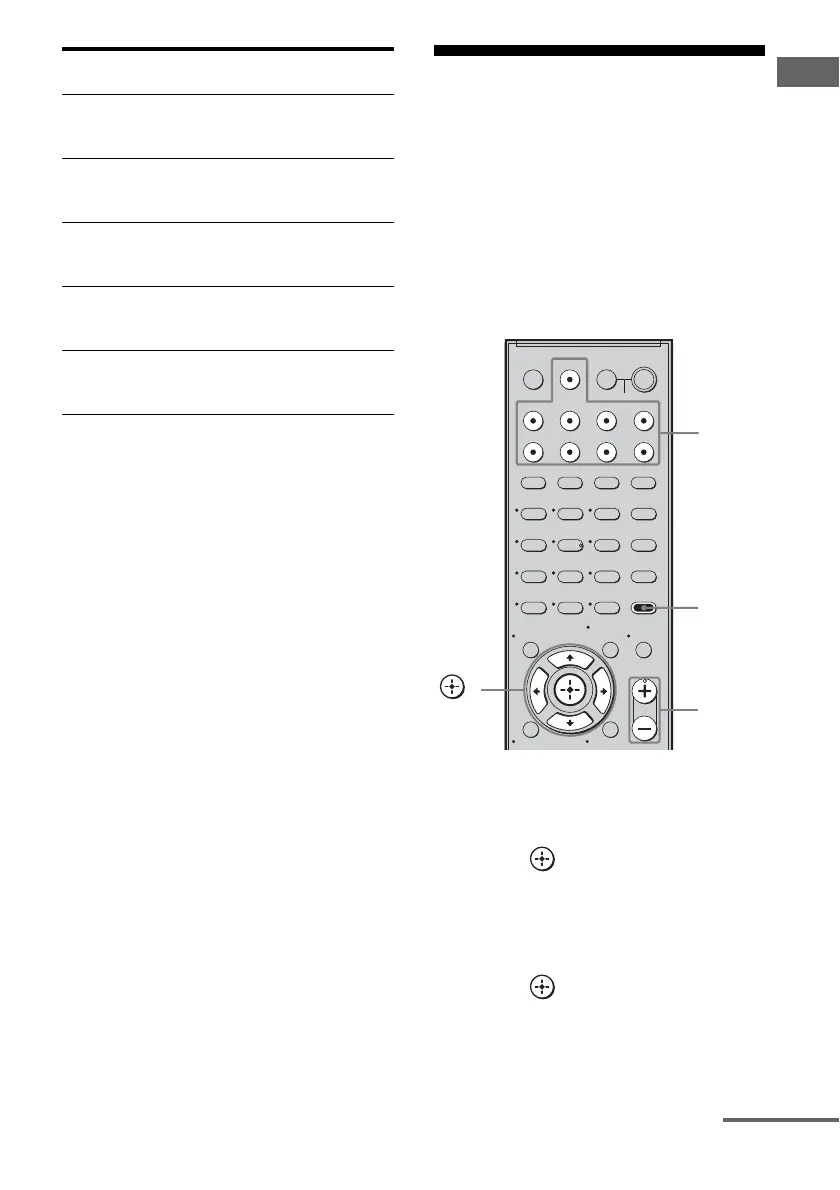
1 Press AMP MENU.
“1-LEVEL” appears on the display.
2 Press or b to enter the
menu.
3 Press V/v repeatedly to select
“T. TONE”.
4 Press or b to enter the
parameter.
Warning
code
Explanation and solution
WARN. 72 The center speaker distance is out
of range. Reposition your center
speaker.
d)
WARN. 73 The surround left speaker distance
is out of range. Reposition your
surround left speaker.
d)
WARN. 74 The surround right speaker distance
is out of range. Reposition your
surround right speaker.
d)
WARN. 75 The surround back left speaker
distance is out of range. Reposition
your surround back left speaker.
d)
WARN. 76 The surround back right speaker
distance is out of range. Reposition
your surround back right speaker.
d)
123
46
78
0/10
ENTER
9
SYSTEM STANDBY
TV INPUT
SLEEP
DMPORT
VIDEO1 VIDEO2 BD DVD
2CH A.F.D.
RETURN/EXIT
MOVIE MUSIC
AMP MENU
CLEAR
DISPLAY
TV VOL
MASTER VOL
DVD/BD
MENU
AUTO CAL
D.TUNING
D.SKIP
THEATRE
SAT TV SA-CD/CD TUNER
?/1
-
O
5
>10
TV
?/1
AV
?/1
MEMORY
MENU/HOME
MUTING
TOOLS/
OPTIONS
AMP
MENU
MASTER
VOL +/–
Input
buttons
,
V/v/B/b
continued



 To Next Page