39
GB
Playback
Selecting a component
1
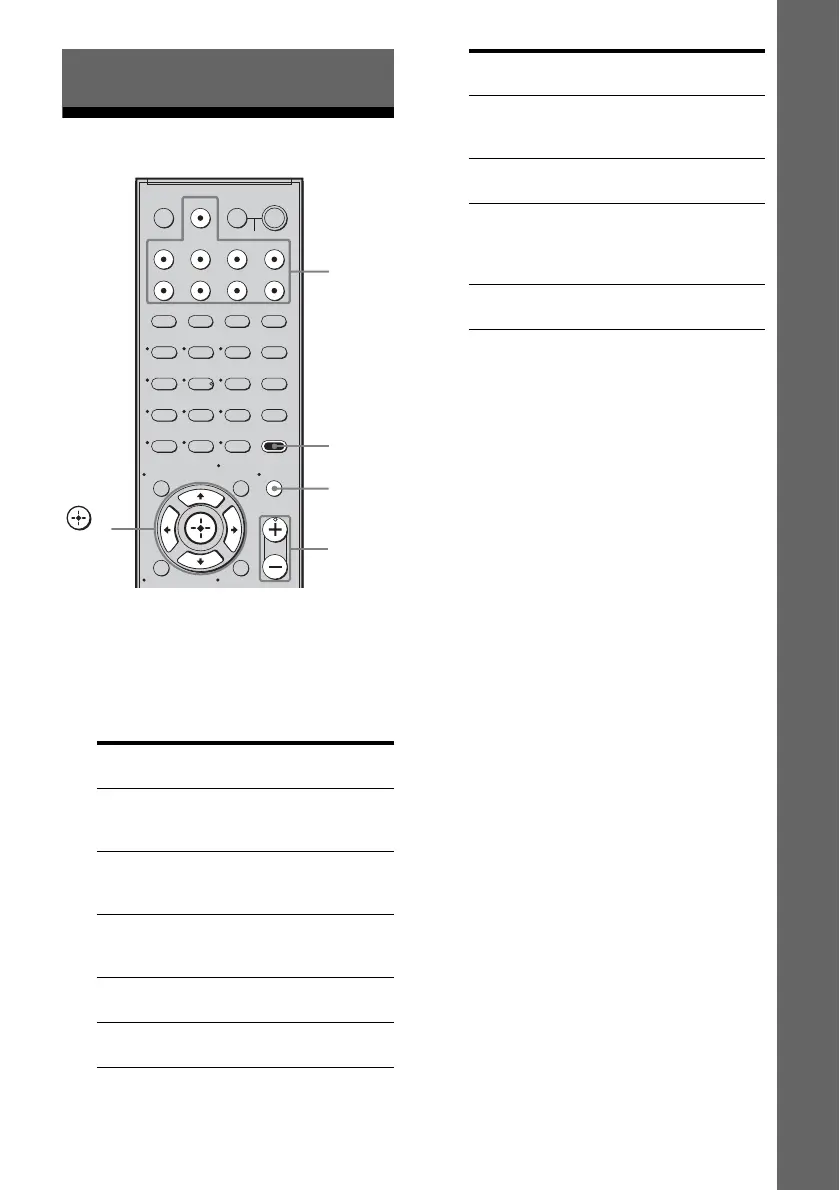
Press the input button to select
a component.
You can also use INPUT SELECTOR on
the receiver.
The selected input appears on the display.
* “SA-CD/CD/CD-R” scrolls across the
display, then “SA-CD/CD” appears.
2 Turn on the component and
start playback.
3 Press MASTER VOL +/– to
adjust the volume.
You can also use MASTER VOLUME on
the receiver.
To activate the muting function
Press MUTING.
The muting function will be canceled when
you do the following.
• Press MUTING again.
• Increase the volume.
• Turn off the receiver.
To avoid damaging your
speakers
Before you turn off the receiver, be sure to turn
down the volume level.
To listen to the subwoofers
• You can use the SUBWOOFER VOLUME on the
power amplifier to adjust the volume of the
subwoofers.
• Set the volume level to suit your preference
according to the selected input as slight
adjustments may enhance the sound.
• If you set the subwoofer volume to maximum,
extraneous noise may be heard depending on the
source you are playing.
Playback
Selected input
[Display]
Components that can
be played back
DMPORT
[DMPORT]
DIGITAL MEDIA PORT
adapter connected to the
DMPORT jack
VIDEO 1
[VIDEO 1]
DVD recorder, VCR, etc.,
connected to the VIDEO
1 jack
VIDEO 2
[VIDEO 2]
Camcorder, video game,
etc., connected to the
VIDEO 2 IN jack
BD
[BD]
Blu-ray disc player, etc.,
connected to the BD jack
DVD
[DVD]
DVD player, etc.,
connected to DVD jack
123
46
78
0/10
ENTER
9
SYSTEM STANDBY
TV INPUT
SLEEP
DMPORT
VIDEO1 VIDEO2 BD DVD
2CH A.F.D.
RETURN/EXIT
MOVIE MUSIC
AMP MENU
CLEAR
DISPLAY
TV VOL
MASTER VOL
DVD/BD
MENU
AUTO CAL
D.TUNING
D.SKIP
THEATRE
SAT TV SA-CD/CD TUNER
?/1
-
O
5
>10
TV
?/1
AV
?/1
MEMORY
MENU/HOME
MUTING
TOOLS/
OPTIONS
AMP
MENU
MASTER
VOL +/–
Input
buttons
,
V/v/B/b
MUTING
Selected input
[Display]
Components that can
be played back
SAT
[SAT]
Satellite tuner, etc.
connected to the SAT
jack
TV
[TV]
TV, etc. connected to the
TV jack
SA-CD/CD
[SA-CD/CD/
CD-R]*
Super Audio CD/CD
player/CD recorder, etc.,
connected to the SA-CD/
CD/CD-R jack
TUNER
[FM or AM band]
Built-in radio tuner



 To Next Page