masterpage:Left
lename[E:\SEM_Janet\DDW760_3rdrevision\J9040000_4252086131DDW760GB\4252086131\
B03CON_HT-DDW760-U.fm]
16
GB
model name1[HT-DDW760]
[4-252-086-13(1)]
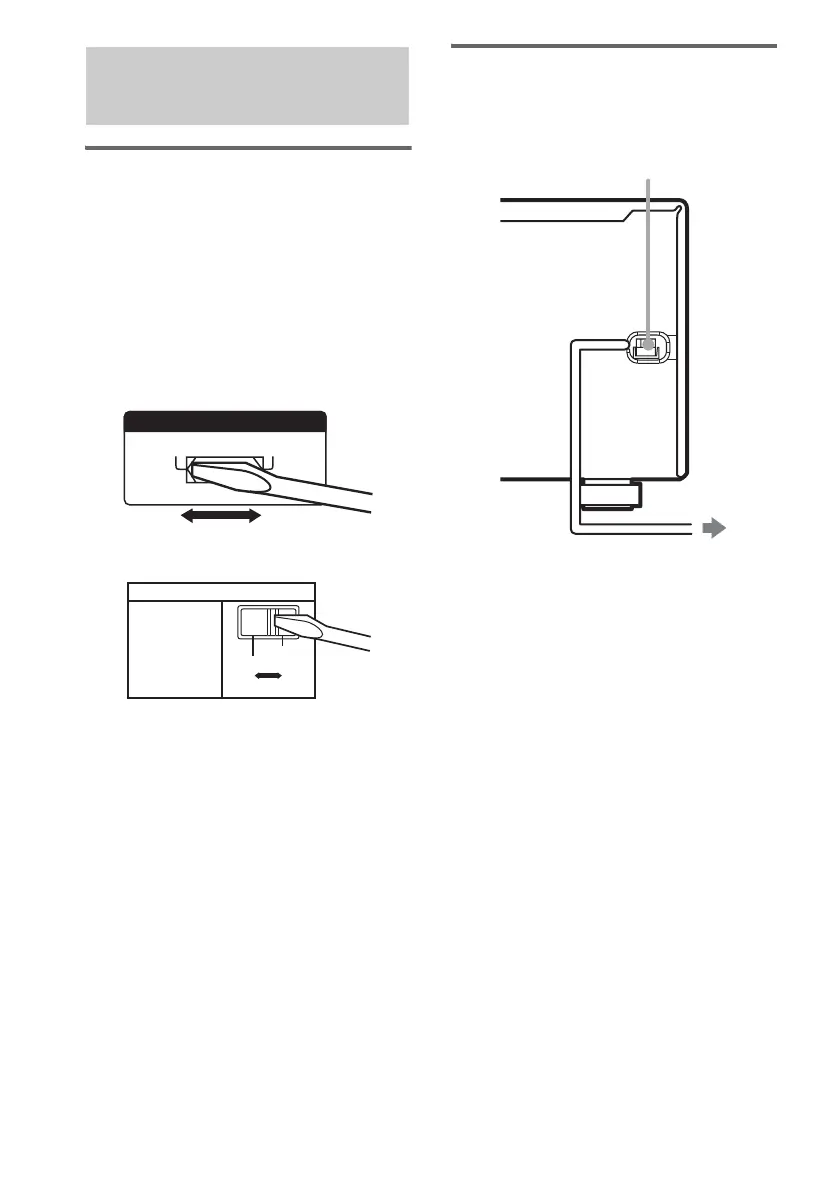
Setting the voltage selector
for the receiver and sub
woofer
If your receiver and sub woofer has a voltage
selector on the rear panel, check that the voltage
selector is set to the local power supply voltage.
If not, use a screwdriver to set the selector to the
correct position before connecting the AC power
cord to a wall outlet.
Receiver
Sub woofer
Connecting the AC power
cord
Connect the AC power cord to a wall outlet.
4: Connecting the AC
power cord
120V
220V 240V
VOLTAGE SELECTORVOLTAGE SELECTOR
220 / 230V
120V
VOLTAGE SELECTOR
To a wall outlet
AC power cord
GB01COV_HT-DDW760-U.book Page 16 Tuesday, April 20, 2004 3:10 PM



 To Next Page