masterpage:Left
lename[E:\SEM_Janet\DDW760_3rdrevision\J9040000_4252086131DDW760GB\4252086131\
B04BSC_HT-DDW760-U.fm]
26
GB
model name1[HT-DDW760]
[4-252-086-13(1)]
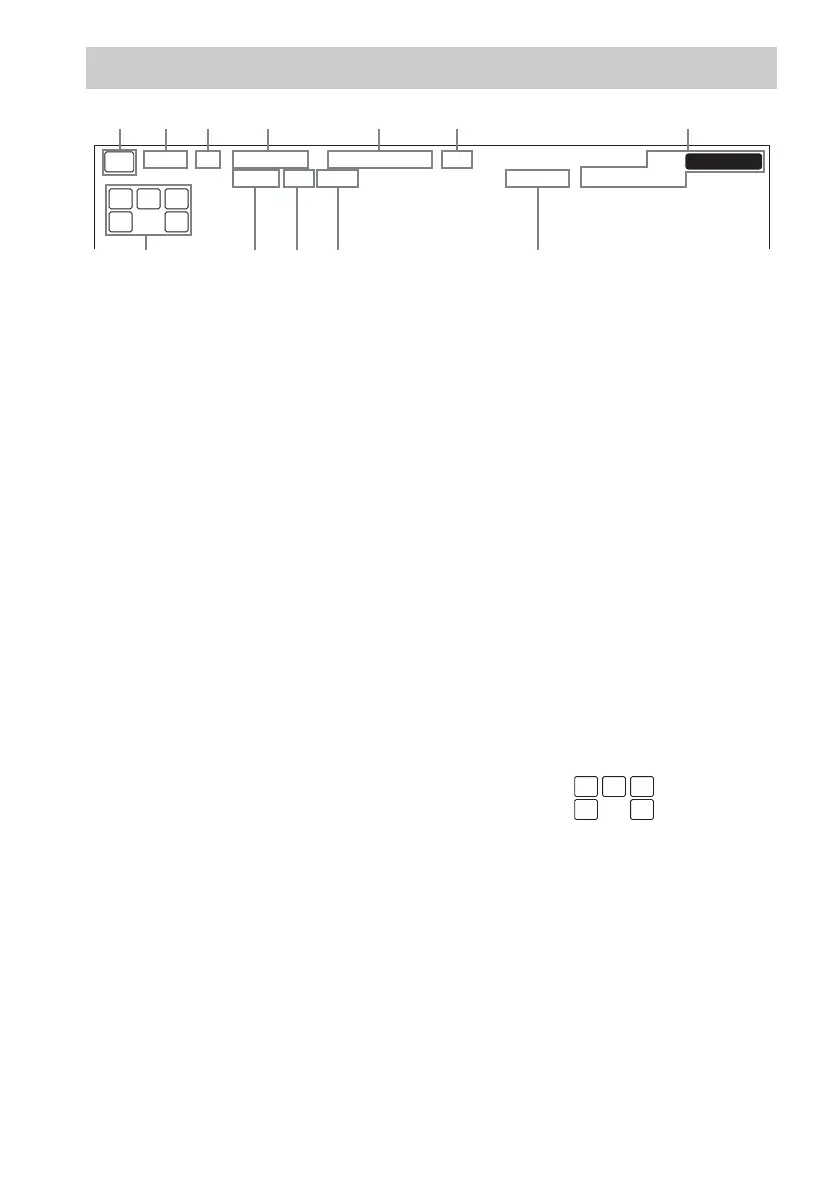
A SW: Lights up when the audio signal is output
from the SUB WOOFER jack.
B LFE: Lights up when the disc being played
back contains the LFE (Low Frequency
Effect) channel and the LFE channel signal is
actually being reproduced.
C SP: Lights up when you turn on the receiver.
Turns off when you connect headphones to the
PHONES jack.
D ; DIGITAL: Lights up when the receiver is
decoding signals recorded in the Dolby Digital
format.
E ; PRO LOGIC II: “; PRO LOGIC” lights
up when the receiver applies Pro Logic
processing to 2 channel signals in order to
output the center and surround channel
signals. “; PRO LOGIC II” lights up when
the Pro Logic II Movie/Music decoder is
activated.
Note
Dolby Pro Logic and Dolby Pro Logic II
decoding do not function for DTS format signals.
F DTS: Lights up when DTS signals are input.
Note
When playing a DTS format disc, be sure that you
have made digital connections and that INPUT
MODE is not set to “ANALOG” (page 30).
G Tuner indicators: Lights up when using the
receiver to tune in radio stations, etc. See
pages 21–24 for tuner operations.
Note
“RDS” appears for models of area code CEL,
CEK only.
H D.RANGE: Lights up when dynamic range
compression is activated (page 31).
I COAX: Lights up when the source signal is a
digital signal being input through the
COAXIAL terminal.
J OPT: Lights up when the source signal is a
digital signal being input through the
OPTICAL terminal.
K SLEEP: Lights up when sleep timer is
activated.
L Playback channel indicators: The letters
(L, C, R, etc.) indicate the channels being
played back. The boxes around the letters vary
to show how the receiver downmixes the
source sound.
L (Front Left), R (Front Right), C (Center
(monaural)), SL (Surround Left), SR
(Surround Right), S (Surround (monaural or
the surround components obtained by Pro
Logic processing))
Example:
Recording format (Front /Surround): 3/2
Sound Field: A.F.D. AUTO
About the indications in the display
MEMORY
L C R
SL SSR
SW
L F E
SP
RDS
STEREO MONOD.RANGE
SLEEP OPT COAX
DIGITAL
;
PRO LOGIC II DTS
;
8
a
s
90
L C R
SL SR
GB01COV_HT-DDW760-U.book Page 26 Tuesday, April 20, 2004 3:10 PM



 To Next Page