12
GB
C:\Documents and
Settings\pc13\Desktop\J9052001_2662269111DDW780_GB\2662269111\GB03CON_HT-
DDW780_CEL.fm
masterpage: Left
HT-DDW780
2-662-269-11 (1)
1: Installing speakers
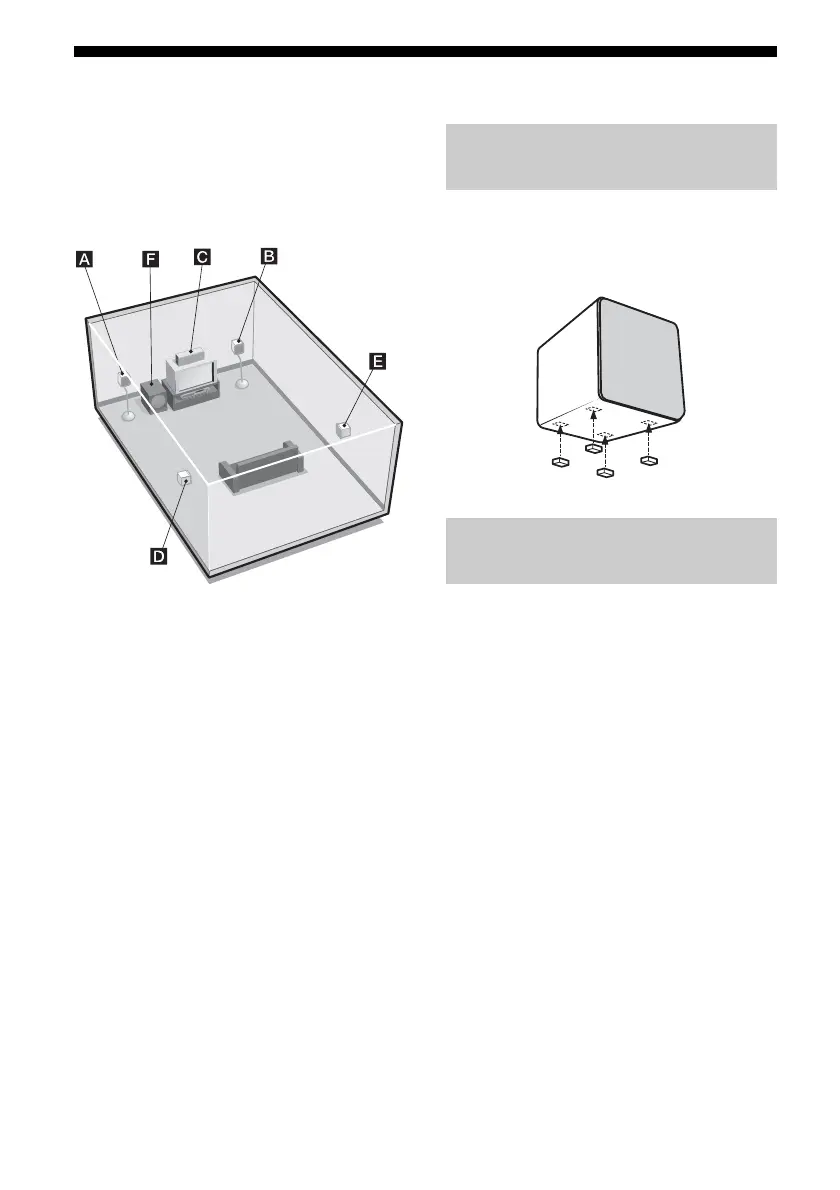
To fully enjoy theater-like multi channel
surround sound requires five speakers
(two front speakers, a center speaker, and two
surround speakers) and a sub woofer
(5.1 channel).
AFront speaker (L)
BFront speaker (R)
CCenter speaker
DSurround speaker (L)
ESurround speaker (R)
FSub woofer
Tip
Since the sub woofer does not emit highly
directional signals, you can place it wherever you
want.
Before you install the speakers and sub
woofer, be sure to attach the supplied foot pads
to prevent vibration or movement as shown in
the illustration below.
For greater flexibility in positioning the
speakers, use the optional WS-FV11 or
WS-FV10D speaker stand (available only in
certain countries). For details, refer to the
operating instructions supplied with the
speaker stand.
Installing the speakers on a flat
surface
Installing the speakers on the
speaker stand
GB01COV_HT-DDW780_CEL.book Page 12 Friday, January 20, 2006 11:32 AM



 To Next Page