23
GB
C:\Documents and
Settings\pc13\Desktop\J9052001_2662269111DDW780_GB\2662269111\GB03CON_HT-
DDW780_CEL.fm
masterpage: Right
HT-DDW780
2-662-269-11 (1)
Getting Started
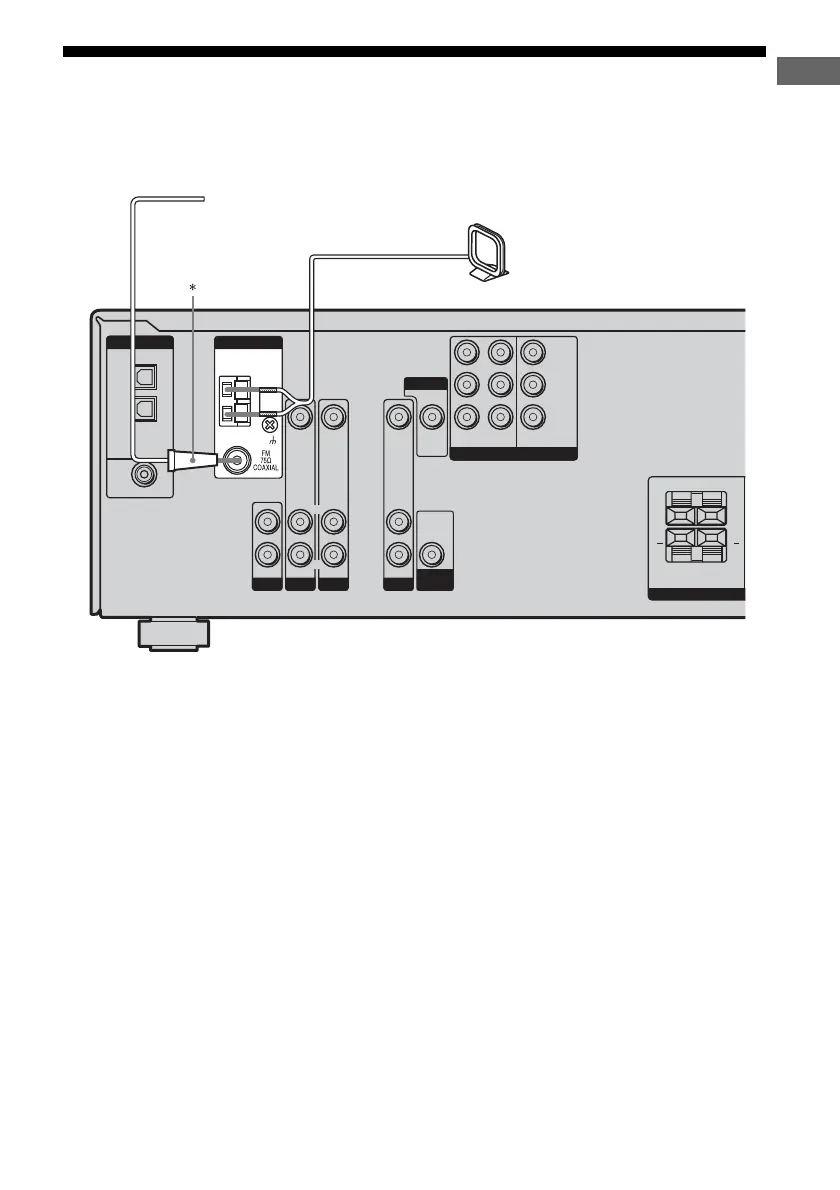
4: Connecting the antennas
Connect the supplied AM loop antenna and
FM wire antenna.
* The shape of the connector varies depending on
the area code of this receiver.
Notes
• To prevent noise pickup, keep the AM loop antenna
away from the receiver and other components.
• Be sure to fully extend the FM wire antenna.
• After connecting the FM wire antenna, keep it as
horizontal as possible.
DVD IN
SA-CD/CD
AUDIO IN
DVD
AUDIO IN
VIDEO 2
AUDIO IN
VIDEO IN VIDEO IN
DIGITAL
OPTICAL
VIDEO 2
IN
VIDEO 1
IN
COAXIAL
AM
ANTENNA
SURROUND
SPEAKE
LR
LR
+ +
R
L
R
L
R
L
AUDIO
OUT
VIDEO 1
COMPONENT VIDEO
AUDIO IN
VIDEO IN
VIDEO OUT
DVD
IN
VIDEO 2
IN
MONITOR
OUT
SUB
WOOFER
MONITOR
Y
P
B
/C
B
/B–Y
P
R
/C
R
/R–Y
FM wire antenna (supplied)
AM loop antenna (supplied)
GB01COV_HT-DDW780_CEL.book Page 23 Friday, January 20, 2006 11:32 AM



 To Next Page