18
GB
C:\Documents and
Settings\pc13\Desktop\J9052001_2662269111DDW780_GB\2662269111\GB03CON_HT-
DDW780_CEL.fm
masterpage: Left
HT-DDW780
2-662-269-11 (1)
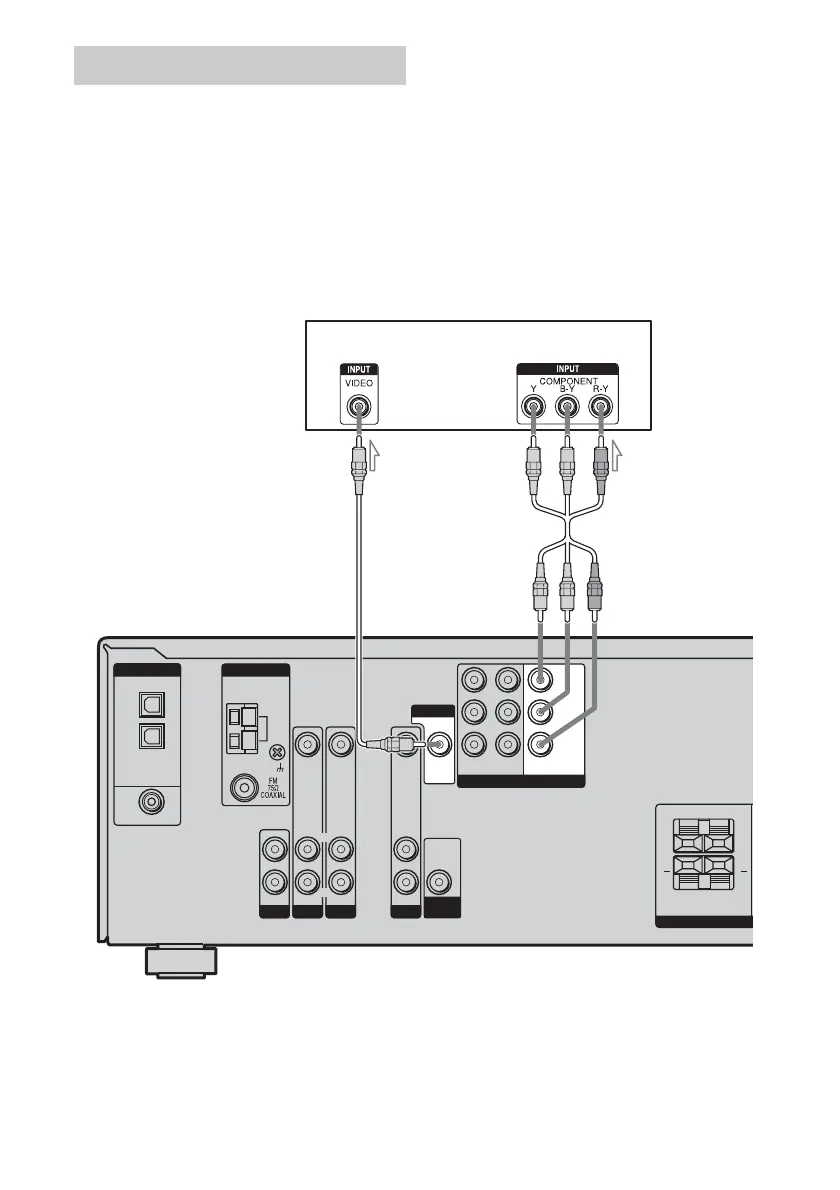
The image from a visual component connected
to this receiver can be displayed on a TV
screen.
It is not necessary to connect all the cables.
Connect video cords according to the jacks of
your components.
Notes
• Connect image display components such as a TV
monitor or a projector to the MONITOR OUT jack
on the receiver.
• Turn on the receiver when the video and audio of a
playback component are being output to a TV via
the receiver. If the power supply of the receiver is
not turned on, neither video nor audio is
transmitted.
Tip
You can watch the selected input image when you
connect the MONITOR OUT jack to a TV monitor.
Hooking up a TV monitor
DVD IN
SA-CD/CD
AUDIO IN
DVD
AUDIO IN
VIDEO 2
AUDIO IN
VIDEO IN VIDEO IN
DIGITAL
OPTICAL
VIDEO 2
IN
VIDEO 1
IN
COAXIAL
AM
ANTENNA
SURROUND
SPEAKE
LR
LR
+ +
R
L
R
L
R
L
AUDIO
OUT
VIDEO 1
COMPONENT VIDEO
AUDIO IN
VIDEO IN
DVD
IN
VIDEO 2
IN
MONITOR
OUT
SUB
WOOFER
VIDEO OUT
MONITOR
Y
P
B
/C
B
/B–Y
P
R
/C
R
/R–Y
TV monitor
BA
A Video cord (not supplied)
B Component video cord (not supplied)
GB01COV_HT-DDW780_CEL.book Page 18 Friday, January 20, 2006 11:32 AM



 To Next Page