47
US
Tuner Operations
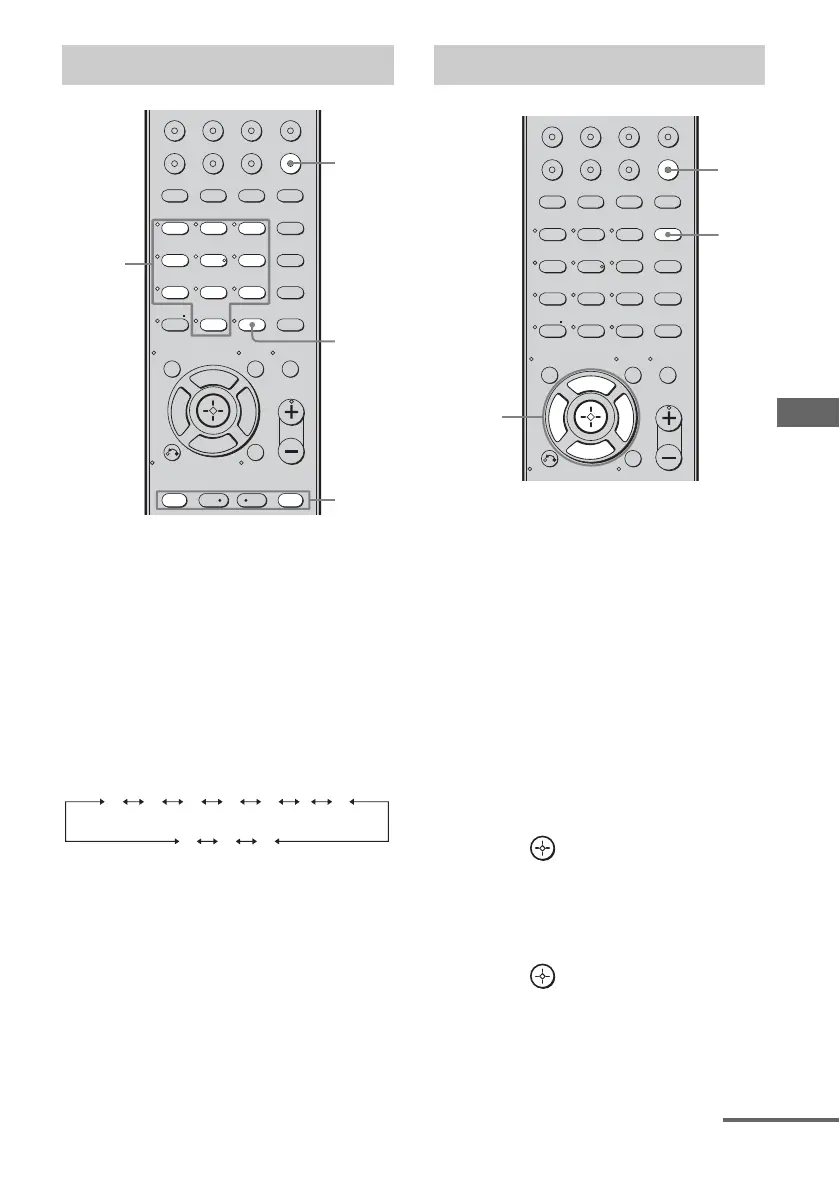
1 Press TUNER repeatedly to
select the FM or AM band.
You can also use INPUT SELECTOR on
the receiver.
2 Press PRESET + or PRESET –
repeatedly to select the preset
station you want.
Each time you press the button, you can
select a preset station as follows:
You can also press the numeric buttons to
select the preset station you want. Then,
press ENTER to enter the selection.
1 Press TUNER repeatedly to
select the FM or AM band.
You can also use INPUT SELECTOR on
the receiver.
2 Tune in the preset station you
want to create an index name
for (page 47).
3 Press AMP MENU.
“1-LEVEL” appears on the display.
4 Press V/v repeatedly to select
“4-TUNER”.
5 Press or b to enter the
menu.
6 Press V/v repeatedly to select
“NAME IN”.
7 Press or b to enter the
parameter.
The cursor flashes and you can select a
character. Follow the procedure given in
“To create an index name” below.
Tuning to preset stations
123
46
78
0/10
ENTER
9
VIDEO 1 VIDEO 2 VIDEO 3 DVD
2CH A.F.D.
RETURN/EXIT
TV CH –
PRESET –
TV CH +
PRESET +
REPLAY ADVANCE
MENU
MOVIE MUSIC
MEMORY DVD MENU
CLEAR
TOOLSDISPLAY
MUTING
TV VOL
MASTER VOL
FM MODE
D.TUNING
D.SKIP
AMP MENU
SAT TV SA-CD/CD TUNER
-
F
Gg
f
.
<
<
>
5
>10/
2
1
ENTER
Numeric
buttons
01 02 03 04 05 27...
30 29 28
Naming preset stations
123
46
78
0/10
ENTER
9
VIDEO 1 VIDEO 2 VIDEO 3 DVD
2CH A.F.D.
RETURN/EXIT
MENU
MOVIE MUSIC
MEMORY DVD MENU
CLEAR
TOOLSDISPLAY
MUTING
TV VOL
MASTER VOL
FM MODE
D.TUNING
D.SKIP
AMP MENU
SAT TV SA-CD/CD TUNER
-
F
Gg
f
5
>10/
1
3
4-7
continued



 To Next Page