17
US
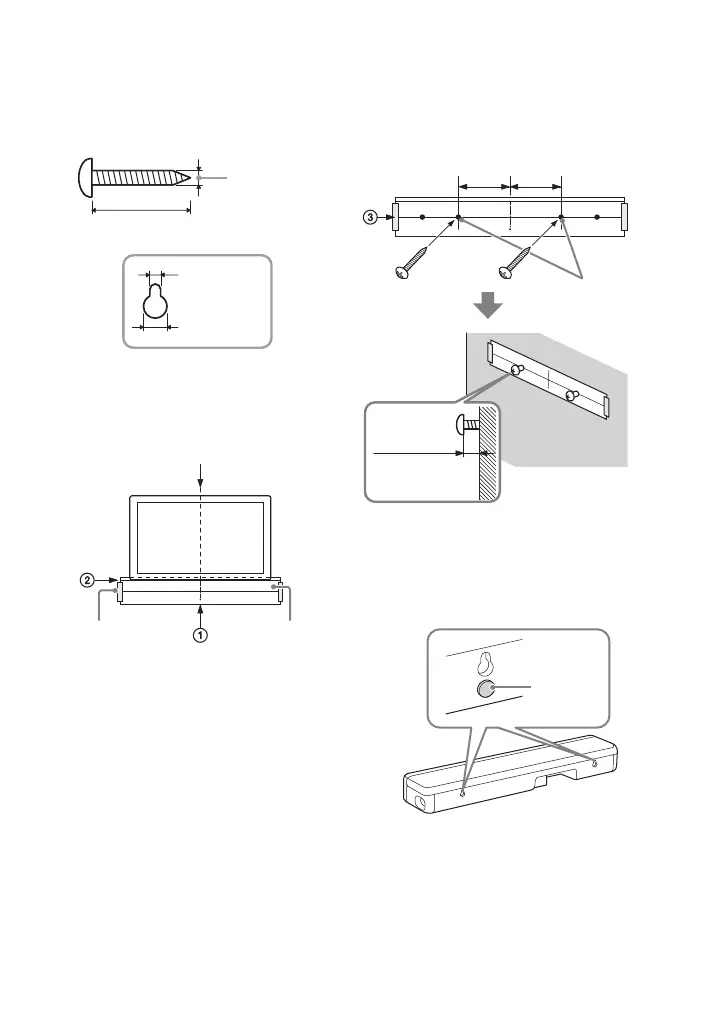
1 Prepare two screws (not supplied)
that are suitable for the wall
mount holes on the rear of the Bar
Speaker.
2 Stick WALL MOUNT TEMPLATE
(supplied) on a wall.
1 Align TV CENTER LINE () of
WALL MOUNT TEMPLATE with the
center line of your TV.
2 Align TV BOTTOM LINE () of
WALL MOUNT TEMPLATE with the
bottom of your TV, then stick
WALL MOUNT TEMPLATE on a
wall by using a commercially
available adhesive tape, etc.
3 Fasten the screws into the marks
() on SCREW LINE () of WALL
MOUNT TEMPLATE as in the
illustration below.
4 Remove WALL MOUNT TEMPLATE.
5 Attach the cushion pads
(supplied) below the holes on the
rear of the Bar Speaker.
Hole on the rear of the Bar Speaker
4mm (3/16 in)
More than 30 mm (1 3/16 in)
5 mm
(7/32 in)
10 mm
(13/32 in)
Center of the TV
WALL MOUNT
TEMPLATE
Adhesive tape,
etc.
Screws
Marks ()
5 mm to
6mm
(3/16 in to
1/4 in)
200 mm
(7 7/8 in)
200 mm
(7 7/8 in)



 To Next Page