9
HT-XT1 4-487-195-51(1)
5 Listening to the sound / 聆聽聲音
Setup / Setup / SetupSetup / 設定
Listening to the audio of the TV
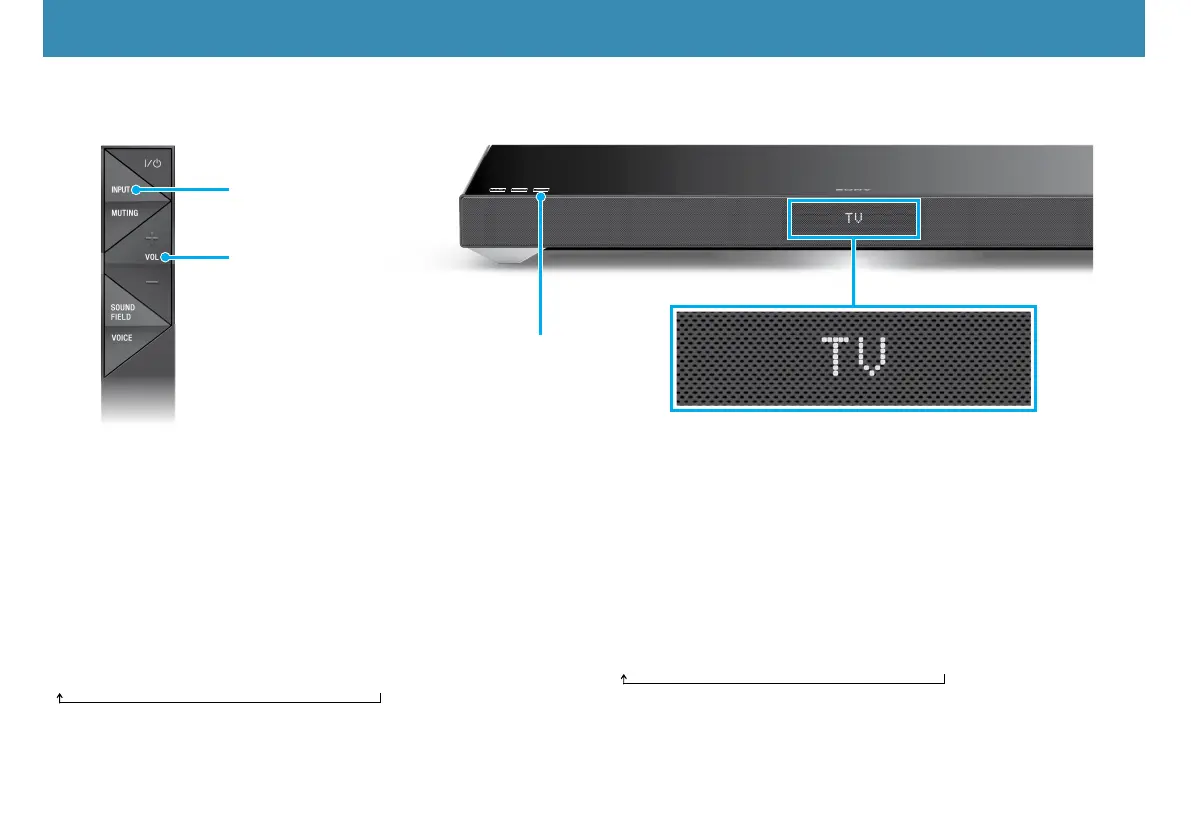
1 PresstheINPUTbuttonontheremotecontrolortouchtheINPUT
touchkeyonthesystemrepeatedlytoselect“TV”input.
2 PresstheVOLbuttonontheremotecontroltoadjustthevolume.
To listen to audio from an input device other than the TV
PresstheINPUTbuttonontheremotecontrolortouchtheINPUTtouch
key on the system repeatedly until the desired input device is indicated
on the display.
TV
HDMI1
HDMI2
HDMI3
ANALOG
BT AU
Setup completed! Enjoy!
聆聽TV的音訊
1 按下遙控器上的INPUT按鈕,或重複觸碰系統上的INPUT觸鍵,即可選
擇“TV”輸入。
2 按下遙控器上的VOL按鈕,即可調整音量。
從輸入裝置(TV除外)聆聽音訊
按下遙控器上的INPUT按鈕,或重複觸碰系統上的INPUT觸鍵,直到顯示幕
出現所要的輸入裝置。
TV
HDMI1
HDMI2
HDMI3
ANALOG
BT AU
設定完成!盡情享受!
INPUT
INPUT
Input device selected / 已選取的輸入裝置
VOL


 To Next Page