EasyManua.ls Logo

Sony ICF-111B - 2-4. RESONANCE INDICATING CIRCUIT BOARD REMOVAL

Sony ICF-111B
15 pages
Print Icon
To Next Page IconTo Next Page
To Previous Page IconTo Previous Page
Loading...
tinned
;
pye
wire
pvc
wire
C1)
screw
copper
wire
WHT
YEL
®P
2.6x
or-inn-..,
drum,
VOL
indicator
Roe
ICF-111B
®
‘tinned
copper
wire
AFC
slide
switch
Hae
a?
ae
ee
copper
(H)
self
tapping
‘eareuy
Fig.
2-8.
Fig.
2-5.
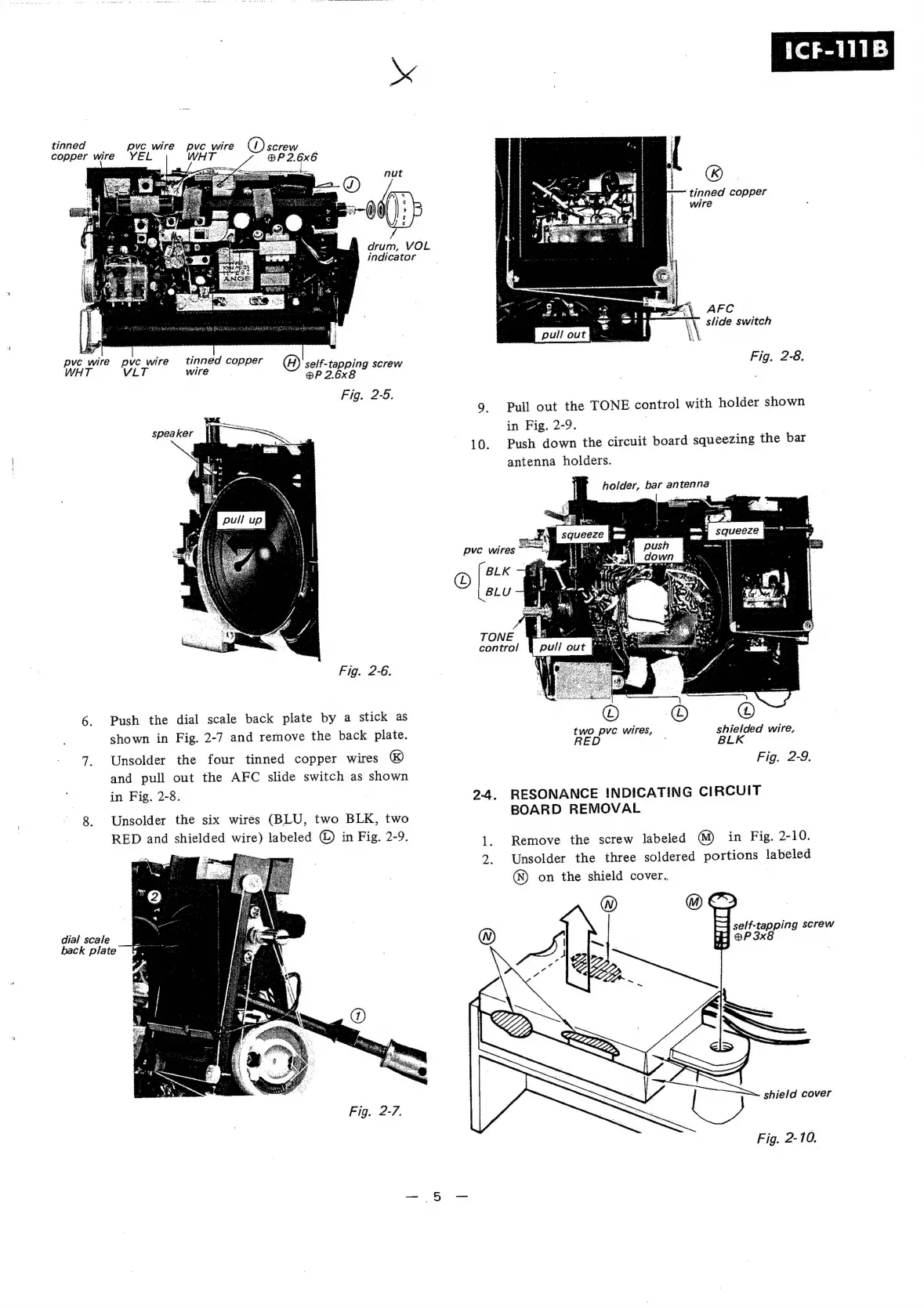
9.
Pull
out
the
TONE
control
with
holder
shown
speaker
(=
in
Fig.
2-9.
|
10.
Push
down
the
circuit
board
squeezing
the
bar
antenna
holders.
holder,
bar
antenna
pvc
wires
*
O
BLK
BLU
TONE
control
Fig.
2-6.
6.
Push
the
dial
scale
back
plate
by
a
stick
as
shown
in
Fig.
2-7
and
remove
the
back
plate.
two
pvc
wires,
shielded
wire,
RED
BLK
7.
Unsolder
the
four
tinned
copper
wires
&)
Fig.
2-9
and
pull
out
the
AFC
slide
switch
as
shown
in
Fig.
2-8.
|
9-4.
RESONANCE
INDICATING
CIRCUIT
8.
Unsolder
the
six
wires
(BLU,
two
BLK,
two
BOARD
REMOVAL
RED
and
shielded
wire)
labeled
©
in
Fig.
2-9.
|.
Remove
the
screw
labeled
@)
in
Fig.
2-10.
“———
:
.
Unsolder
the
three
soldered
portions
labeled
dial
scale
back
plate
Fig.
2-7.
(N)
on
the
shield
cover.
tue
®
v
a.
shield
cover
Fig.
2-10.

Related product manuals