EasyManua.ls Logo

Sony ICF-111B - SECTION 2 DISASSEMBLY; 2-1. REAR CABINET REMOVAL; 2-2. CHASSIS REMOVAL; 2-3. CIRCUIT BOARD REMOVAL

Sony ICF-111B
15 pages
Print Icon
To Next Page IconTo Next Page
To Previous Page IconTo Previous Page
Loading...
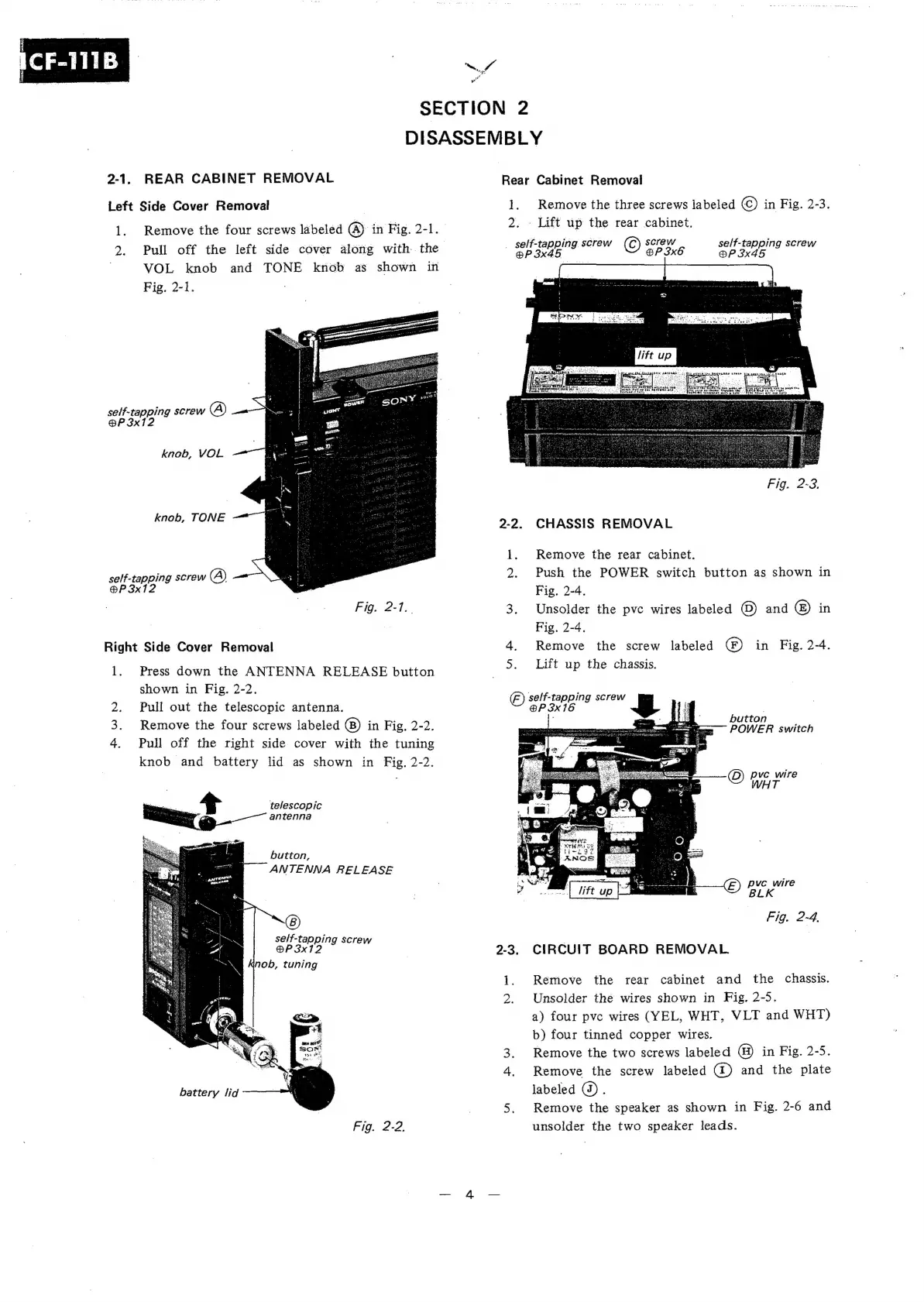
2-1.
h,
fo
age
3?
Pe
SECTION
2
DISASSEMBLY
REAR
CABINET
REMOVAL
Left
Side
Cover
Removal
l.
a
self-tapping
screw
(A)
@P
3x12
self-
tapping
screw
(A)
@P
3x12
Remove
the
four
screws
labeled
(A)
in
Fig.
2-1.
Pull
off
the
left
side
cover
along
with.
the
VOL
knob
and
TONE
knob
as
shown
in
Fig,
2-1.
knob,
VOL
knob,
TONE
Fig.
2-1..
Right.
Side
Cover
Removal
l.
oe)
Press
down
the
ANTENNA
RELEASE
button
shown
in
Fig.
2-2.
Pull
out
the
telescopic
antenna.
Remove
the
four
screws
labeled
in
Fig,
2-2.
Pull
off
the
right
side
cover
with
the
tuning
knob
and
battery
lid
as
shown
in
Fig.
2-2.
telescopic
antenna
button,
ANTENNA
RELEASE
battery
lid
Fig.
2-2,
Rear
Cabinet
Removal
1.
Remove
the
three
screws
labeled
(C)
in
Fig.
2-3.
2.
-
Lift
up
the
rear
cabinet.
_
self-tapping
screw
screw
self-tapping
screw
@P3x45
©
SP
ik
@P
3x45
CHASSIS
REMOVAL
1.
Remove
the
rear
cabinet.
2.
Push
the
POWER
switch
button
as
shown
in
Fig.
2-4.
3.
Unsolder
the
pve
wires
labeled
(©)
and
©)
in
Fig.
2-4,
4.
Remove
the
screw
labeled
(F)
in
Fig.
2-4.
5.
Lift
up
the
chassis.
)
self-tapping
screw
BP
3x16
a5
button
POWER
switch
pyc
wire
BLK
Fig.
2-4.
)
CIRCUIT
BOARD
REMOVAL
1.
Remove
the
rear
cabinet
and
the
chassis.
2.
Unsolder
the
wires
shown
in
Fig.
2-5.
a)
four
pvc
wires
(YEL,
WHT,
VLT
and
WHT)
b)
four
tinned
copper
wires.
3.
Remove
the
two
screws
labeled
@)
in
Fig.
2-5.
4.
Remove
the
screw
labeled
(@)
and
the
plate
labeled
@).
5.
Remove
the
speaker
as
shown
in
Fig.
2-6
and
unsolder
the
two
speaker
leads.

Related product manuals