EasyManua.ls Logo

Sony ICF-C103 - Page 4

Sony ICF-C103
9 pages
Print Icon
To Next Page IconTo Next Page
To Previous Page IconTo Previous Page
Loading...
atle|lom@)el-1e-hilolam@asass-1-)
MAUL
alialeD)
You
can
preset
up
to
five
FM/AM
stations
(one
station
for
each
number
button
1
to
5).
.
1
Press
the
RADIO
ON
button
to
tum
on
the
radio.
When
you
use
the
radio
alarm,
preset
the
station
you
want
for
the
alarm
in
preset
button
1,
as
the
PRESET
1
station
is
the
wake
up
station.
2
Press
the
preset
number
button
of
the
station.
The
band,
frequency
and
preset
number
appear
in
the
display
8
window.
After
10
seconds,
the
indication
becomes
the
current
time.
The
preset
number
remains.
ee
oo
@
eee
rn
os
sorted
asm
ng
:
:
;
ee
eee
te,
ce
mrad
ee
ee
ew
resins
oan,
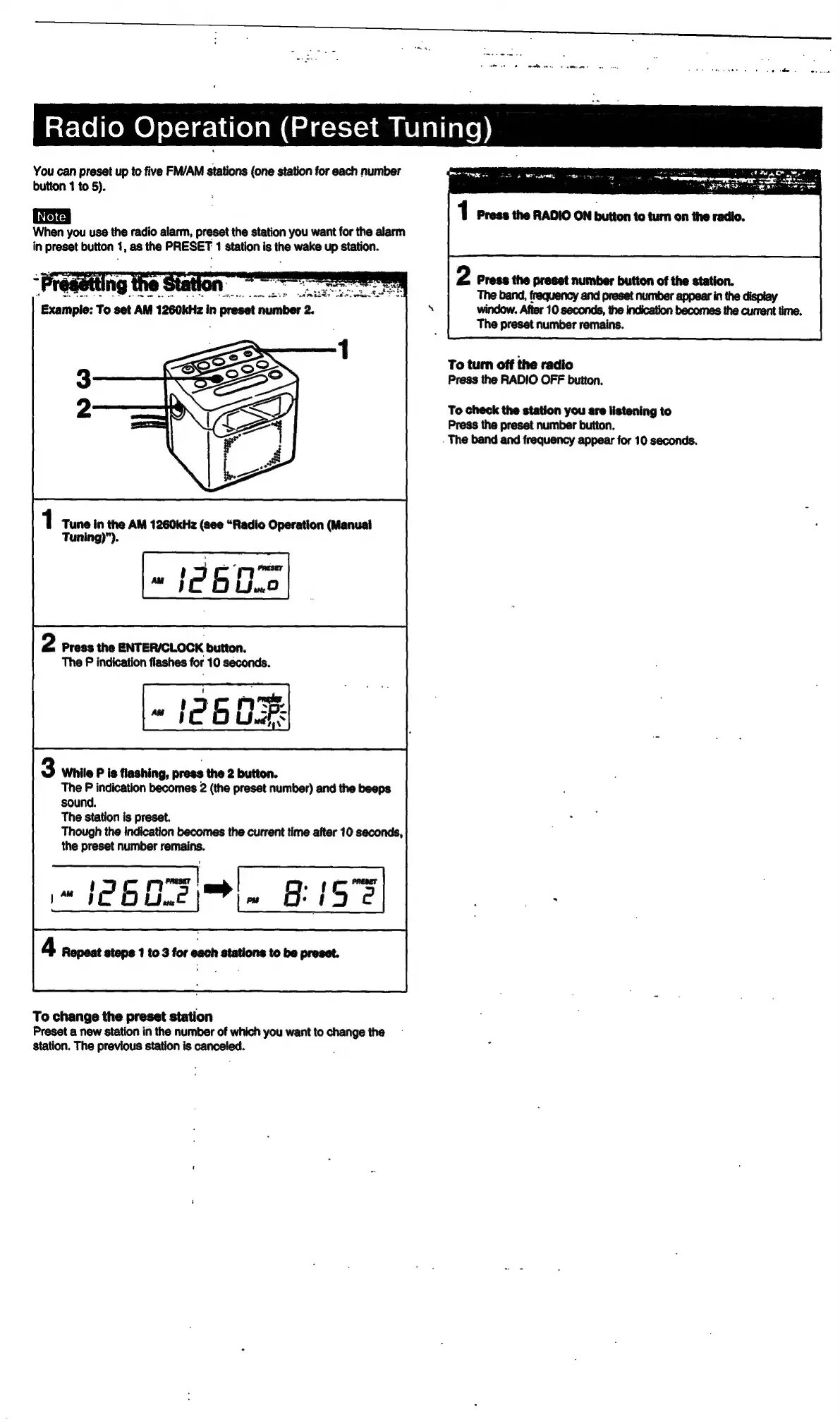
Example:
To
set
AM
1260kHz
in
preset
number
2.
To
turn
off
the
radio
Press
the
RADIO
OFF
button.
To
check
the
station
you
are
listening
to
Press
the
preset
number
button.
.
The
band
and
frequency
appear
for
10
seconds.
1
Tune
in
the
AM
1260kHz
(see
“Radio
Operation
(Manual
[=
12602)
Tuning)”).
2
Press
the
ENTERICLOCK
button.
The
P
indication
flashes
for
10
seconds.
cs
ony
mater,
«
[eb
Uw:
3
While
P
is
flashing,
press
the
2
button.
The
P
indication
becomes
2
(the
preset
number)
and
the
beeps
sound.
The
station
is
preset.
Though
the
indication
becomes
the
current
time
after
10
seconds,
the
preset
number
remains.
ae
jw
PRESET
16D).
ISS]
|
4
Repeat
steps
1
to
3
for
each
stations
to
be
preset.
To
change
the
preset
station
Preset
a
new
station
in
the
number
of
which
you
want
to
change
the
station.
The
previous
station
is
canceled.

Related product manuals