4
ICF-CD543RM
OFF
LOW
MEGA BASS
HIGH
PLAY MODE
1 2 3 4 5
PRESET TUNING
SELECT PRESET
VOLUME TUNE
/
TRACK
TIME SET
RADIO CD
OFF
ON/BAND
CLOCK
D.S.T.
SUMMER T.
PUSH START/STOP
TIMER
OPEN/CLOSE
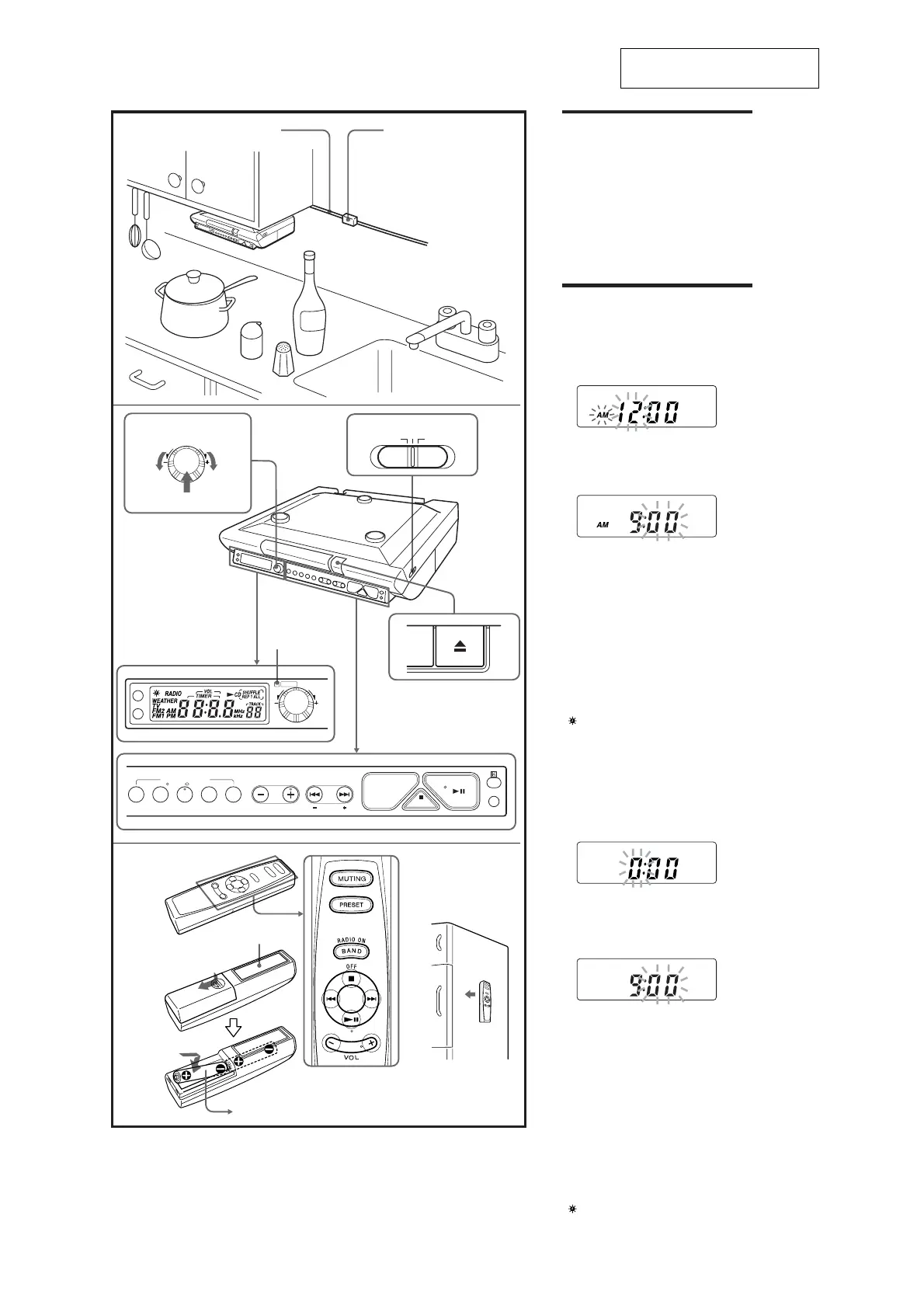
AC power cord Cord clamp
The preset 3, VOLUME + and
CD u buttons have a tactile dot.
Push
Turn
TIMER
TIMER
indicator
Features
• Built-in CD player with CD-R/RW playback
function
•Dynamic Bass Reflex Sound with the MEGA
BASS sound system
• TV/WEATHER/FM/AM 4 band PLL (phase
locked loop) synthesized clock radio (US
model)
•FM/AM 2 band PLL (phase locked loop)
Setting the Clock
(US model)
1
Plug in the CD kitchen clock radio.
The display will flash “AM 12:00”.
2 Press CLOCK for a few seconds.
You will hear a beep and the hour will start
to flash in the display.
3 Press TUNE/TRACK•TIME SET + or –
until the correct hour appears in the
display.
4 Press CLOCK once.
The minute will flash.
5 Repeat steps 3 and 4 to set the minute.
After setting the minute, press CLOCK to start
the counting of the seconds, and you will
hear two short beeps.
To set the current time rapidly, hold down
TUNE/TRACK•TIME SET + or –.
The clock system varies depending on the model
you own.
12-hour system: “AM 12:00” = midnight
In step 5, when you press CLOCK after the
minute setting to activate the clock, the seconds
start counting from zero.
To change the display to the daylight saving
time (summer time) indication
Press D.S.T.•SUMMER T..
“
” is displayed and the time indication
changes to summer time.
To deactivate the summer time function, press
D.S.T.•SUMMER T. again.
(Canadian, AEP models)
•Easy Preset Digital Tuning with 25 station presets
•Easy to set dial cooking timer
• Remote Commander Included
• D.S.T. (Daylight Saving Time) – Summer time
calculation
(Canadian, AEP model)
1 Plug in the CD kitchen clock radio.
The display will flash “AM 12:00” or “0:00”.
2 Press CLOCK for a few seconds.
You will hear a beep and the hour will start
to flash in the display.
3 Press TUNE/TRACK•TIME SET + or –
until the correct hour appears in the
display.
4 Press CLOCK once.
The minute will flash.
5 Repeat steps 3 and 4 to set the minute.
After setting the minute, press CLOCK to start
the counting of the seconds, and you will
hear two short beeps.
To set the current time rapidly, hold down
TUNE/TRACK•TIME SET + or –.
The clock system varies depending on the model
you own.
12-hour system: “AM 12:00” = midnight
24-hour system: “0:00” = midnight
In step 5, when you press CLOCK after the
minute setting to activate the clock, the seconds
start counting from zero.
To change the display to the
daylight saving time (summer time) indication
Press D.S.T.•SUMMER T..
“
” is displayed and the time indication
changes to summer time.
To deactivate the summer time function, press
D.S.T.•SUMMER T. again.
Magnet
Size AAA (R03) x 2
The VOL + and u buttons have a
tactile dot.
SECTION 2
GENERAL
This section is extracted from
instruction manual.



 To Next Page