EasyManua.ls Logo

Sony ICF-CD820 - Basic Operations; Setting the Clock; Playing CDs and Radio; Setting Alarms

Sony ICF-CD820
14 pages
Print Icon
To Next Page IconTo Next Page
To Previous Page IconTo Previous Page
Loading...
Setting
the
Clock
Sot
the time when
the CD
or radio
is turned oft.
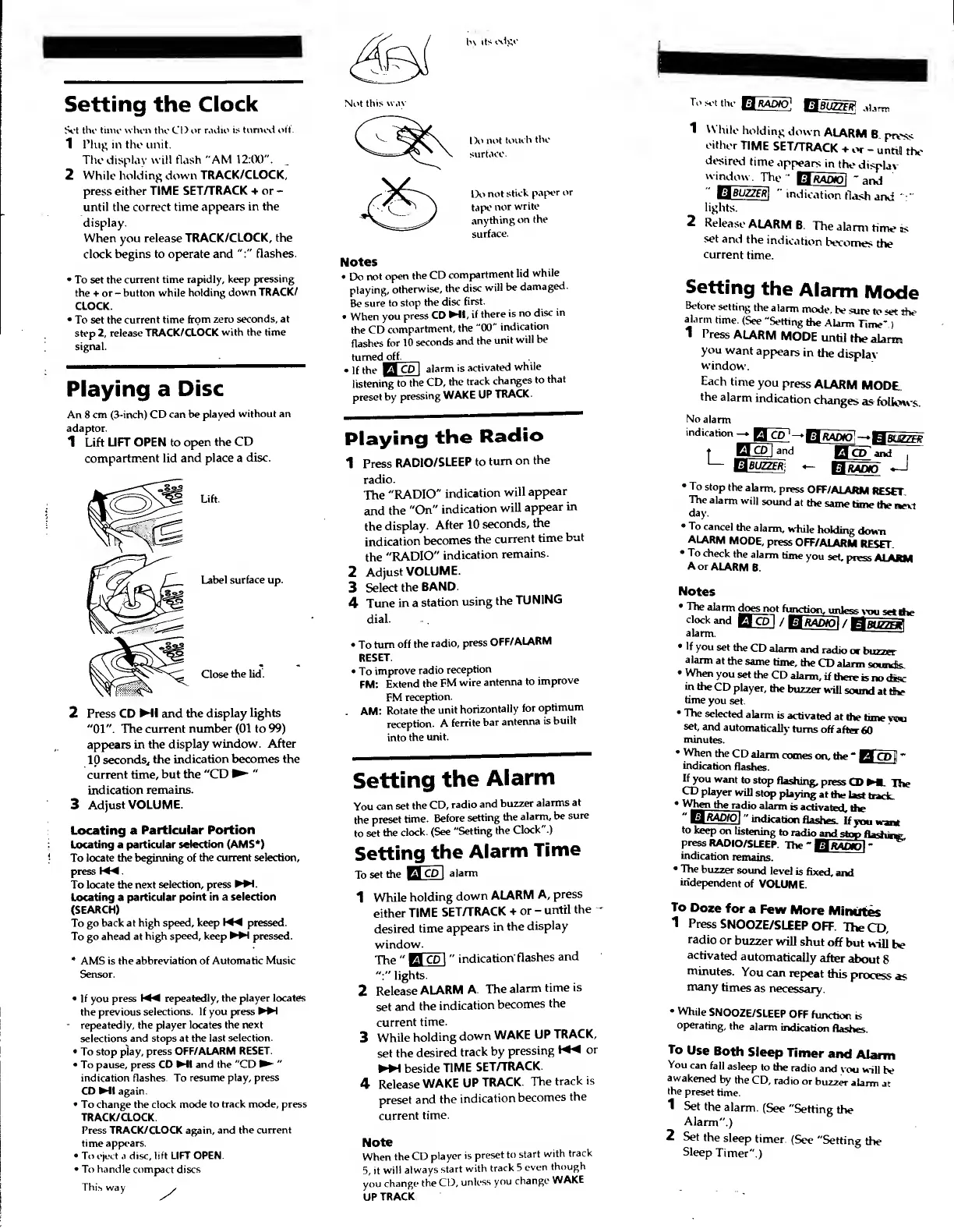
1 Plug in the unit.
The display will flash "AM
12:00".
2
While holding down
TRACK/CLOCK,
press either TIME
SET/TRACK + or
-
until the correct time
appears in the
display.
When you release
TRACK/CLOCK, the
clock begins to operate
and
":"
flashes.
To set the
current time rapidly,
keep
pressing
the + or
-
button while
holding
down
TRACK/
CLOCK.
To set the
current time
from zero
seconds, at
step 2,
release
TRACK/CLOCK
with the time
signal.
Playing a
Disc
An 8 cm (3-inch)
CD can be
played
without an
adaptor.
1 Lift
LIFT OPEN to
open the
CD
compartment lid
and place a
disc.
Lift.
Label surface up.
by
its
edge.
Not
this
w.iv
Close
the lid.
2 Press CD
Ml and the display
lights
"01".
The current
number
(01
to
99)
appears
in the
display
window. After
10
seconds,
the
indication becomes the
current time,
but the
"CD
"
indication
remains.
3
Adjust
VOLUME.
Locating a
Particular
Portion
Locating a particular
selection (AMS*)
To
locate the beginning of
the current selection,
press
M^.
To locate the
next selection, press
WH.
Locating a
particular point in a selection
(SEARCH)
To
go back at
high speed, keep pressed.
To go ahead at
high speed, keep
MH
pressed.
AMS
is the abbreviation of
Automatic Music
Sensor.
If
you
press
K*4 repeatedly, the player locates
the previous
selections. If you
press
MH
-
repeatedly, the
player locates the
next
selections and stops at the
last selection.
To stop play,
press
OFF/ALARM RESET.
To pause, press
CD Ml and the "CD
"
indication flashes. To
resume play, press
CD
Ml again.
To change the clock mode
to track mode, press
TRACK/CLOCK
Press TRACK/CLOCK again,
and the current
time appears.
To eject
.i
disc, lift LIFT OPEN.
To handle compact discs
This way
^/
Do
not
touch
the
surface.
Do
not
stick
paper
or
tape
nor
write
anything
on
the
surface.
Notes
Do
not
open
the
CD
compartment
lid
while
playing,
otherwise,
the
disc
will be
damaged.
Be
sure to
stop
the
disc
first.
When
you
press
CD
Ml,
if
there
is
no
disc
in
the
CD
compartment,
the
"00"
indication
flashes
for
10
seconds
and
the
unit
will be
turned
off.
If
the
B
CD
|
alarm
is
activated
while
listening
to
the
CD,
the
track
changes
to
that
preset by
pressing
WAKE
UP
TRACK.
Playing
the
Radio
1
Press
RADIO/SLEEP
to
turn
on
the
radio.
The
"RADIO"
indication
will
appear
and
the
"On"
indication
will
appear
in
the
display.
After
10
seconds,
the
indication
becomes
the
current
time
but
the
"RADIO"
indication
remains.
2
Adjust
VOLUME.
3
Select
the
BAND.
4
Tune
in a
station
using
the
TUNING
dial.
To
turn off
the
radio,
press
OFF/
ALARM
RESET.
To
improve
radio
reception
FM:
Extend
the
FM
wire
antenna
to
improve
FM
reception.
. AM:
Rotate
the
unit
horizontally
for
optimum
reception.
A
ferrite
bar
antenna
is
built
into
the
unit.
Setting
the
Alarm
You
can
set
the
CD,
radio
and
buzzer
alarms
at
the
preset
time.
Before
setting
the
alarm,
be
sure
to
set
the
clock.
(See
"Setting
the
Clock"
)
Setting
the
Alarm
Time
To
set the
El
CP
I
alarm
1
While
holding
down
ALARM
A,
press
either
TIME
SET/TRACK
+
or
-
until
the
-
desired
time
appears
in
the
display
window.
The
"
El
CP
|
"
indication'
flashes
and
":"
lights.
2
Release
ALARM
A.
The
alarm
time
is
set
and
the
indication
becomes
the
current
time.
3
While
holding
down
WAKE
UP
TRACK,
set the
desired
track
by
pressing
or
MH beside
TIME
SET/TRACK.
4
Release
WAKE
UP
TRACK.
The
track
is
preset
and the
indication
becomes
the
current
time.
Note
When
the
CD
player
is
preset
to
start
with
track
5,
it
will always
start
with
track
5
even
though
you
change
the
CD,
unless
you
change
WAKE
UP
TRACK
To
sot
the
1
W
hile
holding
down
ALARM
B
prvss
either
TIME
SET/TRACK
+
or
-
untiil
the
desired
time
app
ears
in
th
e
display
w
indow.
Th
e
"
^RAOOl
"
and
"
tsjBUZZER]
"
indication
flash
and
'
lights.
2
Release
ALARM
B.
The
alarm
time
us
set and
the
indication
becomes
the
current
time.
Setting
the
Alarm
Mode
Before
setting
the
alarm
mode,
be
sure
to
set
the
alarm
time.
(See
"Setting
the
Alarm
Time-
)
1
Press
ALARM
MODE
until
the
alarm
you
want
appears
in
the
display-
window.
Each
time
you
press
ALARM
MODE,
the
alarm
indication
changes
as
follows.
No
alarm
indication
tUBUZZER
B
RADIO
To
stop
the
alarm,
press
OFF/ALARM
RESET,
The
alarm
will
sound
at
the
same
time
the
next
day.
To
cancel
the
alarm,
while
holding
down
ALARM
MODE,
press
OFF/ALARM
RESET.
To
check
the
alarm
time
you
set,
press
ALARM
A
or
ALARM
B
Notes
The
alarm
does
n
ot
function,
unle
ss
you
set
the
clockand
Q_CP]
/
IJftAOW]
/
giuZZEl
alarm.
If
you
set
the
CD
alarm
and
radio
or
buzzer
alarm
at
the
same
time,
the
CD
alarm
sounds.
When
you
set
the
CD
alarm,
if there
is
no
disc
in
the
CD
player,
the
buzzer
will
sound
at
the
time
you
set.
The
selected
alarm
is
activated
at
the
time
too
set,
and
automatically
turns
off
after
60
minutes.
•When
the
CD
alarm
comes
on,
the
'
BCD
I
*
indication
flashes.
If
you
want
to
stop
flashing,
press
CD
ML
The
CD
player
will
stop
playing
at the
last
track.
When
the
ra
dio
alarm
is
activated,
the
"
ElftAOroJ
"
indication
flashes.
If
you
want
to
keep
on
listening
to
radio
and
stop
flashing,
press
RADIO/SLEEP.
The
-
H/Mfljol
-
indication
remains.
The
buzzer
sound
level
is
fixed,
and
independent
of
VOLUME.
To
Doze
for
a
Few
More
Minutes
1
Press
SNOOZE/SLEEP
OFF.
The
CD,
radio
or
buzzer
will
shut
off
but
will
he
activated
automatically
after
about
8
minutes.
You
can
repeat
this
process
as
many
rimes
as
necessary.
While
SNOOZE/SLEEP
OFF
function
b
operating,
the
alarm
indication
flashes.
To
Use
Both
Sleep
Timer
and
Alarm
You
can
fall
asleep
to
the
radio
and
vou
will
be
awakened
by
the
CD,
radio
or
buzzer
alarm
at
the
preset
time.
1
Set
the
alarm.
(See
"Setting
the
Alarm".)
2
Set
the
sleep
timer.
(See
"Setting
the
Sleep
Timer".)

Other manuals for Sony ICF-CD820

Related product manuals