GB
30
Shooting and viewing images
Shooting still images
In auto mode, the camera analyzes the subject and allows you to shoot with
the appropriate settings.
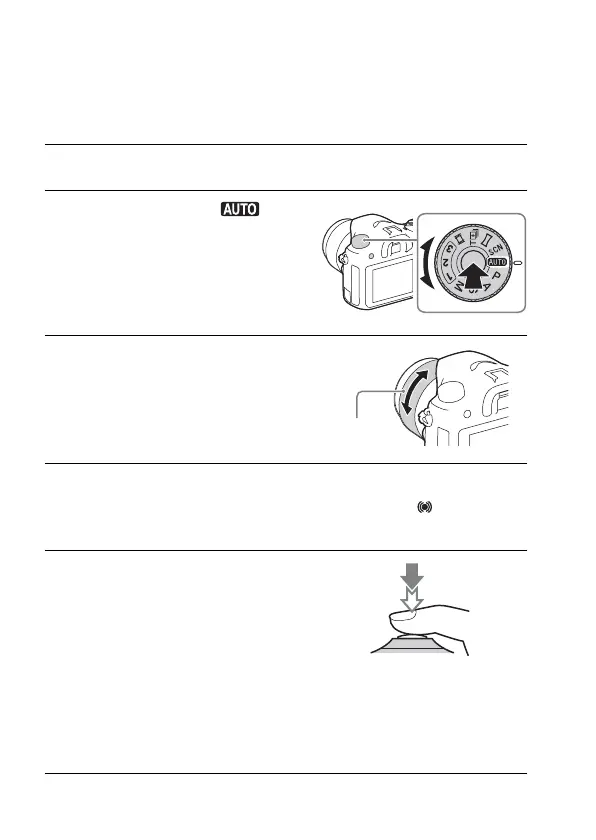
1 Set the power switch to ON to turn on the camera.
2 Set the mode dial to (Auto
Mode).
• Turn the mode dial while pressing the
mode dial lock release button on the
center of the mode dial.
3 Look into the viewfinder and hold
the camera.
When using a zoom lens, adjust the zoom
ring to the proper size of the subject.
4 Press the shutter button halfway down to focus.
• When the image is in focus, a beep sounds and the z or indicator
lights.
5 Press the shutter button fully
down to shoot an image.
• If [Auto Obj. Framing] is set to [Auto],
when shooting faces, close-up (macro)
subjects, or subjects tracked by [Lock-
on AF], the camera analyzes the scene
and automatically trims the captured
image into a suitable composition. Both
the original and the trimmed images
will be saved.
Zoom ring



 To Next Page