GB
35
GB
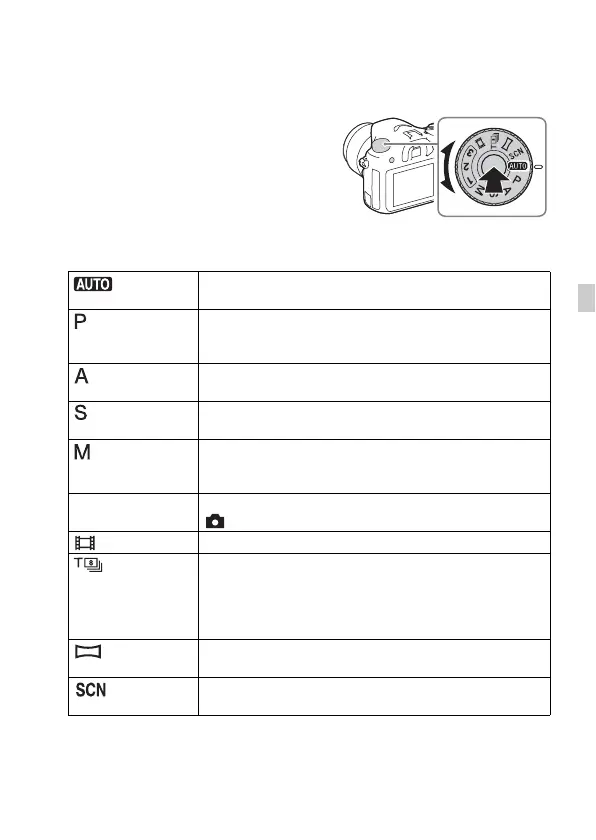
Selecting a shooting mode
Selecting a shooting mode
The following shooting modes are available.
Turn the mode dial while pressing
the mode dial lock release button on
the center of the mode dial.
(Auto Mode) Allows you to shoot still images with the settings adjusted
automatically.
(Program Auto) Allows you to shoot with the exposure (the shutter speed and
the aperture value) adjusted automatically. The other settings
can be adjusted manually.
(Aperture
Priority)
Shoots by adjusting the aperture and changing the focus
range, or by defocus the background.
(Shutter Priority) Adjusts the shutter speed to show the movement of the
subject.
(Manual
Exposure)
Allows you to shoot after manually adjusting the exposure
(the shutter speed and the aperture value) using the control
dial and the control wheel.
1/2/3 (Memory
recall)
Calls up settings pre-registered in [Memory] in the
(Camera Settings).
(Movie) Allows you to change shooting settings and shoot a movie.
(Tele-zoom
Cont. AE)
Allows continuous shooting while the shutter button is fully
depressed. The center area of the image is cropped and the
camera records the images continuously at a maximum of
about 8 images per second. The number of focus area points
is set to a maximum of 25 points.
(Sweep
Panorama)
Allows you to shoot panoramic images by combining
multiple images.
(Scene
Selection)
Allows you to shoot with preset settings according to the
scene.



 To Next Page