If the date and time setting is cancelled halfway, the setting screen for the date and time
appears every time you turn on the camera.
[23] How to Use
Confirming the operation method Confirming the operation method
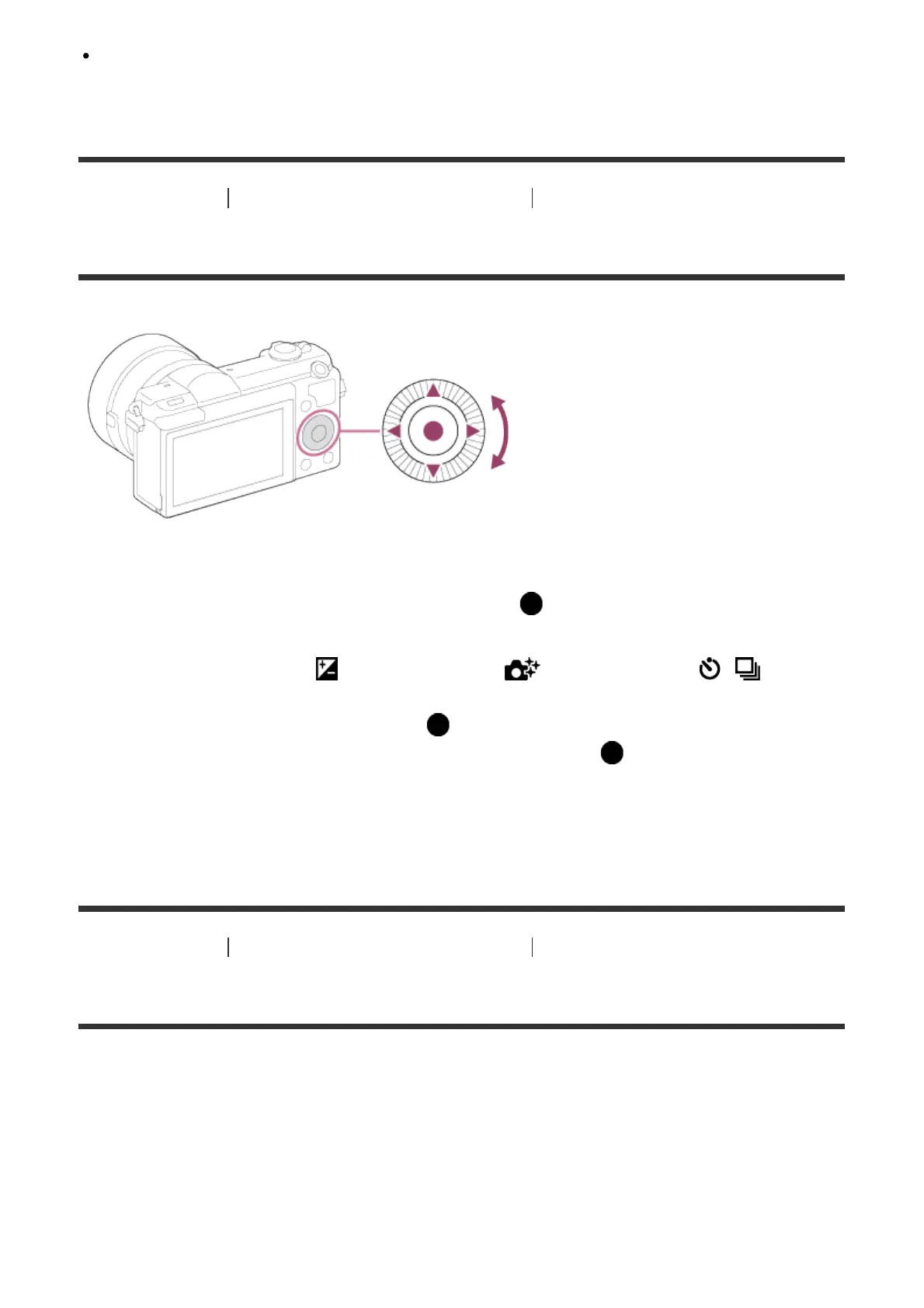
Using the control wheel
You can select setting items by turning or pressing the top/bottom/right/left side of the control
wheel. Your selection is determined when you press on the center of the control wheel.
The DISP (Display Setting), (Exposure Comp.), (Photo Creativity), / (Drive
Mode), ISO functions are assigned to the top/bottom/left/right side of the control wheel. In
addition, [Shoot Mode] is assigned to the in the center. You can assign selected
functions to the left/right/bottom side of the control wheel or to in the center.
During playback, you can display the next/previous image by pressing the right/left side of
the control wheel or by turning the control wheel.
[24] How to Use Confirming the operation method Confirming the operation method
Using the touch panel
This product is equipped with a touch panel. By touching the monitor, you can shoot still
images (Touch Shutter) or bring the subject into focus (Touch Focus). You can also use the
[Touch Shutter] function with [Self-portrait/ -timer] shooting.
Activating/deactivating the touch panel
You can set whether to operate the product using the touch panel.



 To Next Page