Home
Sony
Digital Camera
ILCE-7M2
Page 52 (To Remove the Battery Pack)
Sony ILCE-7M2 - To Remove the Battery Pack
100 pages
Manual
Save Page as PDF
To Next Page
To Next Page
To Previous Page
To Previous Page
Loading...
Charging the battery pack
GB
52
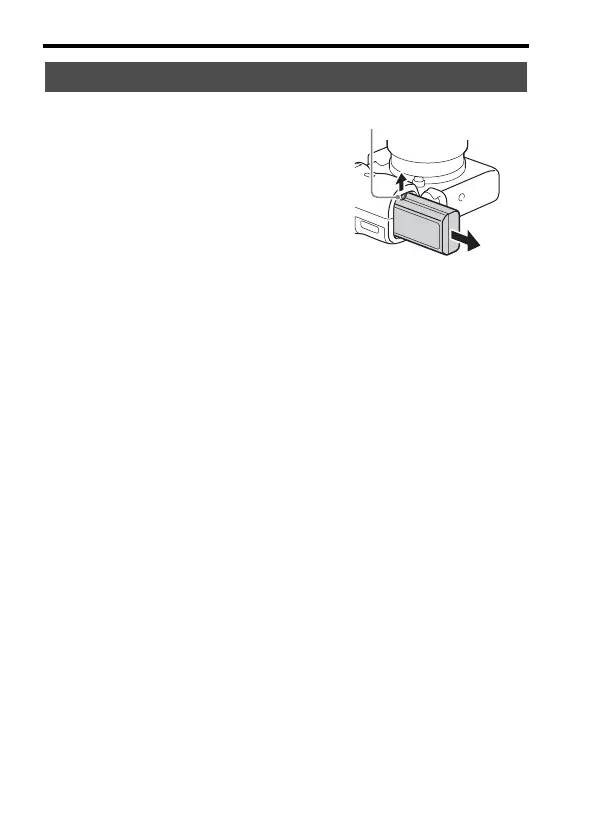
To remove
the battery p
ack
Turn
off th
e camer
a. Sli
de the
lock
lever
afte
r conf
irmi
ng tha
t the a
ccess
lamp
(page
19) is off
, and remove the
battery
pack.
Be sure
not to
drop t
he bat
tery pack
.
Lock lever
51
53
Table of Contents
Main Page
Default Chapter
4
For Customers in Canada
4
For Customers in Europe
5
Table of Contents
7
Introduction of Functions
10
Before Use
12
Notes on Using Your Camera
12
Checking the Supplied Items
16
Identifying Parts
17
Front Side
17
Rear Side
18
Top Side/Side View
20
Bottom View
22
Lens FE 28-70 MM F3.5-5.6 OSS (Supplied with ILCE-7M2K)
23
List of Icons on the Monitor
24
Functions List
28
Functions that Can be Operated Using the Buttons/Dials
28
How to Use the Quick Navi Screen
29
Operating the Camera
31
How to Use the Control Wheel
31
How to Use the Front Dial/Rear Dial
32
Selecting a Function Using the Fn (Function) Button
33
Functions that Can be Registered Using the Fn (Function) Button
34
Functions that Can be Selected Using the MENU Button
35
Camera Settings
36
Custom Settings
39
Using the In-Camera Guide
47
Preparing the Camera
48
Charging the Battery Pack
48
Charging Time (Full Charge)
50
Charging by Connecting to a Computer
51
Checking the Remaining Battery Charge
51
To Remove the Battery Pack
52
Inserting a Memory Card (Sold Separately)
53
Memory Cards that Can be Used
54
Attaching a Lens
55
To the Camera
56
Setting the Date and Time
57
Checking or Resetting the Date/Time and Area
58
Shooting a Clear Image Without Camera Shake
59
Camera Shake Warning Indicator
59
Using the Steadyshot Function
59
Holding the Camera Properly
61
Removing the Eyepiece Cup
62
Shooting and Viewing Images
63
Shooting Still Images
63
Recording Movies
65
Playing Back Images
66
Switching between Still Images and Movies
67
Deleting Images
68
Selecting a Shooting Mode
69
Functions Available for each Shooting Mode
70
Various Functions
71
Using the Various Functions
71
Creative Style
71
Dro/Auto HDR
72
File Format
72
Record Setting
73
Customizing the Picture Quality (Picture Profile)
74
Setting the Time Code (TC/UB Settings)
74
Audio Settings for Movie Recording
75
Playback Functions
76
Using Wi-Fi Functions
77
Using the Wi-Fi and NFC One-Touch Functions
77
Connecting the Camera to a Wireless Access Point
78
Using Applications
79
Adding Applications to the Camera (Application Downloading)
79
Downloading Applications
79
Launching the Application
80
Viewing Images on a Computer
81
Using the Software
81
System Requirements
81
Using Image Data Converter
82
Installing Image Data Converter
82
Using Playmemories Home
83
Installing Playmemories Home
84
Using Remote Camera Control
85
Installing Remote Camera Control
85
Others
86
Checking the Number of Images and Recordable Time of Movies
86
Battery Pack
87
Available Recording Time for a Movie
88
Notes on Continuous Movie Recording
89
Specifications
91
Index
96
Related product manuals
Sony ILCE-7M3
642 pages
Sony ILCE-7M4
179 pages
Sony ILCE-7M2K
290 pages
Sony ILCE-7M3 a7III
666 pages
Sony ILCE-7S
248 pages
Sony ILCE-7C
661 pages
Sony ILCE-7RM5
535 pages
Sony ILCE-7SM2
22 pages
Sony ILCE-7RM4
96 pages
Sony ILCE-7CM2
573 pages
Sony A7Cr ILCE-7CR
147 pages
Sony A7RIII ILCE-7RM3A
763 pages



 To Next Page