ILCE-7M4
5-063-133-11(1)
EN
3
C:\01EN-ILCE7M4CEC\01EN.indd
DTP data saved: 2024/07/05 12:16
PDF file created: 2024/07/05 12:17
EN
Preparations
Checking the supplied items
The number in parentheses indicates the number of pieces.
• Camera (1)
• Rechargeable battery pack
NP-FZ100 (1)
• USB Type-C® cable (1)
• Shoulder strap (1)
• Body cap (1) (attached to the
camera)
• Shoe cap (1) (attached to the
camera)
• Eyepiece cup (1) (attached to the
camera)
• Startup Guide (this manual) (1)
• Reference Guide (1)
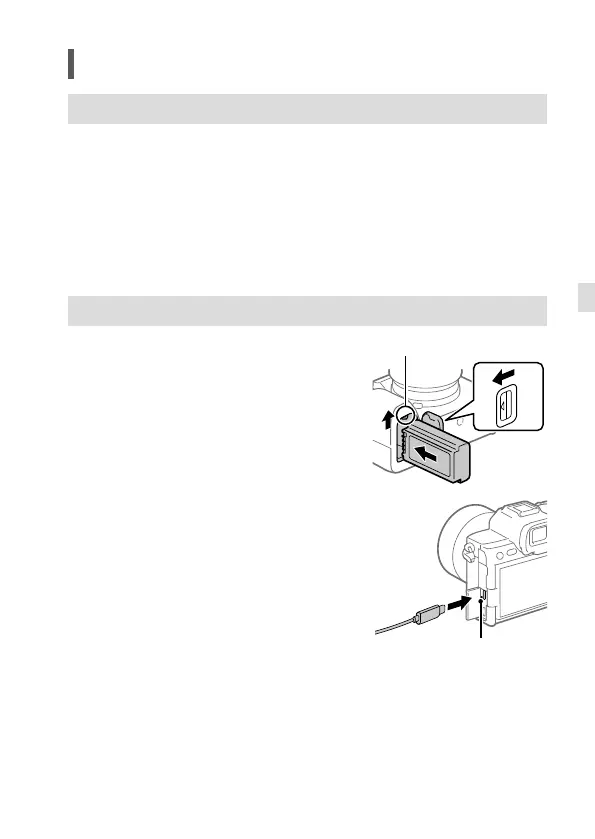
Charging the battery pack
1 Insert the battery pack into the camera.
• Open the battery cover, and then
insert the battery pack while pressing
the lock lever.
2 Turn the power off.
• If the camera is turned on, the battery
pack will not be charged.
Lock lever
3 Using the USB Type-C cable (supplied),
connect the USB Type-C terminal on the
camera to an external power source,
such as a commercially available USB AC
adaptor or mobile battery.
• The charge lamp will light up when
charging starts. When the charge lamp
turns off, charging is completed.
• When you use an AC adaptor, use one
with a rated output of 1.5 A or higher.
• This camera is compatible with
USB-PD (USB Power Delivery). When
a device compatible with USB-PD is
connected to the camera, fast charging
is possible. We recommend using a
USB-PD device that is compatible with
an output of 9V/3A or 9V/2A.
Charge lamp



 To Next Page