ILCE-7M4
5-063-133-11(1)
EN
5
C:\01EN-ILCE7M4CEC\01EN.indd
DTP data saved: 2024/07/05 12:16
PDF file created: 2024/07/05 12:17
EN
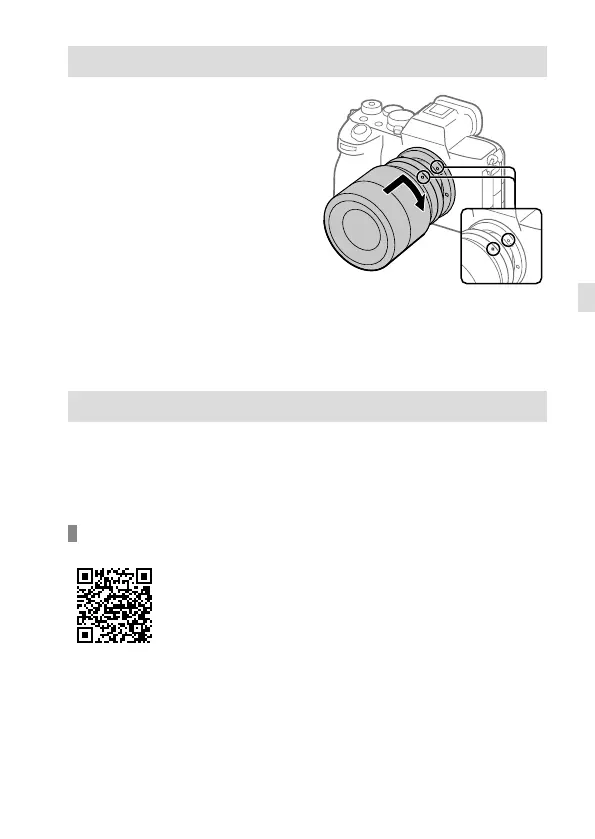
Attaching a lens
1 Remove the body cap from the
camera and the rear lens cap
from the rear of the lens.
2 Mount the lens by aligning
the two white index marks
(mounting indexes) on the lens
and camera.
3 While pushing the lens lightly
toward the camera, turn the
lens slowly in the direction of
the arrow until it clicks into the
locked position.
Mounting indexes
Performing initial setup for the camera
By establishing a Bluetooth connection (pairing) between the camera and
a smartphone, you can perform initial camera setup such as date and time
settings from the smartphone. Install the dedicated application on your
smartphone in advance, and then follow steps 1 to 4 under “Procedures for
initial camera setup.”
Installing the dedicated smartphone application
Install the application from the following website. Also,
update to the latest version of the dedicated application.
The specifications of the dedicated application may change
without notice.
https://www.sony.net/ca/



 To Next Page