ILCE-7RM4A
5-027-204-11(1)
GB
19
Preparations for shooting
\\Win-473\camera\CX88900(MGA)_CX88800(CQA)_IM\01_Compose\MGA_GB\5027204111\5027204111ILCE7RM4AUC2\01GB-ILCE7RM4AUC2\020PRE.indd
DTP data saved: 2020/11/30 16:43
PDF file created: 2020/11/30 18:05
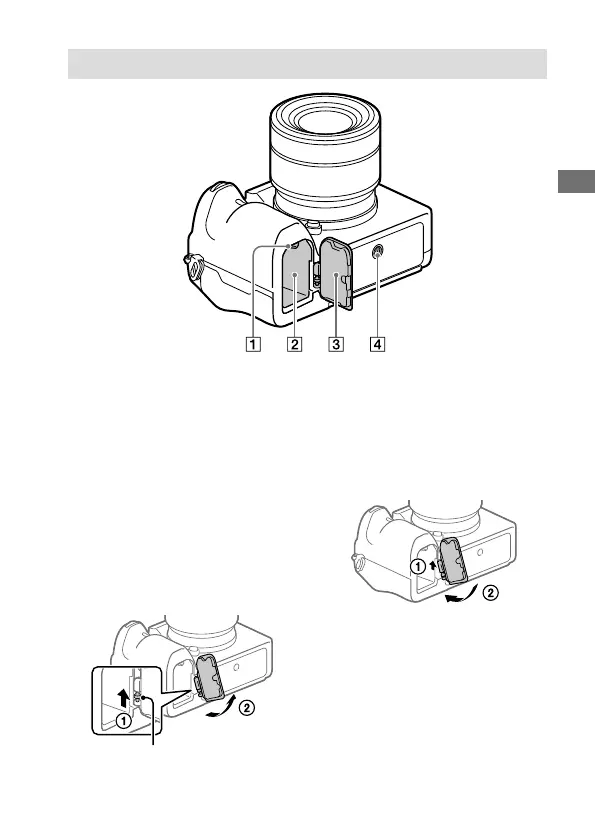
Bottom
Lock lever (27)
Battery insertion slot (27)
Battery cover (27)
When attaching an accessory
such as a vertical grip
(sold separately), remove the
battery cover.
To remove the battery cover
Pull the battery cover release
lever in the direction of the
arrow, and then remove the
battery cover.
Battery cover release lever
To attach the battery cover
Insert the shaft on one side
of the battery cover into the
attachment site, and then
push in the battery cover by
attaching the shaft on the
opposite side.
Tripod socket hole
Supports 1/4-20 UNC screws
Use a tripod with a screw less
than 5.5mm (7/32inches)
long. Otherwise, you cannot
firmly secure the camera, and
damage to the camera may
occur.



 To Next Page