10
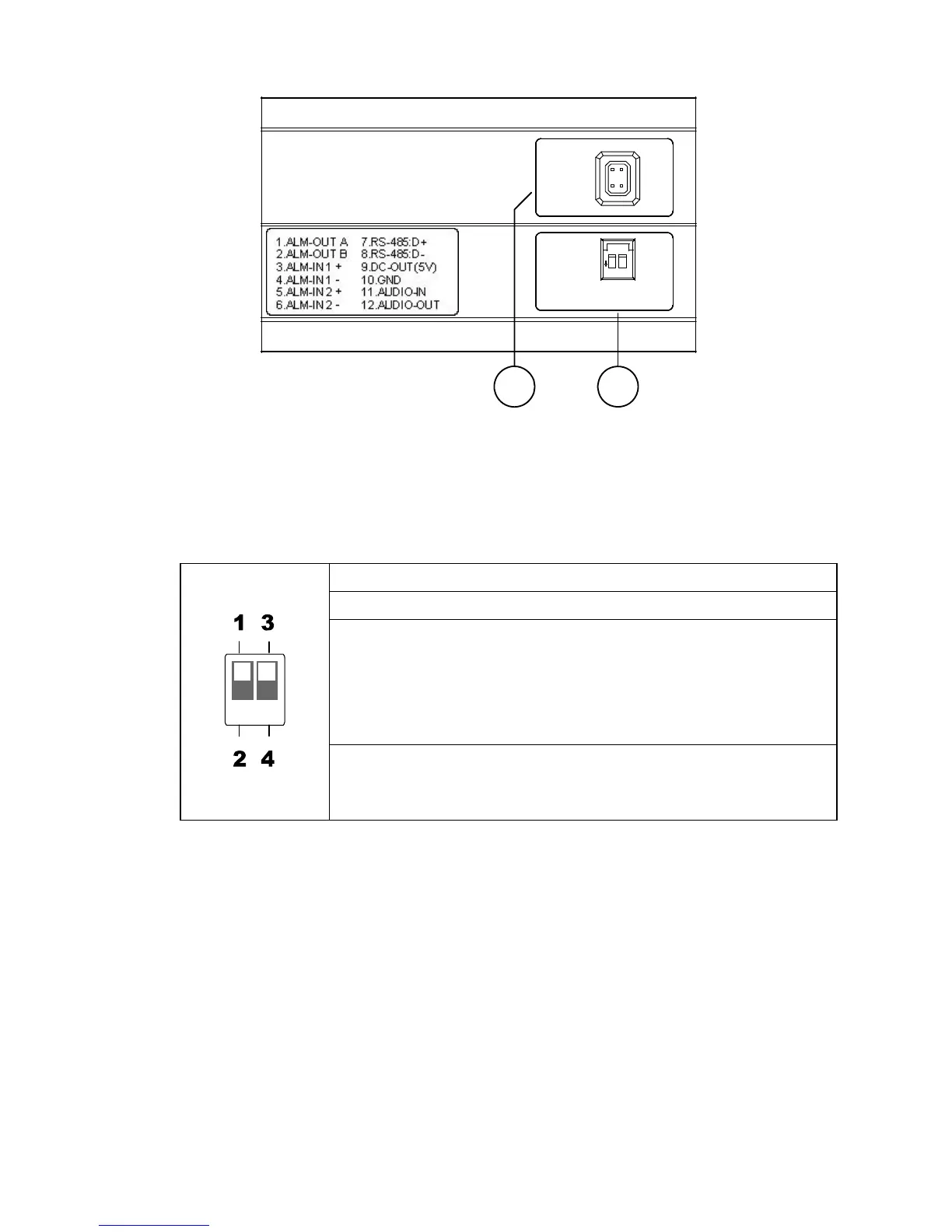
2.3 Flank Panel
IRIS
1. AES
2. DC IRIS
3. DHCP
4. STATIC IP
1
2
3
4
1.ALM-OUT A
2.ALM-OUT B
3.ALM-IN +
4.ALM-IN -
5.ALM-RST +
6.ALM-RST -
7.RS-485:D+
8.RS-485:D-
9.DC-OUT(5V)
10.GND
11.AUDIO-IN
12.AUDIO-OUT
1
2
1. IRIS: Auto iris connector.
This camera works with a DC drive auto iris lens. Please refer to the pin assignment
marked on the camera when connecting the auto iris lens
2. DIP Switch:
1. AES: Auto electric shutter.
2. DC IRIS: Use an auto iris (DC drive)
3.DHCP: Turn On / Turn Off to use the DHCP protocol. If the switch
points upwards, the device can change the setup of
network function (enable/disable) via the network.
(*In the default factory configuration, this DIP Switch is in
the Up position.)
4. STATIC IP: If the switch points down, the device can’t obtain an IP
address from the DHCP server. This option is needed
to configure the network communication settings.



 To Next Page