85
(Supplementary information)
TV Business Division
85
Model Number Setting
>>
>>
>>
>>
>>
>>
>>
[</>] Set [Home]Exit
General Setting
Tuner
Wi-Fi / BT
Service Mode
Model Information
Self diagnosis History
Video / Audio
Panel / PQ
>>SDB Service Menu
>>
Model Information
>>
Model Number Setting
>>
SERIAL NUMBER EDIT
[</>] Set [Home]Exit
Model
Status Information
OK
[MODEL_NUMBER_SETTING]
_ _ _ _ _ _ _ _ _ _ _ _
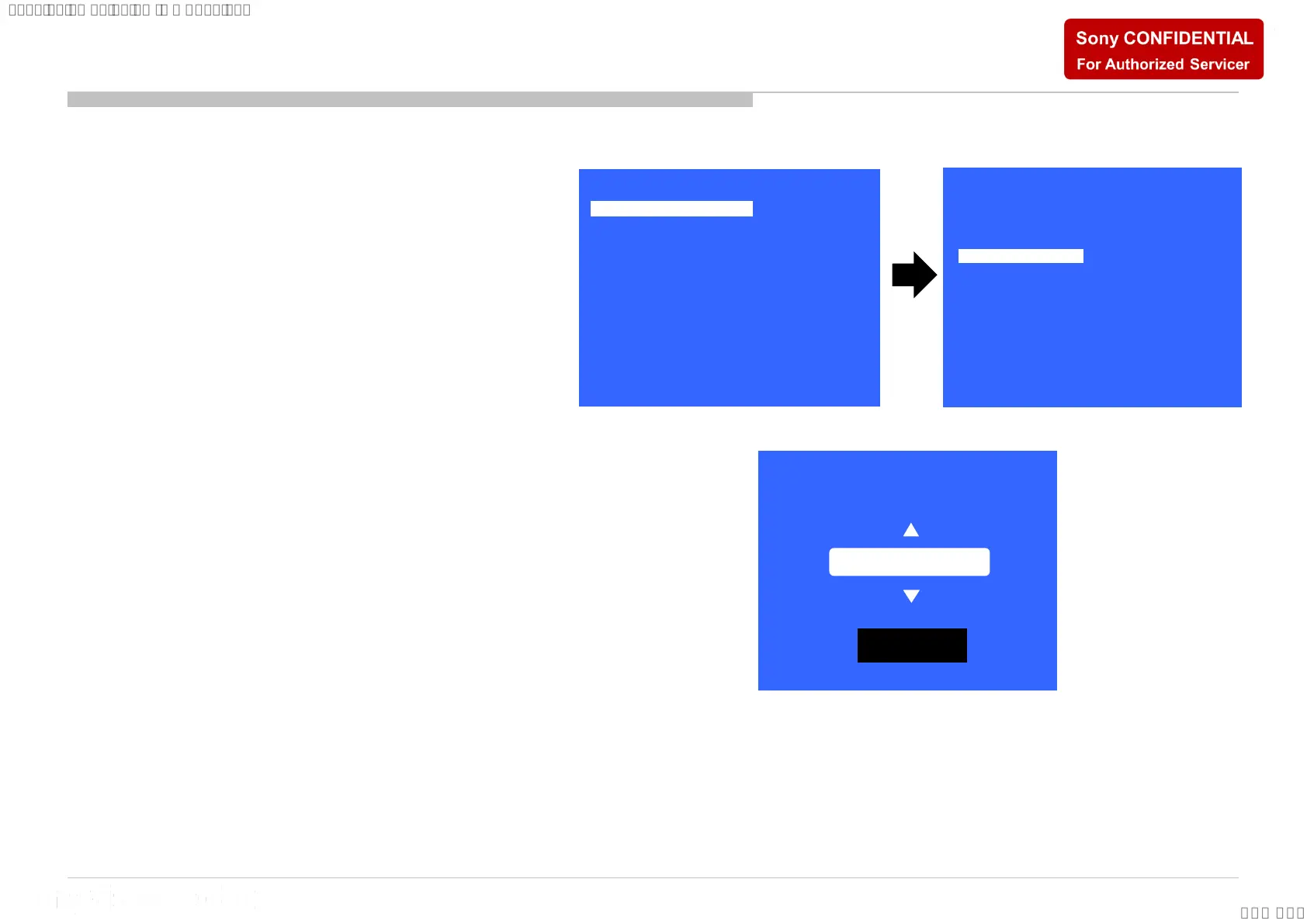
1) In “Service Mode”, select “Model Information”
by pressing “↑” or “↓” then pressing “Enter” or
“→” button to enter inside.
2) Select “Model Number Setting” by pressing
“↑” or “↓” button then pressing “Enter” or “→”
button
3) Press “↑” or “↓” arrow key to scroll Product
Name Candidate. (e.g. KD-65XF9005 CEI)
4) Select one Product Name from the list. After
that select “[OK]” and press “Enter” button.
Model Number Setting






 To Next Page