86
(Supplementary information)
TV Business Division
86
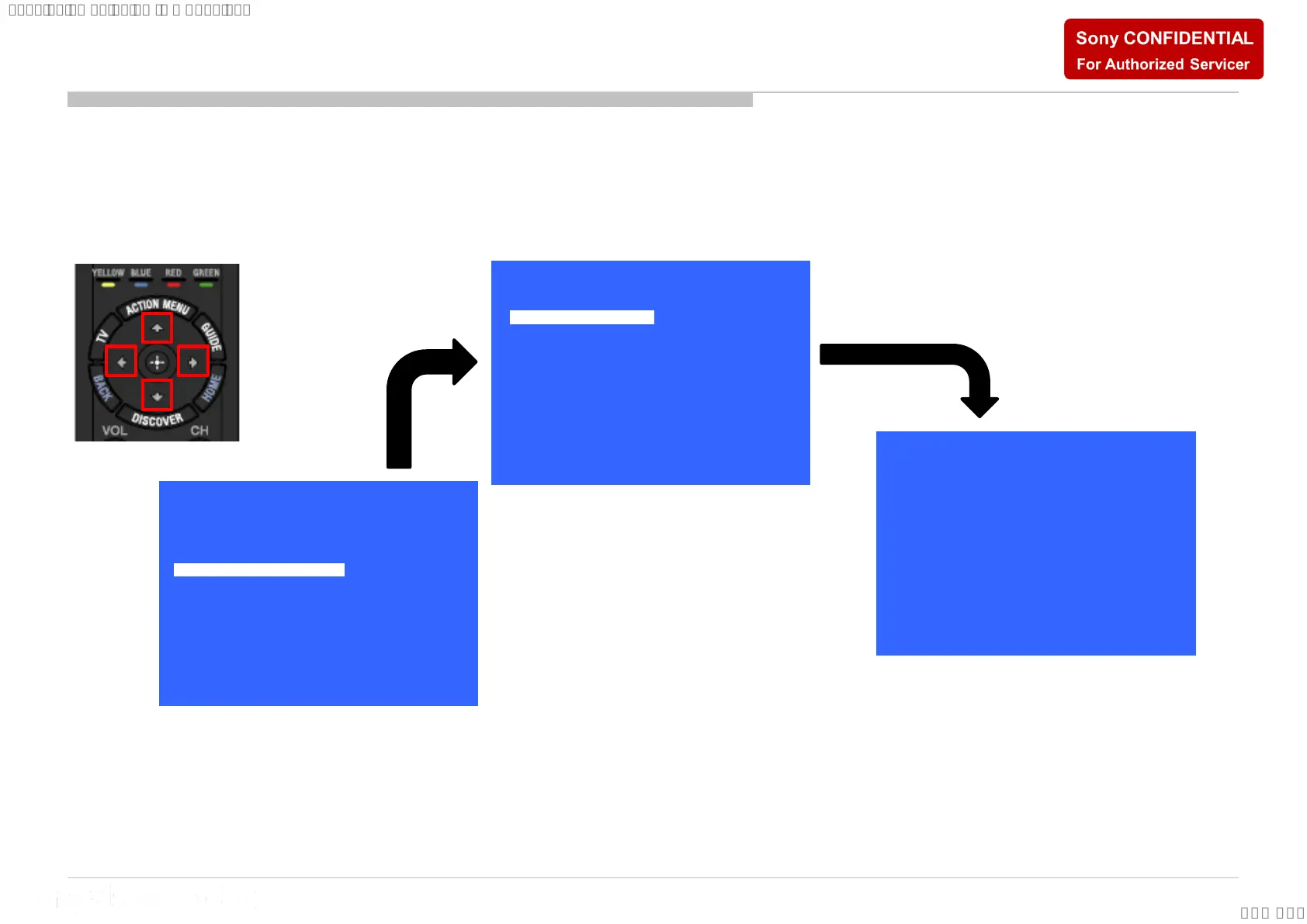
1. In “Panel/PQ” service mode
a. Go to “WB Adjustment” category by “↑” or “↓”.
b. To select “WB Adjustment”, press → button.
c. To change data , press “←” or “→” on remote commander.
a.
b.
c.
>>
>>
>>
>>
>>General Setting
Tuner
Wi-Fi / BT
Service Mode
Model Information
Self diagnosis History
Video / Audio
Panel / PQ
SDB Service Menu
[</>] Set [Home]Exit
>>
>>
>>
<<
>>
>>
Panel / PQ
Back
WB Adjustment
WB/Mura/CUC data transfer
[</>] Set [Home]Exit
<<
<[ 0 ]>
Back
R WB Gain
[</>] Set [Home]Exit
<[ 0 ]>G WB Gain
<[ 0 ]>B WB Gain
<[ 0 ]>R WB Offset
<[ 0 ]>G WB Offset
<[ 0 ]>B WB Offset
WB Adjustment (If necessary)





 To Next Page