EasyManua.ls Logo

Sony LBT-D170 - Chapter 1: Setting up; Connecting the Stereo

Sony LBT-D170
23 pages
Print Icon
To Next Page IconTo Next Page
To Previous Page IconTo Previous Page
Loading...
|
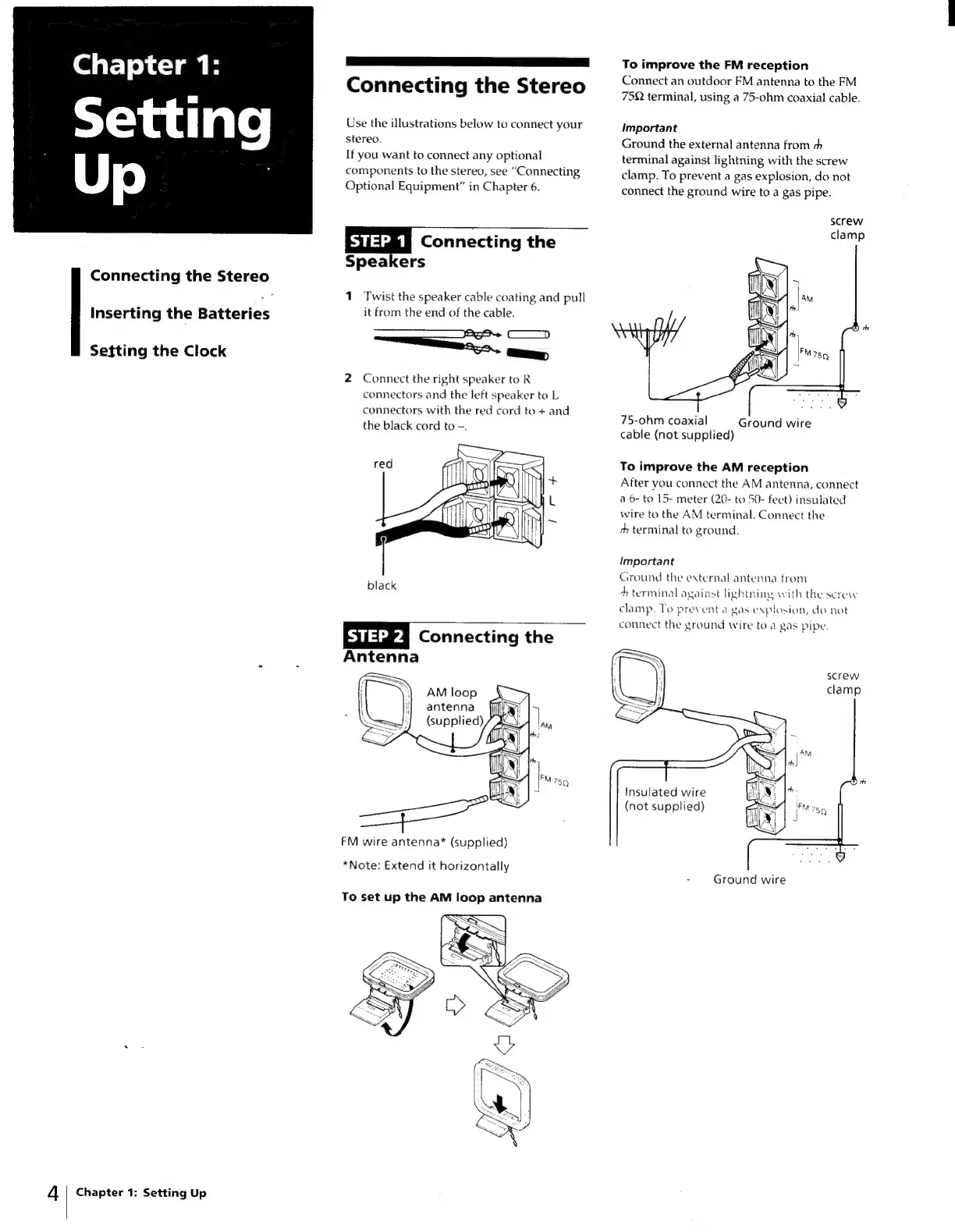
Connecting
the
Stereo
Chapter
1:
Use
the
illustrations
below
to
connect
your
stereo.
If
you
want
to
connect
any
optional
components
to
the
stereo,
see
“Connecting
Optional
Equipment”
in
Chapter
6.
Connecting
the
Speakers
Connecting
the
Stereo
f
1
Twist
the
speaker
cable
coating
and
pull
it
from
the
end
of
the
cable.
=
bat)
2
Connect
the
right
speaker
to
R
connectors
and
the
left
speaker
to
L
connectors
with
the
red
cord
to
+
and
the
black
cord
to
~.
Inserting
the
Batteries
Setting
the
Clock
Connecting
the
Antenna
AM
loop
antenna
(supplied)
FM
wire
antenna®*
(supplied)
*Note:
Extend
it
horizontally
To
set
up
the
AM
loop
antenna
4
|
Chapter
1:
Setting
Up
To
improve
the
FM
reception
Connect
an
outdoor
FM
antenna
to
the
FM
75Q
terminal,
using
a
75-ohm
coaxial
cable.
important
Ground
the
external
antenna
from
h
terminal
against
lightning
with
the
screw
clamp.
To
prevent
a
gas
explosion,
do
not
connect
the
ground
wire
to
a
gas
pipe.
screw
clamp
75-ohm
coaxial
Ground
wire
cable
(not
supplied)
To
improve
the
AM
reception
After
you
connect
the
AM
antenna,
connect
a
6-
to
15-
meter
(20-
to
50-
feet)
insulated
wire
to
the
AM
terminal.
Connect
the
rh
terminal
to
ground.
Important
Ground
the
external
antenna
from
+
terminal
against
lightning
with
the
screw
clamp.
To
prevent
a
gas
explosion,
do
not
connect
the
ground
wire
to
a
gas
pipe.
Insulated
wire
(not
supplied)
-
Ground
wire

Related product manuals