
 Need help?
Do you have a question about the Sony LBT-D109CD and is the answer not in the manual?
Record model and serial numbers for future reference.
FCC compliance and interference guidelines.
Warnings about modifications and CATV installers.
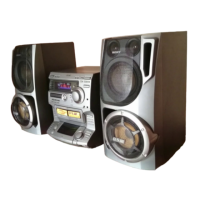
Lists system components and model numbers.
Inserting batteries and battery life information.
Preventing battery leakage and remote malfunction.
General connection tips and speaker cord attachment.
Connecting FM antenna and wire attachment guide.
Connecting AM antenna and improving reception.
Connecting a turntable and AC power cord.
Adjusting volume, equalizer, and bass (DBFB).
Using surround effect and headphone jack.
Tuning stations, stereo reception, and weak signal issues.
Storing, erasing, and directly tuning stations.
Adjusting the AM tuning interval and important notes.
Playing tapes on deck A/B, Dolby NR, and relay play.
Steps for recording audio, including Dolby NR and precise start.
Protecting tapes from further recording and type II tape caution.
Steps for dubbing tapes, speed selection, and Dolby NR.
Playing entire disc, 8cm CD, volume, and condensation cautions.
Understanding display readouts and locating selections/points.
Playing in random order, cancelling, and custom selection.
Creating custom playback order and repetition.
Modifying programs, tape editing, and checking time.
Playing beginnings of selections and repeating tracks/selections.
Setting total playing time for tape sides and adjusting duration.
Applying fade-in and fade-out effects to audio.
Setting, cancelling, and checking time fade duration.
Cleaning cabinets, discs, heads, and tape path.
Detailed specs for receiver, CD player, amplifier, and speakers.
Solutions for common general and tuner issues.
Solutions for cassette deck playback, recording, and dubbing problems.
Troubleshooting CD player operation and remote control problems.
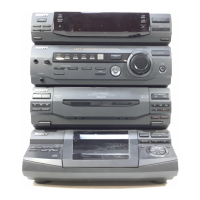
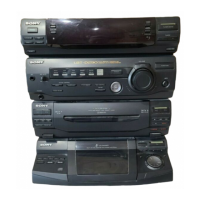
Identifies controls for CD receiver, tuner, amp, cassette, and CD player.
Details functions of remote control buttons.
The Sony LBT-D109CD/LBT-D110CD is a compact Hi-Fi stereo system designed for comprehensive audio playback and recording. This system integrates a compact disc player, a dual cassette deck, and an AM/FM tuner, offering a versatile audio experience. It is controlled via a combination of front-panel buttons and a supplied remote commander (RM-S109), which allows for convenient operation from a distance.
The core of the system is its ability to play various audio sources. The compact disc player supports standard 12-cm (5-inch) CDs and 8-cm (3-inch) CDs, with the latter placed on the inner circle of the tray. It offers continuous play, random order (shuffle play), and programmed play, allowing users to create custom playlists of up to 24 selections. The shuffle play feature can play all selections in a random order or only desired selections after deleting unwanted ones. The programmed play allows users to designate a specific order for tracks and even adjust the total playing time, a useful feature for tape editing. The system also includes a Music Scan Play function, which plays the beginning of each selection for 10 seconds, fading out for 2 seconds before moving to the next track, providing a quick overview of the disc's content.
The dual cassette deck facilitates both playback and recording. It supports Type I and Type II tapes. Users can play tapes from either Deck A or Deck B, or utilize a relay play function where Deck B plays first, followed by Deck A. Recording is possible from various sources (CD, tuner, phono) onto a blank tape inserted into Deck B. The system incorporates a Dolby NR (noise reduction) system, which can be switched on or off to reduce tape hiss in low-level, high-frequency signals during recording and playback. This system is equipped with DOLBY B NR.
Dubbing tapes from Deck A to Deck B is a key feature, allowing users to duplicate their cassette collections. This can be done at either normal or high speed. When dubbing, the recording level and Dolby NR settings from the original tape in Deck A are automatically applied to the tape in Deck B. The system also allows for listening to other program sources during dubbing, providing flexibility.
The AM/FM stereo tuner enables reception of radio broadcasts. It supports both FM and AM bands, with the ability to switch between them. Users can tune into stations manually or use the auto-scan function, which stops when it tunes into a station. For FM stereo programs, a ST/MUTE button is available to toggle between stereo effect and improved reception for weak signals. The tuner also features station storage, allowing up to 30 frequencies per band to be saved using a combination of letters and numbers (e.g., A-1, B-2). This allows for quick recall of favorite stations. The AM tuning interval can be adjusted between 10-kHz and 9-kHz depending on regional requirements.
The amplifier section provides basic sound adjustments, including a 5-band graphic equalizer to boost or cut specific frequency ranges (100 Hz, 330 Hz, 1 kHz, 3.3 kHz, 10 kHz). A DBFB (Dynamic Bass Feedback) control reinforces the bass, and a SURROUND control enhances the soundstage, though it does not function with monaural sources. Volume is adjusted via a rotary control. For private listening, a HEADPHONES jack is provided, which mutes the speakers when in use.
The system emphasizes user convenience through its intuitive controls. Power is turned on via a dedicated POWER button on the compact disc deck receiver. Function selectors (CD, TUNER, PHONO) allow easy switching between audio sources. The remote commander mirrors many of these functions, providing control over CD playback, tuner operations, and volume from a distance. Numeric buttons on the remote commander are particularly useful for direct selection of CD tracks or stored radio stations.
For CD playback, the tray opens and closes with an OPEN/CLOSE button. Playback starts with the button, pauses with the II button, and stops with the button. Fast forward and rewind are handled by the ►►I and ◄◄◄ buttons. The display window provides crucial information, including the total number of selections and total playing time of a disc in stop mode, and remaining time of the current selection, remaining time of the disc, or elapsed playing time during play.
Tape operations are managed by dedicated buttons: (play), / (stop/eject), ►► (rightward fast winding), ◄◄ (leftward fast winding), II PAUSE, and REC (for Deck B). A TAPE SELECT button allows selection of tape type, and a DUBBING SPEED button controls the speed for tape-to-tape copying. The DOLBY NR switch is also easily accessible.
The system incorporates "Time Edit" features for tape recording, allowing users to designate a total playing time for a program, which the unit then automatically fills with selections. This is particularly useful for recording both sides of a tape. The fading in/out function allows for smooth transitions at the beginning or end of playback, with adjustable durations from 2 to 10 seconds.
Safety precautions are highlighted, such as the need to operate the unit on 120 V AC, 60 Hz, and to unplug it when not in use. Warnings regarding fire and shock hazards emphasize not exposing the unit to rain or moisture and not removing the cover. The laser beam used in the CD player is noted as harmful to the eyes, advising against disassembly.
Maintaining the system ensures optimal performance and longevity. The manual provides clear instructions for cleaning various components.
For the cabinets, a soft cloth lightly moistened with a mild detergent solution is recommended.
Discs should be cleaned with a cleaning cloth, wiping from the center outward. Users are cautioned against using solvents like benzine, thinner, or anti-static sprays meant for analog discs, as these can damage CDs.
The cassette deck requires regular maintenance of its heads and tape path. After every 10 hours of use and before recording, the heads and tape path should be cleaned. This involves pressing the / button to open the cassette holder, moistening a cotton swab with cleaning fluid or alcohol, and then wiping the playback head, erasing head, playback/recording head, pinch roller, and capstans. It's crucial to ensure these cleaned areas are completely dry before inserting a cassette.
Demagnetizing the heads is also recommended every 20 to 30 hours of use to remove magnetism buildup, which can affect sound quality. This should be done with a commercially available demagnetizer, with the unit turned off beforehand.
Troubleshooting guidance is provided for common issues, covering general problems (no power, no sound), tuner issues (blinking indications, hum/noise), cassette deck problems (playback/recording failures, unbalanced tone, unclear sound, wow/flutter, incomplete erasure), and CD player malfunctions (tray not closing, play not starting, play not beginning from first selection). Solutions range from checking connections and adjusting volume to cleaning components and replacing batteries in the remote commander. Moisture condensation, a common issue with CD players, is addressed with a recommendation to leave the unit on for about an hour to allow the moisture to evaporate.
 General
| Type | Stereo System |
|---|---|
| CD Player | Yes |
| Cassette Deck | Yes |
| Tuner | FM/AM |
| Bluetooth | No |
| USB Playback | No |
| Remote Control | Yes |
| Speakers | 2 |
| Functions | CD, Radio |
| Power Output | 100W (50W + 50W) |



 To Next Page