EasyManua.ls Logo

Sony LBT-D109CD - Playing Back Tapes; Tape Playback Operations

Sony LBT-D109CD
28 pages
Print Icon
To Next Page IconTo Next Page
To Previous Page IconTo Previous Page
Loading...
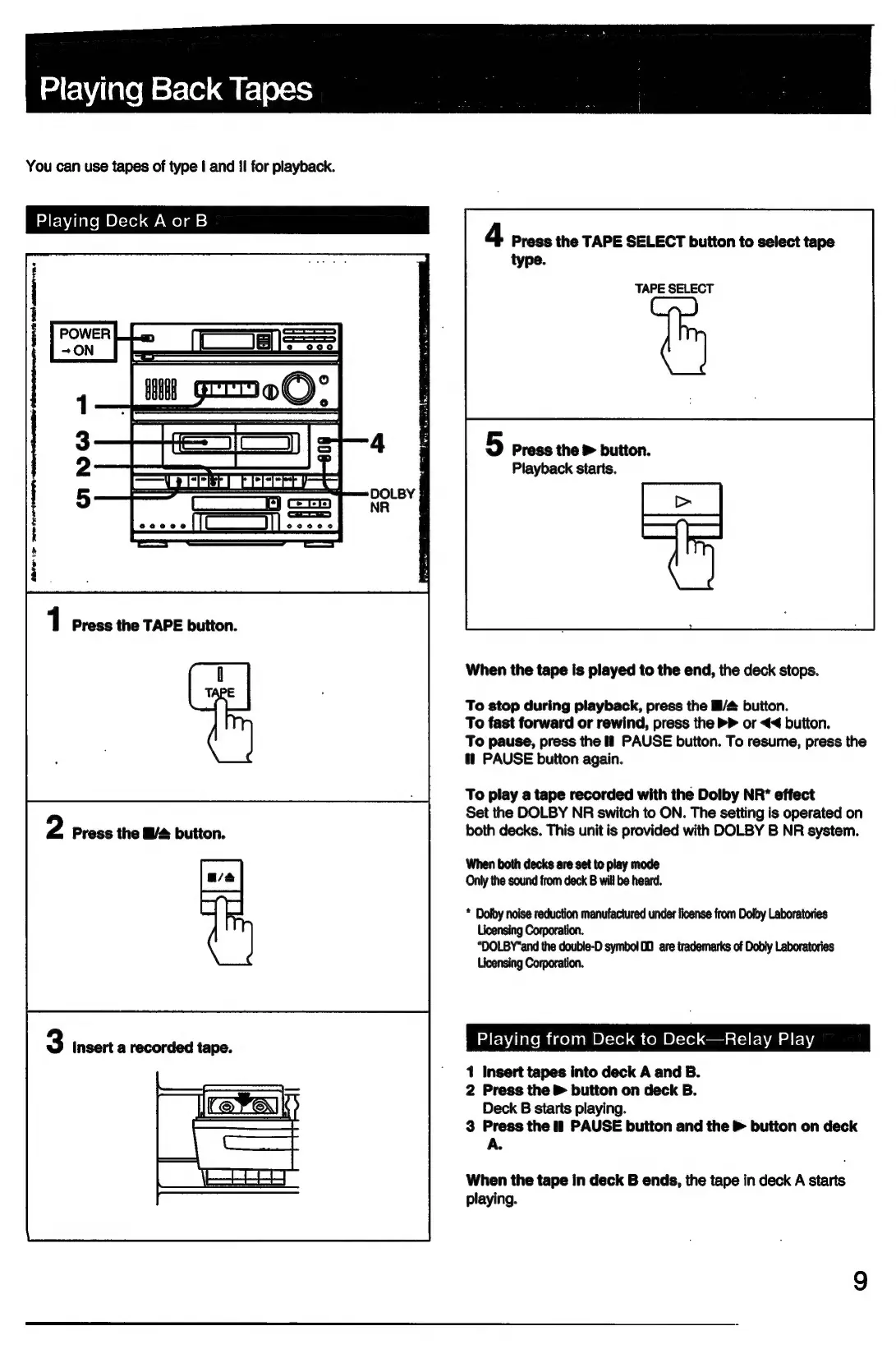
Playing
Back
Tapes
You
can
use
tapes
of
type
|
and
II
for
playback.
Playing
Deck
A
or
B
4
Press
the
TAPE
SELECT
button
to
select
tape
type.
TAPE
SELECT
Wn
Grom®©)?°
5
Press
the
&
buiton.
=
|
2
Playback
starts.
Pees
|
ee
} |
ees
1
Press
the
TAPE
button.
When
the
tape
is
played
to
the
end,
the
deck
stops.
To
stop
during
playback,
press
the
B/&
button.
To
fast
forward
or
rewind,
press
the
>>
or
<4
button.
To
pause,
press
the
if
PAUSE
button.
To
resume,
press
the
tt
PAUSE
button
again.
To
play
a
tape
recorded
with
the
Dolby
NR*
effect
Set
the
DOLBY
NR
switch
to
ON.
The
setting
is
operated
on
both
decks.
This
unit
is
provided
with
DOLBY
B
NR
system.
When
both
decks
are set
to
play
mode
Only
the
sound
from
deck
B
will
be
heard.
*
Dolby
noise
reduction
manufactured
under
license
from
Dolby
Laboratories
Licensing
Corporation.
“DOLBY"and
the
double-D
symbol
00
are
trademarks
of
Dobly
Laboratories
Licensing
Corporation.
Playing
from
Deck
to
Deck—Relay
Play
1
Insert
tapes
into
deck
A
and
B.
2
Press
the
&
button
on
deck
B.
Deck
B
starts
playing.
3
Press
the
lf
PAUSE
button
and
the
&
button
on
deck
A.
When
the
tape
in
deck
B
ends,
the
tape
in
deck
A
starts
playing.

Related product manuals