EasyManua.ls Logo

Sony LBT-D109CD - Receiving Broadcasts; Tuning and Station Reception

Sony LBT-D109CD
28 pages
Print Icon
To Next Page IconTo Next Page
To Previous Page IconTo Previous Page
Loading...
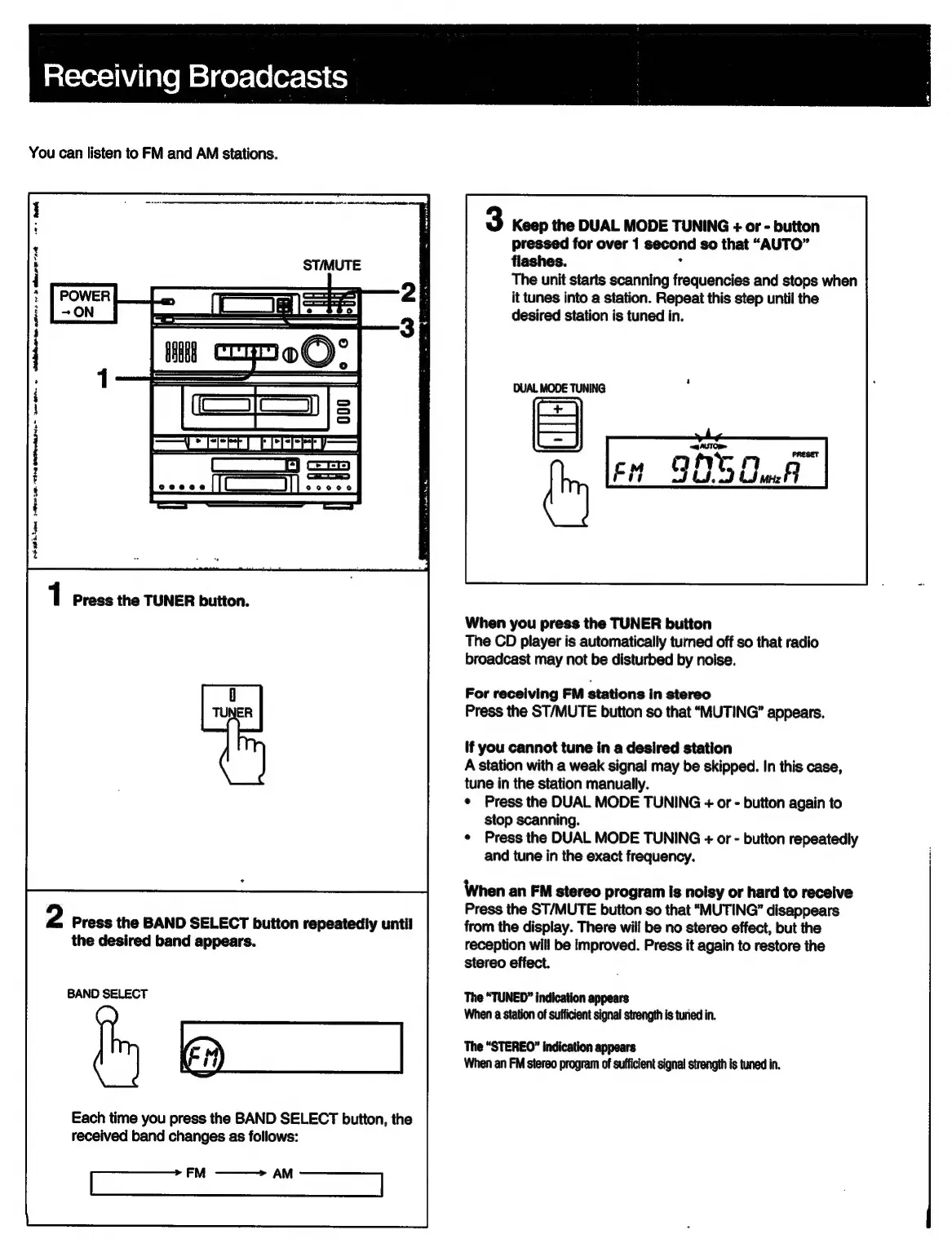
Receiving
Broadcasts
You
can
listen
to
FM
and
AM
stations.
wetdateanen
aster:
se
dimmer
8+
heh
Ce
ee
ee
eee
1
Press
the
TUNER
button.
0
TUNER
2
Press
the
BAND
SELECT
button
repeatedly
until
the
desired
band
appears.
BAND
SELECT
I
a
_|
Each
time
you
press
the
BAND
SELECT
button,
the
received
band
changes
as
follows:
FM
———>
AM
3
Keep
the
DUAL
MODE
TUNING
+
or
-
button
pressed
for
over
1
second
so
that
“AUTO”
flashes.
:
The
unit
starts
scanning
frequencies
and
stops
when
it
tunes
into
a
station.
Repeat
this
step
until
the
desired
station
is
tuned
in.
DUAL
MODE
TUNING
4
——
fy
a
SBE
Oal
When
you
press
the
TUNER
button
The
CD
player
is
automatically
turned
off
so
that
radio
broadcast
may
not
be
disturbed
by
noise.
For
receiving
FM
stations
in
stereo
Press
the
ST/MUTE
button
so
that
“MUTING”
appears.
If
you
cannot
tune
in
a
desired
station
A
station
with
a
weak
signal
may
be
skipped.
In
this
case,
tune
in
the
station
manually.
¢
Press
the
DUAL
MODE
TUNING
+
or
-
button
again
to
stop
scanning.
¢
Press
the
DUAL
MODE
TUNING
+
or
-
button
repeatedly
and
tune
in
the
exact
frequency.
When
an
FM
stereo
program
is
noisy
or
hard
to
receive
Press
the
ST/MUTE
button
so
that
“MUTING’
disappears
from
the
display.
There
will
be
no
stereo
effect,
but
the
reception
will
be
improved.
Press
it
again
to
restore
the
stereo
effect.
The
“TUNED”
indication
appears
When
a
station
of
sufficient
signal
strength
is
turied
in.
The
“STEREO”
indication
appears
When
an
FM
stereo
program
of
sufficient
signal
strength
is
tuned
in.

Related product manuals