EasyManua.ls Logo

Sony LBT-D109CD - Selection Play Modes; Music Scan and Repeat Play

Sony LBT-D109CD
28 pages
Print Icon
To Next Page IconTo Next Page
To Previous Page IconTo Previous Page
Loading...
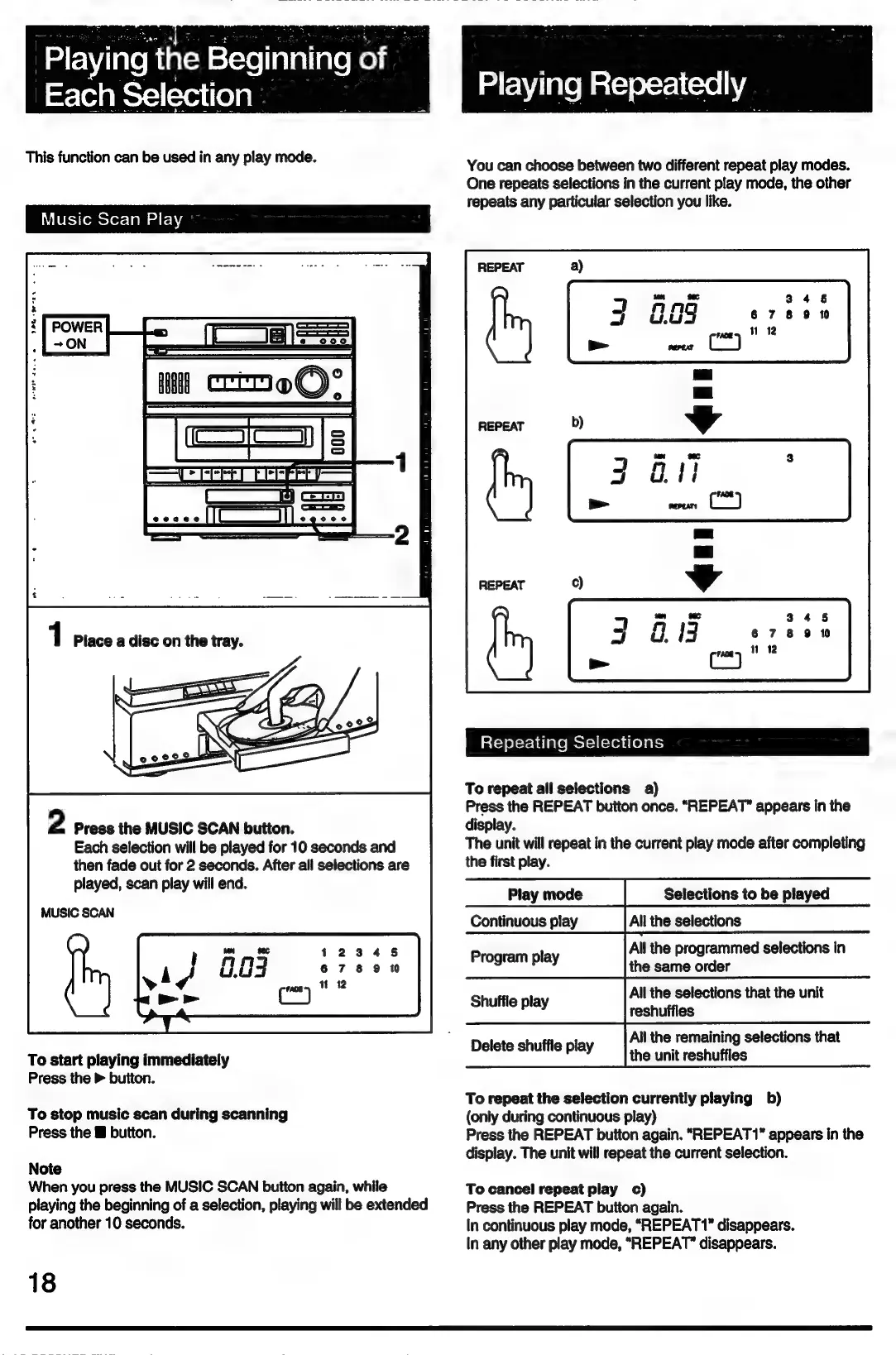
Playing
the
Beginning
of
_
Each
Selection
This
function
can
be
used
in
any
play
mode.
Music
Scan
Play
_=n
ET
Ere
yy]
ES
©
ee)
2
Press
the
MUSIC
SCAN
button.
Each
selection
will
be
played
for
10
seconds
and
then
fade
out
for
2
seconds.
After
all
selections
are
played,
scan
play
will
end.
MUSIC
SCAN
To
start
playing
immediately
Press
the
>
button.
To
stop
music
scan
during
scanning
Press
the
&
button.
Note
When
you
press
the
MUSIC
SCAN
button
again,
while
playing
the
beginning
of
a
selection,
playing
will
be
extended
for
another
10
seconds.
18
You
can
choose
between
two
different
repeat
play
modes.
One
repeats
selections
in
the
current
play
mode,
the
other
repeats
any
particular
selection
you
like.
Repeating
Selections
To
repeat
all
selections
a)
Press
the
REPEAT
button
once.
“REPEAT”
appears
in
the
display.
The
unit
will
repeat
in
the
current
play
mode
after
completing
the
first
play.
Play
mode
Continuous
play
Selections
to
be
played
All
the
selections
All
the
programmed
selections
in
the
same
order
All
the
selections
that
the
unit
reshuffles
All
the
remaining
selections
that
the
unit
reshuffles
Program
play
Shuffle
play
Delete
shuffle
play
To
repeat
the
selection
currently
playing
b)
(only
during
continuous
play)
Press
the
REPEAT
button
again.
“REPEAT1*
appears
in
the
display.
The
unit
will
repeat
the
current
selection.
To
cancel
repeat
play
c)
Press
the
REPEAT
button
again.
In
continuous
play
mode,
“REPEAT”
disappears.
In
any
other
play
mode,
“REPEAT”
disappears.

Related product manuals