Camera
About the camera
The camera in your device is equipped with the highly sensitive Exmor R sensor, which
helps you capture sharp photos and videos even in low lighting conditions. From the
camera, you can, for example, send your photos and videos to friends as messages, or
upload them to a web service. Your device also has a front camera, which is useful for
self-portraits.
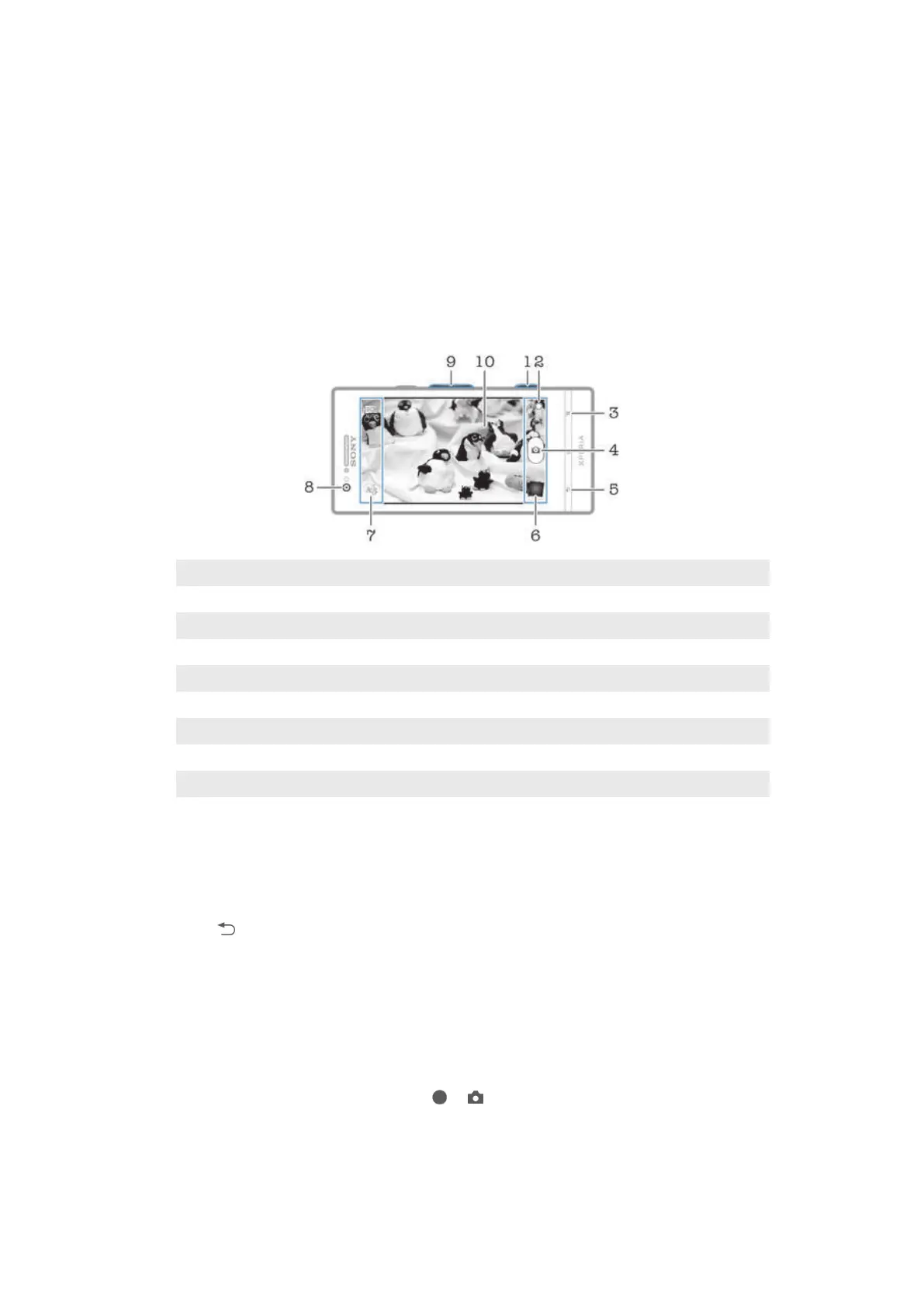
Camera controls overview
1 Camera key – Activate the camera/Take photos/Record videos
2 Switch between still and video camera
3 Display all settings
4 Take photos or record video clips
5 Go back a step or exit the camera
6 View photos and videos
7 Camera setting icons
8 Front camera
9 Zoom in or out
10 Main camera screen
To open the camera
• When the screen is active, press and hold down the camera key.
To close the camera
• Press from the main camera screen.
Using the still camera
There are three ways to take photos with the still camera. You can press the camera key,
tap the on-screen camera button, or touch a spot on the screen.
To take a photo using the camera key
1 Activate the camera.
2 If the still camera is not selected, drag to .
3 Press the camera key halfway down to activate auto-focus.
4 When the focus frame or frames are green, press the camera key fully down.
65
This is an Internet version of this publication. © Print only for private use.





 To Next Page