EasyManua.ls Logo

Sony M-425 - Recording; Setting VOR; Starting Recording

Sony M-425
14 pages
Print Icon
To Next Page IconTo Next Page
To Previous Page IconTo Previous Page
Loading...
Sh
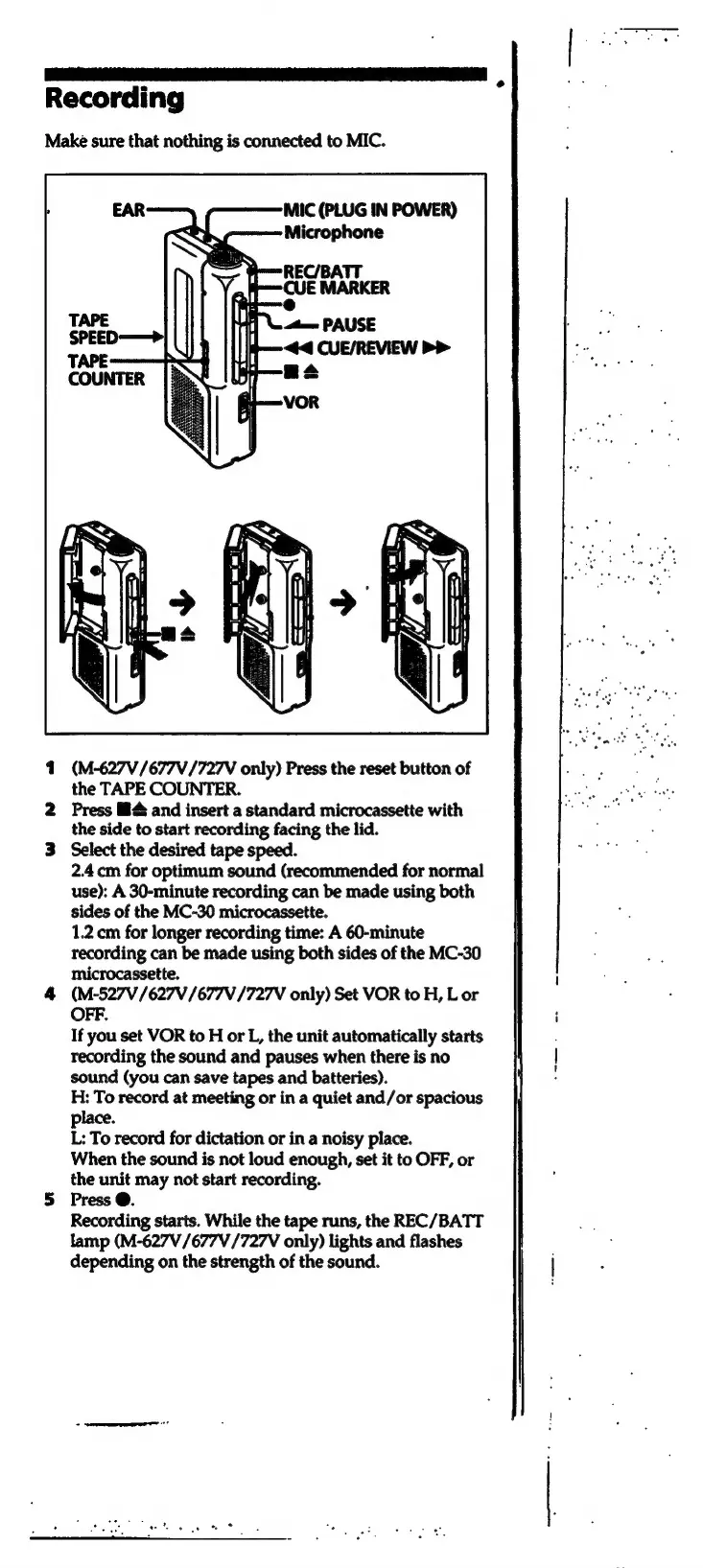
Recording
Make
sure
that
nothing
is
connected
to
MIC.
1
(M-627V/677V/727V
only)
Press
the
reset
button
of
the
TAPE
COUNTER.
2
Press
M4
and
insert
a
standard
microcassette
with
the
side
to
start
recording
facing
the
lid.
3
Select
the
desired
tape
speed.
2.4.cm
for
optimum
sound
(recommended
for
normal
use):
A
30-minute
recording
can
be
made
using
both
sides
of
the
MC-30
microcassette.
1.2
cm
for
longer
recording
time:
A
60-minute
recording
can
be
made
using
both
sides
of
the
MC-30
microcassette.
H
4
(M-527V/627V/677V
/727V
only)
Set
VOR
to
H,
L
or
OFF.
i
If
you
set
VOR
to
H
or
L,
the
unit
automatically
starts
recording
the
sound
and
pauses
when
there
is
no
sound
(you
can
save
tapes
and
batteries).
H:
To
record
at
meeting
or
in
a
quiet
and/or
spacious
place.
L:
To
record
for
dictation
or
in
a
noisy
place.
When
the
sound
is
not
loud
enough,
set
it
to
OFF,
or
the
unit
may
not
start
recording.
5
Press
@.
Recording
starts.
While
the
tape
runs,
the
REC/BATT
tamp
(M-627V
/677V/727V
only)
lights
and
flashes
depending
on
the
strength
of
the
sound.

Related product manuals