EasyManua.ls Logo

Sony M-425 - Page 5

Sony M-425
14 pages
Print Icon
To Next Page IconTo Next Page
To Previous Page IconTo Previous Page
Loading...
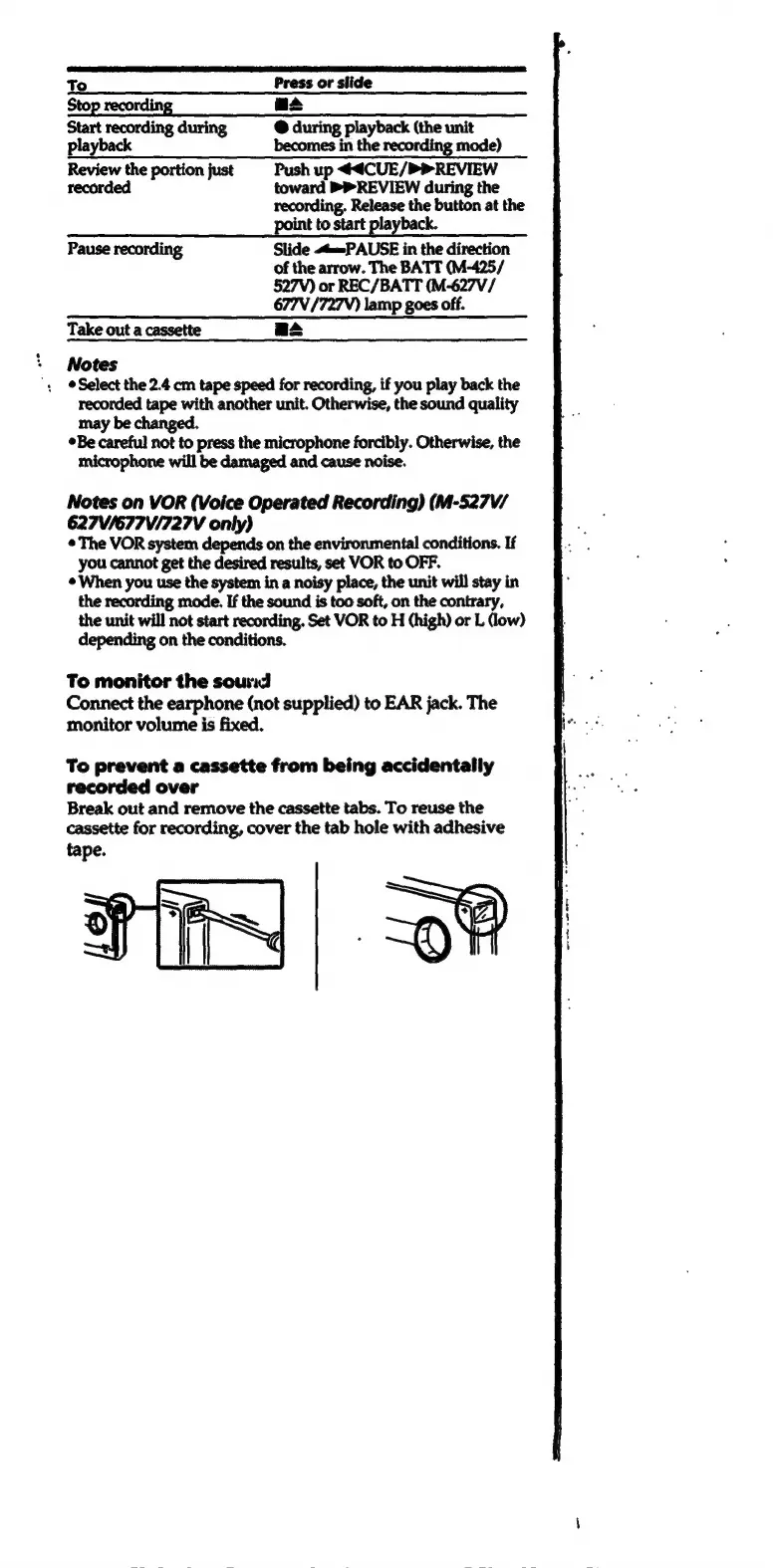
To
Press
or
slide
Stop
recording
asa
Start
recording
during
@
during
piayback
(the
unit
playback
becomes
in
the
recording
mode)
Review
the
portion
just
Push
up
44CUE/PREVIEW
recorded
toward
PREVIEW
during
the
recording.
Release
the
button
at
the
point
to
start
playback.
Pause
recording
Slide
«t=PAUSE
in
the
direction
of
the
arrow.
The
BATT
(M-425/
527V)
or
REC/BATT
(M-627V/
677V
/727V)
lamp
goes
off.
Take
out
a
cassette
as
Notes
Select
the
2.4
cm
tape
speed
for
recording,
if
you
play
back
the
recorded
tape
with
another
unit.
Otherwise,
the
sound
quality
may
be
R
Be
careful
not
to
press
the
microphone
forcibly.
Otherwise,
the
microphone
will
be
damaged
and
cause
noise.
Notes
on
VOR
(Voice
Operated
Recording)
(M-527V/
627V/677V/727V
only)
©The
VOR
system
depends
on
the
environmental
conditions.
If
you
cannot
get
the
desired
results,
set
VOR
to
OFF.
©
When
you use
the
system
in
a
noisy
place,
the
unit
will stay
in
the
recording
mode.
If
the
sound
is
too
soft,
on
the
contrary,
the
unit
will
not
start
recording.
Set
VOR
to
H
(high)
or
L
(ow)
depending
on
the
conditions.
To
monitor
the
sound
Connect
the
earphone
(not
supplied)
to
EAR
jack.
The
monitor
volume
is
fixed.
To
prevent
a
cassette
from
being
accidentally
recorded
over
Break
out
and
remove
the
cassette
tabs.
To
reuse
the
cassette
for
recording,
cover
the tab
hole
with
adhesive
tape.

Related product manuals