EasyManua.ls Logo

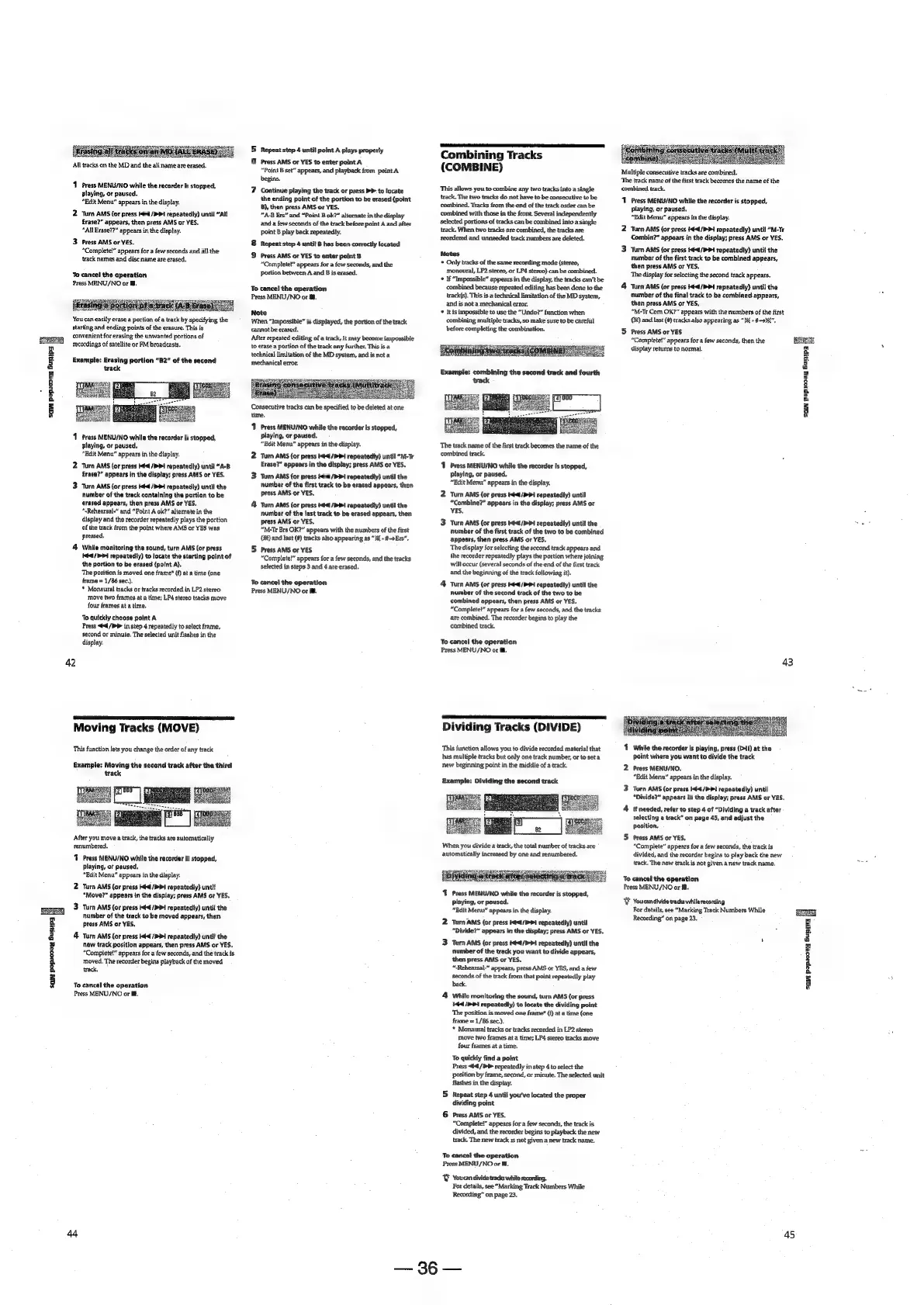
Sony MDS-E12 - Editing Recorded MDs; Erasing Tracks (ERASE); Moving Tracks (MOVE); Dividing Tracks (DIVIDE)

Sony MDS-E12
120 pages
Print Icon
To Next Page IconTo Next Page
To Previous Page IconTo Previous Page
Loading...
7
2
3
8
or:
&
4
g
SQ
Pepiczey
Suny
All
tracks
on
the
MD
and
the
all
name
are
erased.
1
Press
MENU/NO
while
the
recorder
is
stopped,
playing,
or
paused.
“Edit
Menu”
appears
in
the
display.
2
‘Turn
AMS
(or
press
4
/>Pi
repeatedly)
until
“All
£rase?”
appears,
then
press
AMS
or
YES.
“All
Erase??”
appears
in
the
display.
3
Press
AMS
or
YES.
“Complete!”
appears
for
a
few
seconds
and
al}
the
track
names
and
disc
name
are
erased,
To
cancel
the
operation
Press
MENU/NO
or
Ml.
You
can
easily
erase
a
portion
of
a
track
by
specifying
the
starting
and
ending
points
of
the
erasure.
This
is
convenient
for
erasing
the
unwanted
portions
of
recordings
of
satellite
or
FM
broadcasts.
Exampfe:
Erasing
portion
“B2”
of
the
second
track
1
Press
MENU/NO
while
the
recorder
Is
stopped,
playing,
or
paused,
“Edit
Menu”
appears
in
the
display.
2
‘Turn
AMS
(or
press
Kéd
{PPI
repeatedly)
until
“A-B
Erase?”
appears
in
the
display;
press
AMS
or
YES.
3
Turn
AMS
(or
press
t-4/PP4
repeatedly)
until
the
number
of
the
track
containing
the
portion
to
be
erased
appears,
then
press
AMS
or
YES.
“-Rehearsal-"
and
“Point
A
ok?”
alternate
in
the
display
and
the
recorder
repeatedly
plays
the
portion
of
the
track
from
the
point
where
AMS
or
YES
was
pressed,
4
Wile
monitoring
the
sound,
turn
AMS
(or
press
kd
/P
Pi
repeatedly)
to
locate
the
starting
point
of
the
portion
to
be
erased
{point
A).
‘The
position
is
moved
one
frame’
(f)
at
a
time
(one
frame
=
1/86
sec.),
*
Monaural
tracks
or
tracks
recorded
in
LP2
stereo
move
two
frames
at
a
time;
LP
stereo
tracks
move
four
frames
at
a
time.
To
quickly
chaose
point
A
Press
«#4
/b
in
step
4
repeatedly
to
select
frame,
second
or
minute.
The
selected
unit
flashes
in
the
display.
42
Moving
Tracks
(MOVE)
‘This
function
lets
you
change
the
order
of
any
track
Example:
Moving
the
second
track
after
the
third
track
Pe
lal
After
you
move
a
track,
the
tracks
are
automatically
renumbered.
T
Press
MENU/NO
while
the
recorder
is
stopped,
playing,
or
paused,
"Bdit
Menu”
appears
in
the
display.
2.
Turn
AMS
(or
press
Het
4
repeatedty)
untit
“Move?”
appears
in
the
display;
press
AMS
or
YES.
3
Turn
AMS
(or
press
t4<¢/>P#
repeatedly)
until
the
number
of
the
track
to
be
moved
appears,
then
press
AMS
or
YES,
4
Turn
AMS
(or
press
ttl
/PP1
repeatedly)
until
the
new
track
position
appears,
then
press
AMS
or
YES.
“Complete!”
appears
for
a
few
seconds,
and
the
track
is
moved,
The
recorder
begins
playback
of
the
moved
track,
To
cancel
the
operation
Press
MENU/NO
or
i.
5
Repeat
step
4
until
point
A
plays
properly
6
Press
AMS
or
YES
to
enter
point
A
“Point
B
set”
appears,
and
playback
from
point
A
begins.
7
Continue
playing
the
track
or
press
PP
to
locate
the
ending
point
of
the
portion
to
be
erased
{point
8),
then
press
AMS
or
YES,
“A-B
Ers”
and
“Point
B
ok?”
alternate
in
the
display
and
a
few
seconds
of
the
track
before
point
A
and
after
point
B
play
back
repeatedly.
Repeat
step
4
until
B
has
been
correctly
located
&
Press
AMS
or
YES
to
enter
point
B
“Complete!”
appears
for
a
few
seconds,
and
the
portion
between
A
and
B
is
erased.
To
cancel
the
operation
Press
MENU/NO
or
i.
Note
When
“Impossible”
is
displayed,
the
portion
of
the
track
cannot
be
erased.
After
repeated
editing
of
a
track,
it
may
become
impossible
to
erase
a
portion
of
the
track
any
further,
This
is
a
technical
limitation
of
the
MD
system,
and
is
not
a
mechanical
error.
i
Se
ee
Consecutive
tracks
can
be
specified
to
be
deleted
at
one
time.
11
Press
MENU/NO
while
the
recorder
is
stopped,
playing,
or
paused,
“Edit
Menu”
appears
in
the
display.
2
Turn
AMS
{or
press
#44
/PP1
repeatedly)
until
“M-Tr
Erase?”
appears
in
the
display:
press
AMS
or
YES.
3
Turn
AMS
{or
Press
4
/PP1
repeatedly)
until
the
number
of
the
first
track
to
be
erased
appears,
then
press
AMS
or
YES.
4
Turn
AMS
(ar
press
#4
/P
PI
repeatedly)
until
the
number
of
the
fast
track
to
be
erased
appears,
then
press
AMS
or
YES,
“M-Tr
Ere
OK?"
appears
with
the
numbers
of
the
first
QS)
and
last
(#)
tracks
also
appearing
as
“3X
-
#Ers".
5
Press
AMS
or
YES
“Complete!”
appears
for
a
few
seconds,
and
the
tracks
selected
in
steps
3
and
4
are
erased,
To
cancel
the
operation
Press
MENU/NO
or
@.
Combining
Tracks
(COMBINE)
This
allows
you
to
combine
any
two
tracks
into
a
single
track,
The
two
tracks
do
not
have
to be
consecutive
to
be
combined.
Tracks
from
the
end
of
the
track
order
can
be
combined
with
those
in
the
front.
Several
independently
selected
portions
of
tracks
can
be
combined
into
a
single
track.
When
two
tracks
are
combined,
the
tracks
are
teordered
and
unneeded
track
numbers
are
deleted.
Notes
*
Only
tracks
of
the
same
recording
mode
(stereo,
monoural,
LP2
stereo,
or
LP4
stereo)
can
be
combined.
+
If
“Impossible”
appears
in
the
display,
the
tracks
can’t
be
combined
because
repeated
editing
has
been
done
to
the
track(s).
This
is
a
technical
Jimitation
of
the
MD
system,
and
is
not
a
mechanical
error.
*
Itis
impossible
to
use
the
“Undo?”
function
when.
combining
multiple
tracks,
so
make
sure
to
be
careful
before
completing
the
combination.
The
track
name
of
the
first
track
becomes
the
name
of
the
combined
track.
11
Press
MENU/NO
while
the
recorder
is
stopped,
playing,
or
paused,
“Edit
Menu”
appears
in
the
display.
2
Turn
AMS
(or
press
I44t/P
1
repeatedly)
until
“Combine?”
appears
in
the
display;
press
AMS
or
YES,
3
Turn
AMS
(or
press
te4l/>4
repeatedly)
until
the
number
of
the
first
track
of
the
two
to
be
combined
appears,
then
press
AMS
or
YES,
The
display
for
selecting
the
sccond
track
appears
and
the
recorder
repeatedly
plays
the
portion
where
joining
will
occur
(several
seconds
of
the
end
of
the
first
track
and
the
beginning
of
the
track
following
it).
4
Turn
AMS
(or
press
Kd
/PPi
repeatedly)
until
the
number
of
the
second
track
of
the
two
to
be
combined
appears,
then
press
AMS
or
YES.
“Complete!”
appears
for
a
few
seconds,
and
the
tracks
are
combined.
The
recorder
begins
to
play
the
combined
track.
To
cancel
the
operation
Press
MENU/NO
or
BB.
Dividing
Tracks
(DIVIDE)
This
function
allows
you
to
divide
recorded
material
that
has
multiple
tracks
but
only
one
track
number,
or
to
set
a
new
beginning
point
in
the
middie
of
a
track,
Example:
Dividing
the
second
track
Wher
you
divide
a
track,
the
total
number
of
tracks
are
automatically
increased
by
one
and
renumbered.
1
Press
MENU/NO
while
the
recorder
is
stopped,
playing,
or
paused.
“Edit
Menu”
appears
in
the
display.
2
Turn
AMS
(or
press
t€<1/>Pi
repeatedly)
until
“Divide?”
appears
in
the
display;
press
AMS
or
YES,
3
Turn
AMS
(or
press
t¢4/P>1
repeatedly)
until
the
number
of
the
track
you
want
to
divide
appears,
then
press
AMS
or
YES.
“-Rehearsal-”
appears,
press
AMS
or
YES,
and
afew
seconds
of
the
track
from
that
point
repeatedly
play
back.
4
While
monitoring
the
sound,
turn
AMS
(or
press
144
/P
>
repeatedly)
to
locate
the
dividing
point
The
position
is
moved
one
frame®
(f}
at
a
time
(one
frame
=
1/86
sec.).
*
Monaural
tracks
or
tracks
recorded
in
LP2
steren
Move
two
frames
at
a
time;
LP4
stereo
tracks
move
four
frames
at
a
time.
To
quickly
find
a
point
Press
«#4
/t¥
repeatedly
in
step
4
to
select
the
position
by
frame,
second,
or
minute.
The
selected
unit
flashes
in
the
display.
5
Repeat
step
4
until
you've
located
the
proper
dividing
point
6
Press
AMS
or
YES.
“Complete!”
appears
for
a
few
seconds,
the
track
is
divided,
and
the
recorder
begins
to
playback
the
new
track.
The
new
track
1s
not
given
a
new
track
name.
To
cancel
the
operation
Press
MENU/NO
or
8.
&
Youcan
divide tracks
while
recording.
For
details,
see
“Marking
Track
Numbers
While
Recording”
on
page
23.
36
Multiple
consecutive
tracks
are
combined.
‘The
track
name
of
the
first
track
becomes
the
name
of
the
combined
track.
1
Press
MENU/NO
while
the
recorder
is
stopped,
playing,
or
paused.
“Edit
Menu”
appears
in
the
display.
2
Turn
AMS
{or
press
44
/>
>
repeatedly)
until
“M-Tr
Combin?”
appears
in
the
display;
press
AMS
or
YES.
3
Turn
AMS
(or
press
4-4/4
repeatedly)
untit
the
number
of
the
first
track
to
be
combined
appears,
then
press
AMS
or
YES,
The
display
for
selecting
the
second
track
appears.
4
Turn
AMS
(or
press
44/1
repeatedly)
until
the
aumber
of
the
final
track
to
be
combined
appears,
then
press
AMS
or
YES,
“M-Tr
Com
OK?”
appears
with
the
numbers
of
the
first
(0%)
and
last
(#)
tracks
also
appearing
as
"3K
-
#92",
5
Press
AMS
or
YES
“Complete!”
appears
for
a
few
seconds,
then
the
display
returns
to
normal.
a
'-4
a
2
8
a
a
z
g
43
4
While
the
recorder
is
playing,
press
(>0!)
at
the
point
where
you
want
to
divide
the
track
2
Press
MENU/NO.
“Edit
Menu”
appears
in
the
display.
3
Turn
AMS
(or
press
44
/P!
repeatedly)
until
“Divide?”
appears
in
the
display;
press
AMS
or
YES,
4
If
needed,
refer
to
step
4
of
“Dividing
a
track
after
selecting
a
track”
on
page
45,
and
adjust
the
position,
5
Press
AMS
or
YES,
“Complete”
appears
for
a
few
seconds,
the
track
is
divided,
and
the
recorder
begins
to
play
back
the
new
track.
The
new
track
is
not
given
a
new
track
name.
To
cancel
the
oparation
Press
MENU/NO
or
@.
Y
Youcandivide
tracks
while
recording
For
details,
see
“Marking
Track
Numbers
While
Recording”
on
page
23.
=
5
z
2
iJ
£
&
3
3
¥
45

Other manuals for Sony MDS-E12

Related product manuals