MEX-D30/V30
8
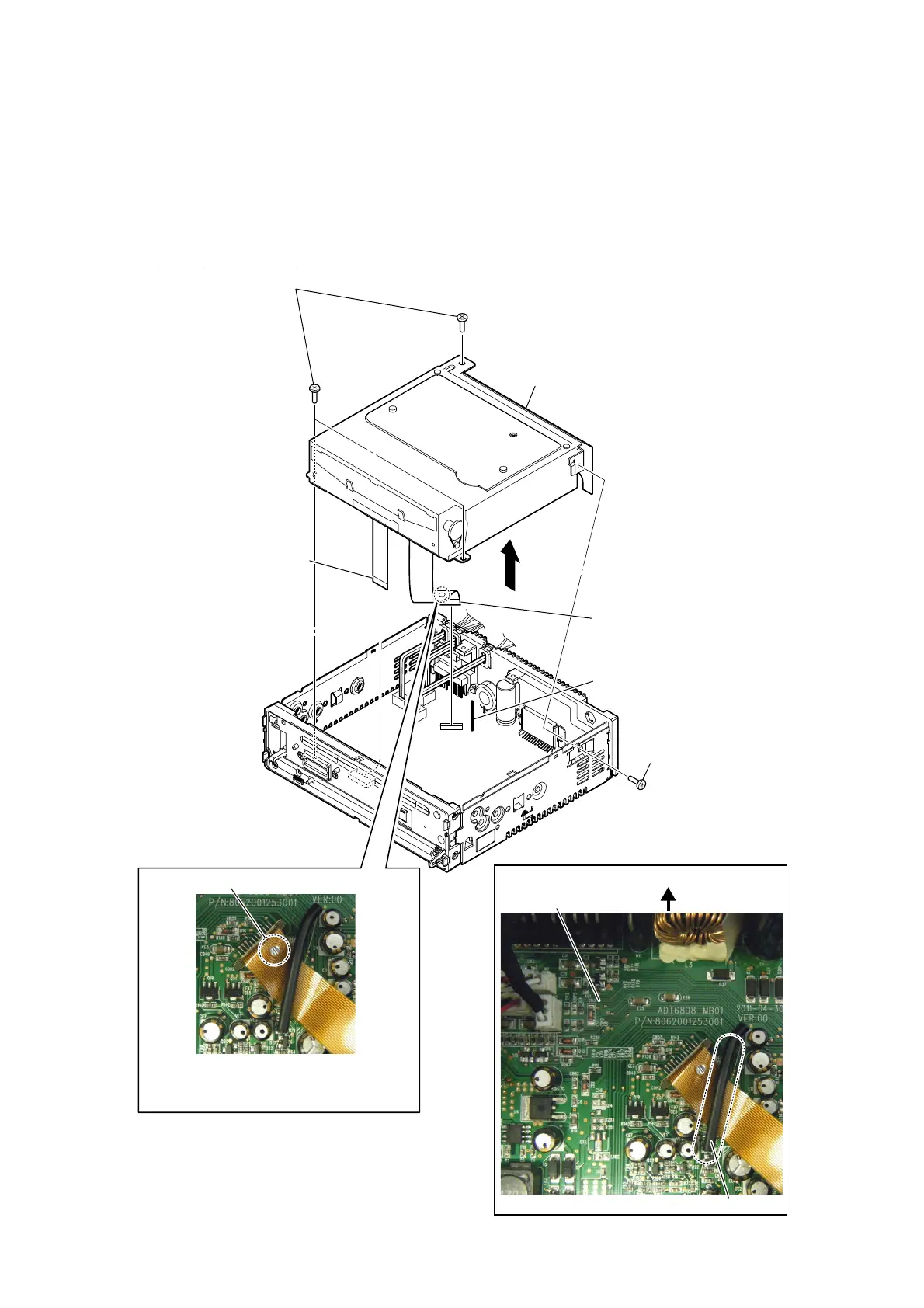
3-3. DVD DECK ASSY (DL-C28DB2-YG2-SP: MEX-D30/DL-C28DB2-YG2: MEX-V30)
Note 1: Before disconnecting the FPC (SJ-V049-01) of optical pick-up block, solder the short-land.
Note 3: When assembling the optical pick-up block,
remove the solder of short-land after
connecting the FPC (SJ-V049-01).
2
1 screw
(BTT M3) (MEX-D30)
(M3 u 5) (MEX-V30)
4 Lift up the lead pin.
5 FPC (SJ-V049-01)
(CON2)
6 FFC (deck to MAIN MT, SJ-V049-0)
(J101)
7 DVD deck assy
(DL-C28DB2-YG2-SP) (MEX-D30)
(DL-C28DB2-YG2) (MEX-V30)
1 three screws
(BTT M3) (MEX-D30)
(M3 u 5) (MEX-V30)
Note 2:
When you install three screws, fix by the following bond.
Part No. Description
7-432-916-01 BOND TAFF, SONY 20 ml
3
Solder the short-land.
)OH[LEOHSULQWHGFDEOHVHWWLQJ
rear side
MAIN board
lead pin
Ver. 1.2


 To Next Page