23
E Format
F Playback status (PLAY N, PAUSE X, etc.)
G Current setting
H Options
I Selected item
J Selected item name and/or operation assist
messages
*1 When playing a VCD with the PBC function
(page 22), no indication appears.
*2 During JPEG playback, no indication appears.
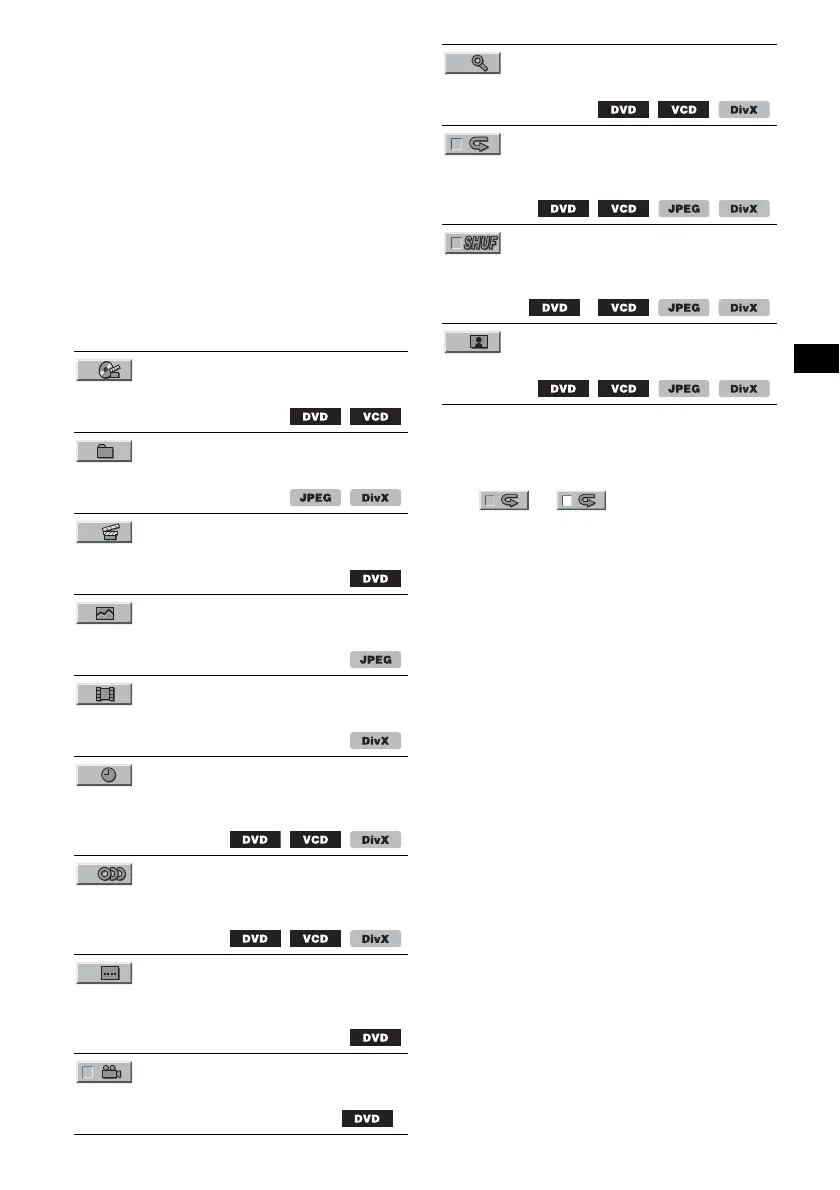
List of play mode menu items
Press </M/m/,/number buttons to select an
item, then press (ENTER).
To return to the previous display, press O.
Refer to the pages listed for details.
* Excluding DVD-R/DVD-R DL/DVD-RW in VR mode.
Tip
When “SHUFFLE” or “REPEAT” is activated or
“ANGLE” is available, its check-box lights up in green
(e.g., t ). However, you may not be
able to change the angle depending on the scene,
even if the check-box is lit in green.
TITLE, TRACK 30
To select a title, scene or track to play.
ALBUM 30
To select an album or folder to display.
CHAPTER 30
To select a chapter to play.
IMAGE 30
To select an image to display.
FILE 30
To select a video file to play.
TIME 30
To check the elapsed playback time; input time
code.
AUDIO 17, 25
To change the audio language/format/channel;
check the program format.
SUBTITLE 17
To turn subtitles on or off/change the subtitle
language.
ANGLE 17
To change the angle.
*
CENTER ZOOM 26
To magnify an image.
REPEAT 30
To play a title/chapter/track/album/image/video
file repeatedly.
SHUFFLE 30
To play chapters/tracks/images/video files in
random order.
*
PICTURE EQ 27
To adjust picture quality.



 To Next Page