41
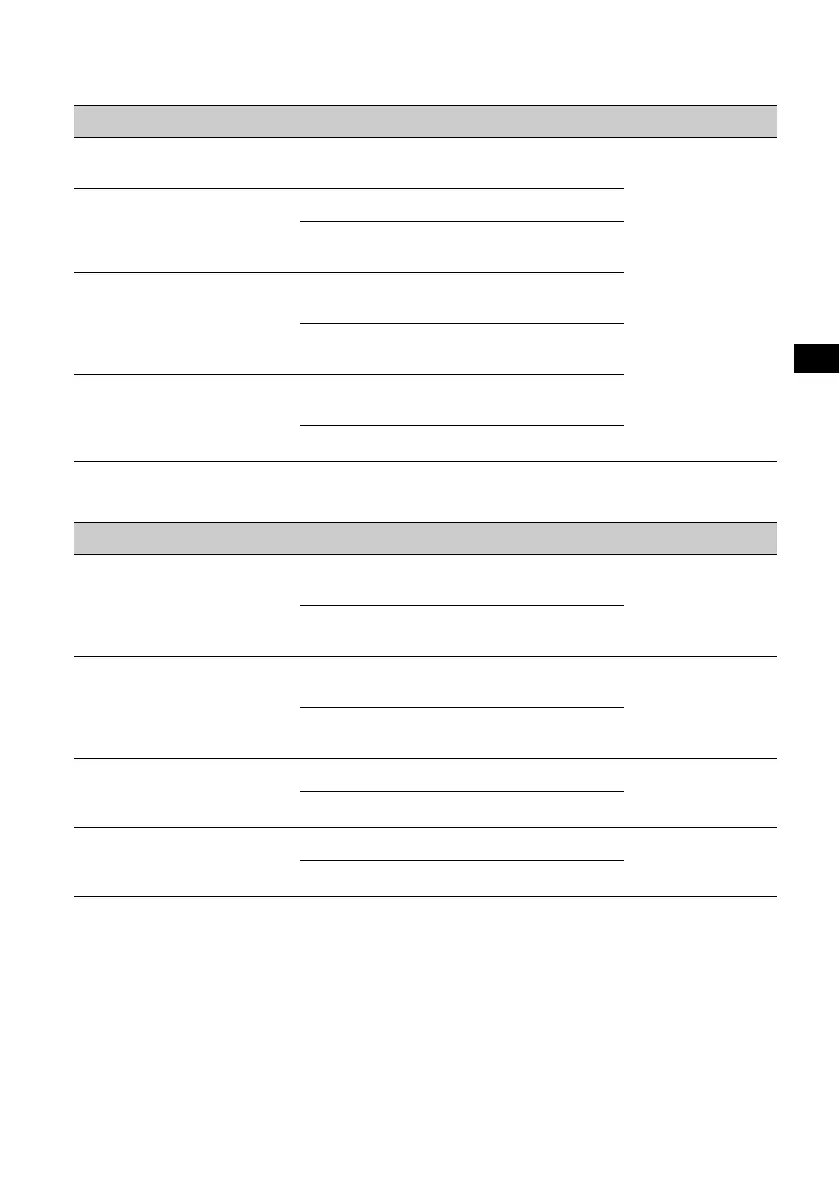
Follow the page reference for details. “z” indicates the default setting.
SET (Setup)
DSPL (Display)
Item Option Purpose Unit status
CLOCK-ADJ (Clock Adjust)
(page 43)
–
–
Any status.
CT (Clock Time) (page 33, 34)
ON
To activate the CT function.
OFF (z)
To deactivate the CT
function.
BEEP
ON (z)
To activate the operation
sound.
OFF
To deactivate the operation
sound.
AUTO-OFF
Shuts off automatically after a
desired time when the unit is
off.
NO (z)
To deactivate the Auto Off
function.
30S, 30M, 60M
To select the desired time.
Item Option Purpose Unit status
M.DSPL (Motion Display)
Selects the Motion Display
mode.
SA (z)
To show moving patterns
and spectrum analyzer.
During playback/
radio reception.
OFF
To deactivate the Motion
Display.
DEMO (Demonstration)
ON (z)
To activate the
demonstration.
Unit off.
OFF
To deactivate the
demonstration.
DIMMER
Changes the display
brightness.
ON
To dim the display.
Any status.
OFF (z)
To deactivate the dimmer.
AUTO-SCRL (Auto Scroll)
Scrolls long items
automatically.
ON (z)
To scroll.
During disc
playback.
OFF
To not scroll.
continue to next page t



 To Next Page