EasyManua.ls Logo

Sony MHC-2200CD - Page 20

Sony MHC-2200CD
31 pages
Print Icon
To Next Page IconTo Next Page
To Previous Page IconTo Previous Page
Loading...
Disc
Playing
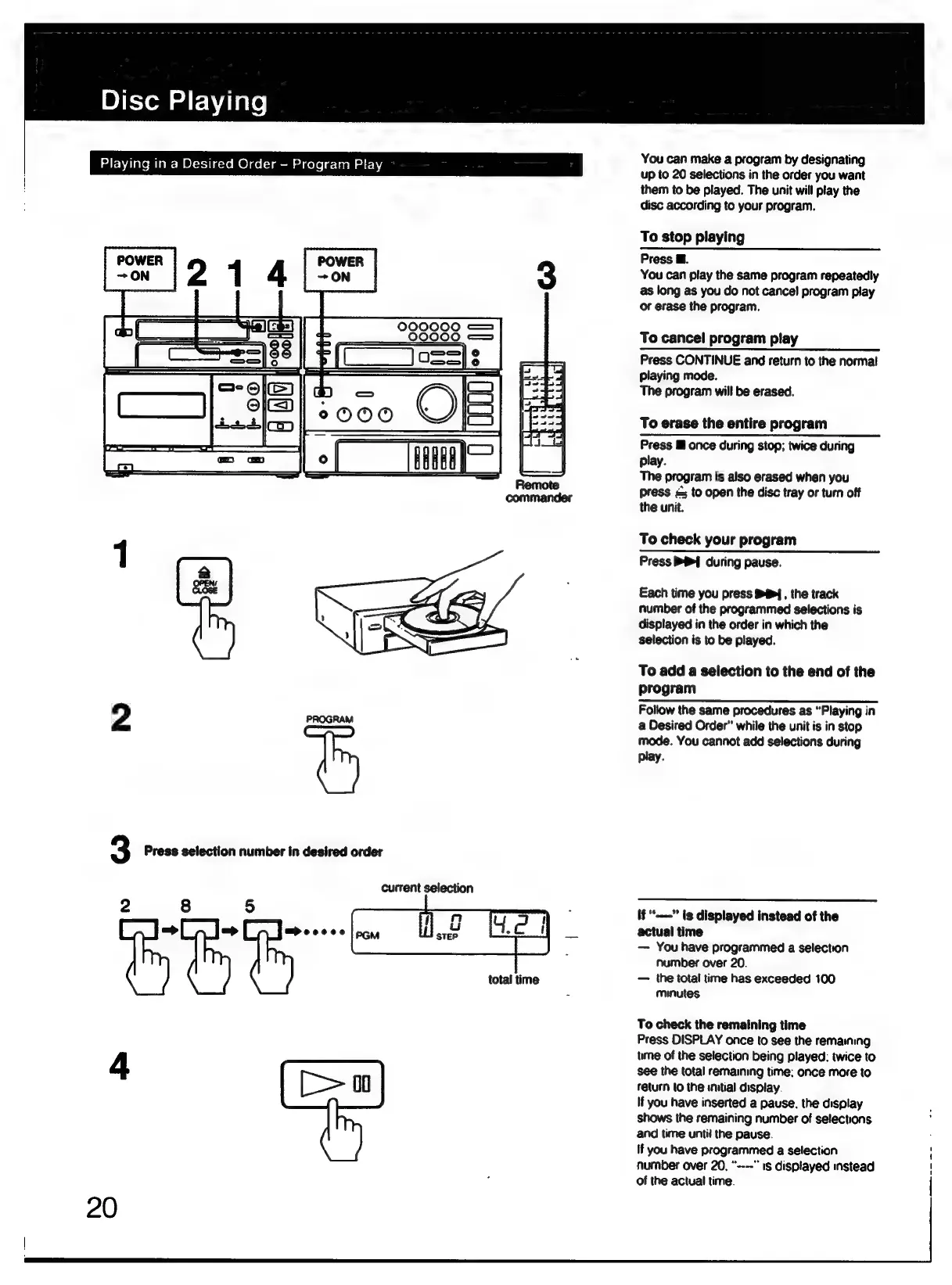
You
can
make
a
program
by
designating
up
to
20
selections
in
the
order
you
want
them
to
be
played.
The
unit
will
play
the
disc
according
to
your
program.
Playing
in
a
Desired
Order
-
Program
Play
To
stop
playing
Press
@.
You
can
play
the
same
program
repeatedly
as
long
as
you
do
not
cancel
program
play
or
erase
the
program.
To
cancel
program
play
Press
CONTINUE
and
return
to
the
normal
playing
mode.
The
program
will
be
erased.
To
erase
the
entire
program
Press
@
once
during
stop;
twice
during
play.
The
program
is
also
erased
when
you
press
<
to
open
the
disc
tray
or
turn
off
the
unit.
To
check
your
program
Press
P&I]
during
pause.
Each
time
you
press
S?4,
the
track
number
of
the
programmed
selections
is
displayed
in
the
order
in
which
the
selection
is
to
be
played.
To
add
a
selection
to
the
end
of
the
program
Follow
the
same
procedures
as
“Playing
in
2
PROGRAM
a
Desired
Order”
while
the
unit
is
in
stop
mode.
You
cannot
add
selections
during
play.
3
Press
selection
number
in
desired
order
current
selection
if
*----”
is
displayed
instead
of
the
=
apeocee
2
actual
time
ieee
as
You
have
programmed
a
selection
number
over
20.
total
time
the
total
time
has
exceeded
100
:
minutes
To
check
the
remaining
time
Press
DISPLAY
once
to
see
the
remaining
4
time
of
the
selection
being
played:
twice
to
see
the
total
remaining
time:
once
more
to
return
to
the
initial
display.
If
you
have
inserted
a
pause.
the
display
shows
the
remaining
number
of
selections
and
time
until
the
pause.
If
you
have
programmed
a
selection
number
over
20.
“----”
is
displayed
instead
of
the
actual
time.
20