How to Use This
Manual
How this manual is composed
_____
Please read the instructions in this manual
referring to the illustrations.
• The letters in the illustrations correspond
to the letters in the text:
ex. Speaker Cord Connection Q
• The step numbers in the illustrations
correspond to the step numbers in the
text.
• Use the page numbers in “Parts
Identification” at the end of this manual as
an index to find how to use the buttons
and controls.
• Subsidiary information is located at the
bottom of the pages.
Overview
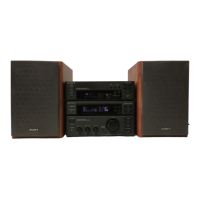
Tuner section
' You can store up to 30 stations.
Amplifier section
• DBFS (Dynamic Bass Feedback) system
reinforces bass sound.
• You can easily adjust the music to your
taste by selecting from 7 factory-preset
graphic equalizer settings.
• You can store up to 3 individual settings of
graphic equalizer.
Cassette deck section
___________
• Auto-reverse decks enable repeated
playback of both sides of the cassette.
• CD synchro function enables easy
recording of a CD.
• Double decks enable tape dubbing and
continuous playback.
CD player section
> You can enjoy listening in various playing
modes.
> Time edit function allows you to program
selections automatically to fit in a desired
duration.


 To Next Page