EasyManua.ls Logo

Sony MHC-501 - Playing a CD (Normal Play)

Sony MHC-501
22 pages
Print Icon
To Next Page IconTo Next Page
To Previous Page IconTo Previous Page
Loading...
Chapter
2:
the
CD
Player
Playing
a
CD
(normal
play)
Playing,
Tracks
in
Random
Order
(shuffle
play)
|
Playing
Tracks
in
the
Desired
Order
(programme
play)
Playing
Tracks
Repeatedly
(repeat
play)
Playing
a
CD
(normal
My
You
can
play
CDs
in
four
modes:
normal,
shuffle,
programme
and
repeat.
The
mode
*
decides
which
tracks
(songs)
you
will
listen
to,
in
which order
and
whether
or
not
they
will
repeat.
Also,
you
can
play
12
cmand
8
cm
CDs.
If
the
CD
is
supplied
with
an
adaptor,
remove
it
before
playing
the
CD.
Before
you
play
the
CD,
decrease
the
sound
level:
by
turning
VOLUME
control
counterclockwise,
not
to
damage
the
speakers.
Use
the
buttons
on
the
unit.to
do
this
operation.
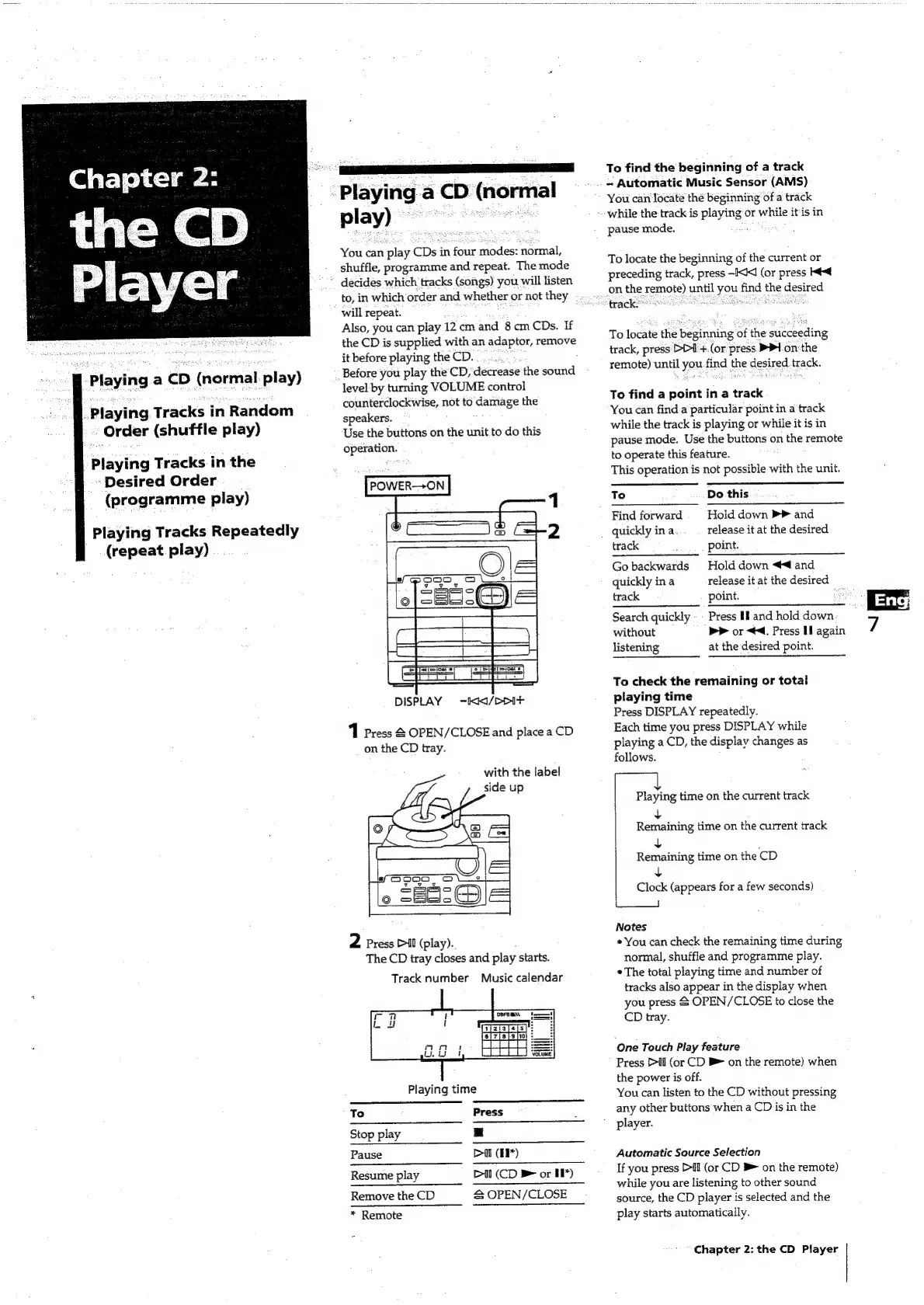
POWER-—>ON
DISPLAY
=
-kK/DD1+
1
Press
&
OPEN/CLOSE
and
place
a
CD
on
the
CD
tray.
with
the
label
side
up
o
Bee
OE
2
Press
Pil
(play).
The
CD
tray
closes
and
play
starts.
Track
number
Music
calendar
Playing
time
To
Press
Stop
play
am
Pause
Dil
(*)
Resume
play
Dil
(CD
>
or
IP)
Remove
the
CD
&
OPEN/CLOSE
*
Remote
ca
To
find
the
beginning
of
a
track
~
Automatic
Music
Sensor
(AMS)
You
can
locate
thé
beginning
of
a
track
while
the
track
is
playing
or
while
itis
in
pause
mode.
.
To
locate
the
beginning
of
the
current
or
preceding
track,
press
-IXK1
(or
press
Kt-€
on
the
remote)
until
you
find
the
desired
track
rae
To
locate
the
beginning
of
the
succeeding
track,
press
Di>l
+.(or
press:
>P1-on
the
remote)
until
you.find
the
desired
track.
To
find
a
point
in
a
track
You
can
find
a
particular
point
in
a
track
while
the
track
is
playing
or
while
it
is
in
pause
mode.
Use
the
buttons
on
the
remote
to
operate
this
feature.
This
operation
is
not
possible
with
the
unit.
To
Do
this
Find
forward
Hold
down
>
and
quickly
ina
release
it
at
the
desired
track
point.
Go
backwards
Hold
down
44
and
quickly
ina
release
it
at
the
desired
track
point.
rs]
Search
quickly
-
Press
Mand
hold
down
7
without
bP
or
<4.
Press
H
again
listening
at
the
desired
point.
To
check
the
remaining
or
total
playing
time
Press
DISPLAY
repeatedly.
Each
time
you
press
DISPLAY
while
playing
a
CD,
the
display
changes
as
follows.
ee
Playing
time
on
the
current
track
Revaining
time
on
the
current
track
nee
time
on
the
CD
eee
(appears
for
a
few
seconds)
Ly
Notes
*
You
can
check
the
remaining
time
during
normal,
shuffle
and
programme
play.
*
The
total
playing
time
and
number
of
tracks
also
appear
in
the
display
when
you
press
&
OPEN/CLOSE
to
close
the
CD
tray.
One
Touch
Play
feature
Press
>I
(or
CD
B>
on
the
remote)
when
the
power
is
off.
You
can
listen
to
the
CD
without
pressing
any
other
buttons
when
a
CD
is
in
the
"player.
Automatic
Source
Selection
If
you
press
Pl
(or
CD
#
on
the
remote)
while
you
are
listening
to
other
sound
source,
the
CD
player
is
selected
and
the
play
starts
automatically.
Chapter
2:
the
CD
Player