EasyManua.ls Logo

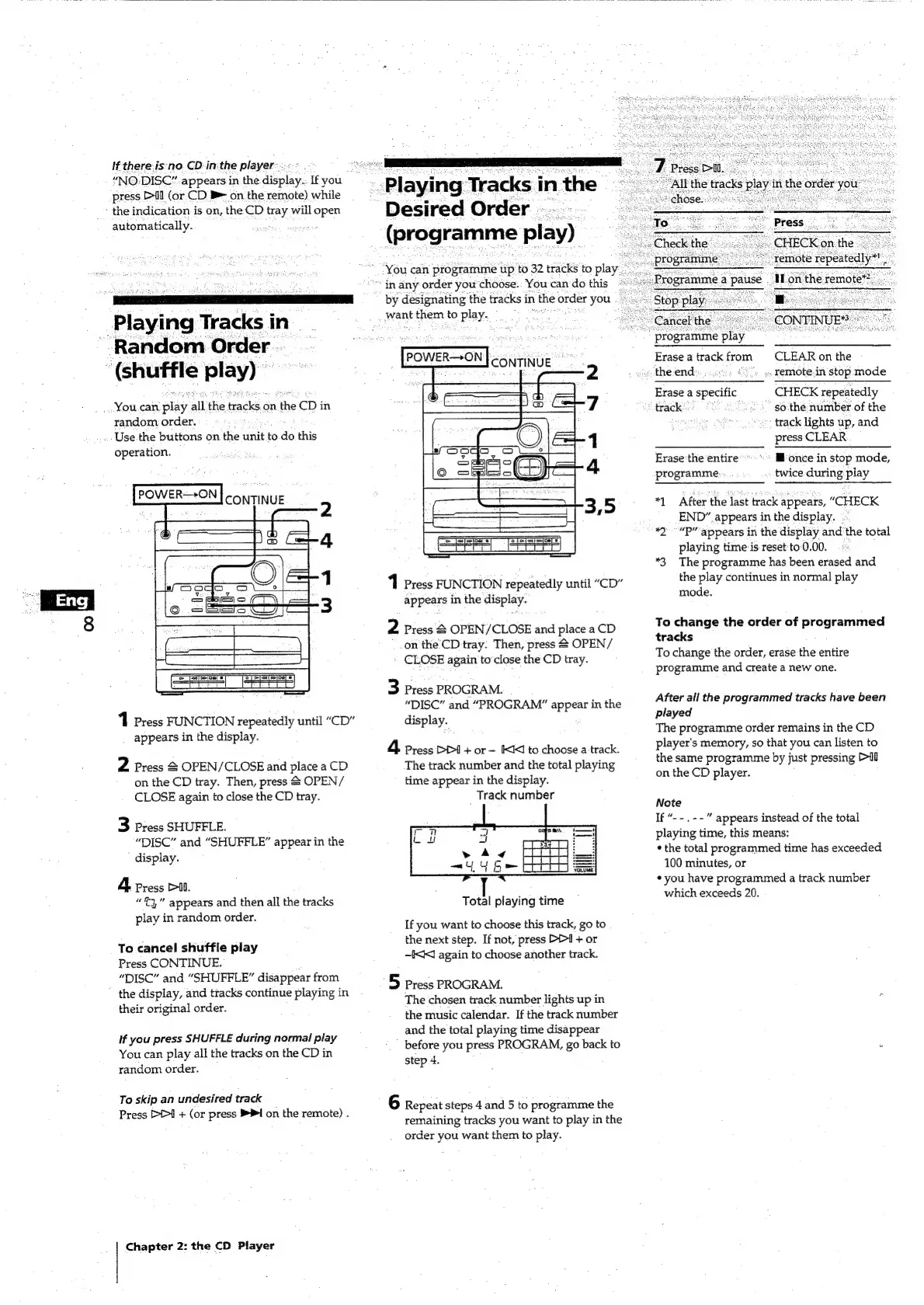
Sony MHC-501 - Playing Tracks in Random Order (Shuffle Play); Playing Tracks in Desired Order (Programme Play)

Sony MHC-501
22 pages
Print Icon
To Next Page IconTo Next Page
To Previous Page IconTo Previous Page
Loading...
If
there-is‘no.
CD-in:the
player:
“NO:DISC”
appears
in
the
display..
If
you
press
Il
(or
CD
B
on
the
remote)
while
-
the
indication
is
on,
the:CD
tray
will
open
automatically.
Playing
Tracks
in-
Random
Order
.-
(shuffle
play)
You.can
py
all
the
tracks
es
the
fap)
in
random
order.
:
Use
the
buttons
on
the
unit
to
do
this
operation.
1
Press
FUNCTION
repeatedly
until
“CD”
_
appears
in
the
display.
2
Press
&
OPEN/CLOSE
and
place
a
CD
on
the
CD
tray.
Then,
press
2
OPEN/
CLOSE
again
to
close
the
CD
tray.
3
Press
SHUFFLE.
“DISC”
and
“SHUFFLE”
appear
in
the
display.
4
Press
Pil.
“3,”
appears
and
then
all
the
tracks
play
in
random
order.
To
cancel
shuffle
play
Press
CONTINUE.
“DISC”
and
“SHUFFLE”
disappear
from
the
display,
and
tracks
continue
playing
in
their
original
order.
if
you
press
SHUFFLE
during
normal
play
You
can
play
all
the
tracks
on
the
CD
in
random
order.
To
skip
an
undesired
track
Press
D>>1
+
(or
press
PI
on
the
remote)
.
Chapter
2:
the
CD
Player
Playing
Tracks
in
the
Desired
Order...
(programme
play)
You
can
programme
tip
to
32
tracks
to
play_
in
any
order
you
choose.:
You
can
do
this
by
designating
the
tracks
in
the
order
you
want
them
to
play.
es
POWER—ON
|
conTiNUE
1
Press
FUNCTION
repeatedly
until
“CD”
appears
in
the
display.
2
Press
&
OPEN/CLOSE
and
place
a
CD
on
the
CD
tray:
Then,
press
2
OPEN/
CLOSE
again
to’close
the
CD
tray.
3
Press
PROGRAM.
“DISC”
and
“PROGRAM”
appear
in
the
display.
4.
Press
PDI
+
or
—
IKK
to
choose
a
track.
The
track
number
and
the
total
playing
time
appear
in
the
display.
Track
number
Total
playing
time
If
you
want
to
choose
this
track,
go
to
the
next
step.
If
not,
press
P=
+
or
~I<K
again
to
choose
another
track.
5
press
PROGRAM.
The
chosen
track
number
lights
up
in
the
music
calendar.
If
the
track
number
and
the
total
playing
time
disappear
before
you
press
PROGRAM,
go
back
to
step
4.
6
Repeat
steps
4
and
5
to
programme
the
remaining
tracks
you
want
to
play
in
the
order
you
want
them
to
play.
:
programme
play
All
the
tracks
play
in
th
‘remote
repeatedly*!
“Mon
the
remote”).
CONTINUE?
Erase
a
track
from
CLEAR
on
the
«the
end»...
.
»
remote.in
stop
mode
Erase
a
specific
CHECK
repeatedly
“track:
so:the
number
of
the
vee
_
track
lights
up,
and
press
CLEAR
Erase
the
entire
@
once
in
stop
mode,
programme:
twice
during
play
*1
After
the
last
track
appears,
“CHECK
END”
appears
in
the
display.
*2-“P’
appears
in
the
display
and
the
total
playing
time
is
reset
to-0.00.
*3
The
programme
has
been
erased
and
the
play
continues
in
normal
play
mode.
To
change
the
order
of
programmed
tracks
;
To
change
the
order,
erase
the
entire
programme
and
create
a
new
one.
After
all
the
programmed
tracks
have
been
played
The
programme
order
remains
in
the
CD
player's
memory,
so
that
you
can
listen
to
the
same
programme
by
just
pressing
Pil
on
the
CD
player.
Note
If
“--.--”
appears
instead
of
the
total
playing
time,
this
means:
*
the
total
programmed
time
has
exceeded
100
minutes,
or
¢
you
have
programmed
a
track
number
which
exceeds
20.